Vertipack Jetpack
🟠 Updated over a year ago⚠️ Install Order · 2 steps
Install in this order, then this mod last — most mods fail to load without their framework and dependencies in place.
Preview
🔍 Analysis
- 👍 2.9% endorsement rate — high engagement, a strong quality signal
- 🏆 #7 of 205 Armour mods in this game by downloads
📋 About This Mod
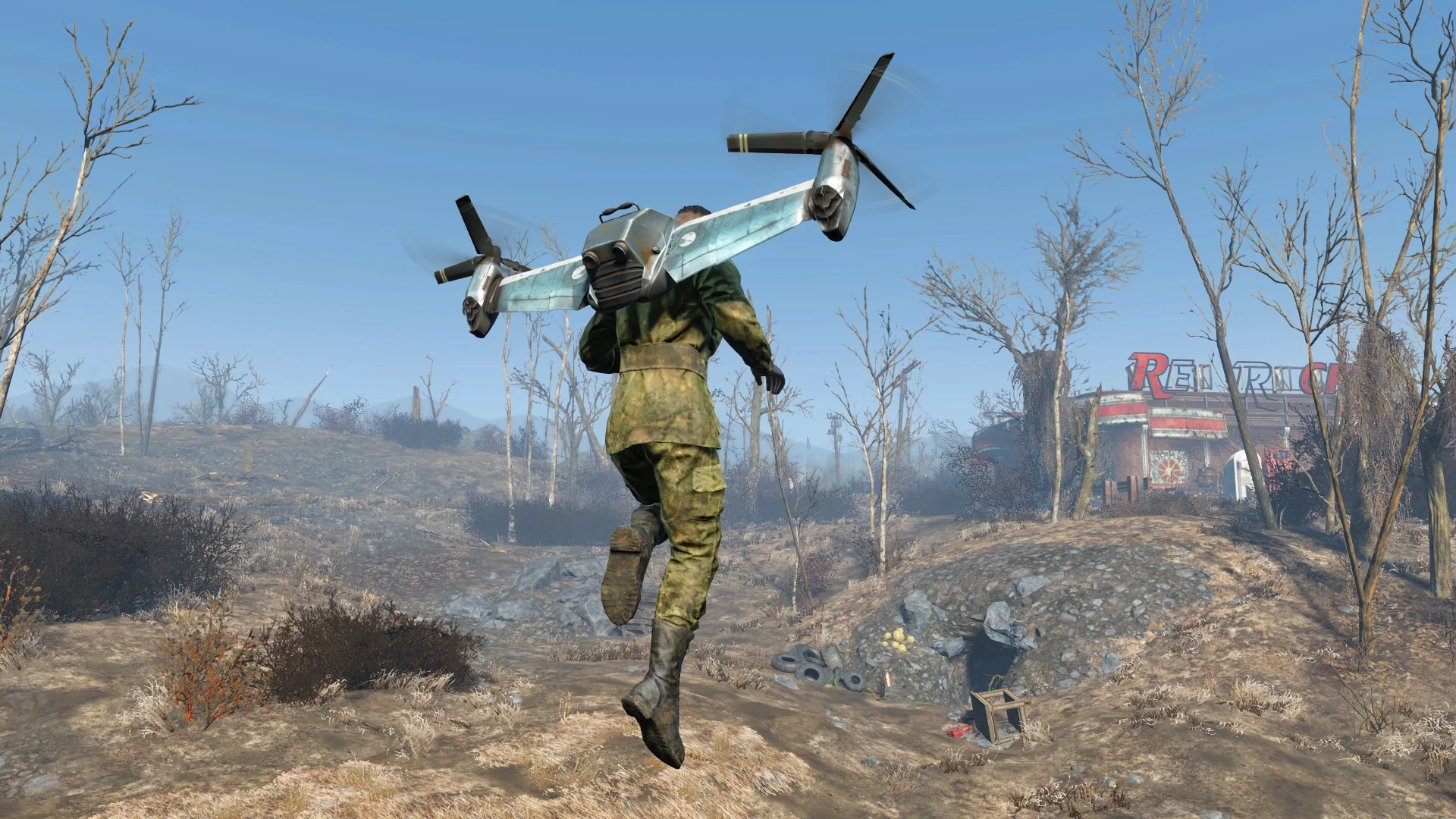
Its so dangerously stupid, it becomes completely lore-friendly, like the kinda thing a raider cobbles together.
What is it?
Vanilla assets edited to look like miniature vertibird wings and engines on your back - a different looking jetpack. It has a weight of 20 and small damage and energy resistance. Does not use a body slot. The plugin has ESL flag.
Requirements
Fallout 4 Script Extender, because of the script to attach rotating propeller blades on press/release of the jump button.
Where to find it?
Cambridge PD. It will re-spawn. It's not craftable, unless you know how to use FO4Edit - there is a constructible object inside the plugin(without material/perk requirements), you just have to add the armor to it.
Effects
-
[]On jump button pressed - the propeller blades rotate faster, there's some glow(no illumination) and heat effects from the engines.
[
]On jump button released(idle state) - the blades keep rotating at lower speed. Same goes when you equip it.[]Increased jump height, reduced fall damage and slightly increased movement speed.
[]One modification on the armor workbench, which requires Science 3 and reduces AP drain by half(it's not cumulative, just changes game settings to half of default vanilla value).
[]Custom jetpack thrust sound, without affecting PA jetpack sound(v1. 1).
[]8 decal options(v1. 2) - under Paint on the armor bench: Atom Cats, Brotherhood of Steel, Gunners, Institute, Minutemen, RailRoad, Vault-Tec and Wolfenstein. They require Armorer 2 and no materials. Having a decal boosts Charisma with +1.
-
[]When you first equip the Vertipack, the propeller blades will be missing. Same goes if you are wearing the Vertipack and you've just exited a workbench. Pressing the jump button will make them appear. (Fixed)
[
]The vertipack model is big so expect clipping here and there. It may get in the way of your 3rd person aiming. - When you start the game and load a save, the rotating blades will become misaligned from the engines and the jetpack thrust sound will be back to default one. This can be easily fixed by re-equipping the vertipack. I don't know if there's other, more permanent solution. (sound is fixed in v1. 3, but the blades still get misaligned upon game start, sorry)
Recommended mods
Jetpack Animations - this mod will replace falling animations with something more stylish and suitabl
📊 Mod Details
- Game
- Fallout 4 Mods
- Author
- robotized
- Version
- 1.3
- Downloads
- 2,692
- Endorsements
- 77
- Category
- Armour
- Created
- 2/4/2024
- Updated
- 2/14/2025
🔧 How to Install Fallout 4 Mods
Download from Nexus.
📖 Full step-by-step install guide for Fallout 4 →
Visit the official mod page for specific installation instructions for this mod.
🎮 Need cheat codes or console commands? Check ur gaming wiki for Fallout 4 commands, item IDs, and more.
Keep browsing — more Fallout 4 mods await