VamS - Vibrant and more Sharp DLC Robots V 1.0 by Diranar
⚪ Last updated 2016⚠️ Install Order · 2 steps
Install in this order, then this mod last — most mods fail to load without their framework and dependencies in place.
Preview
🔍 Analysis
- 👍 4.4% endorsement rate — high engagement, a strong quality signal
- 🏆 #266 of 329 Models and Textures mods in this game by downloads
📋 About This Mod
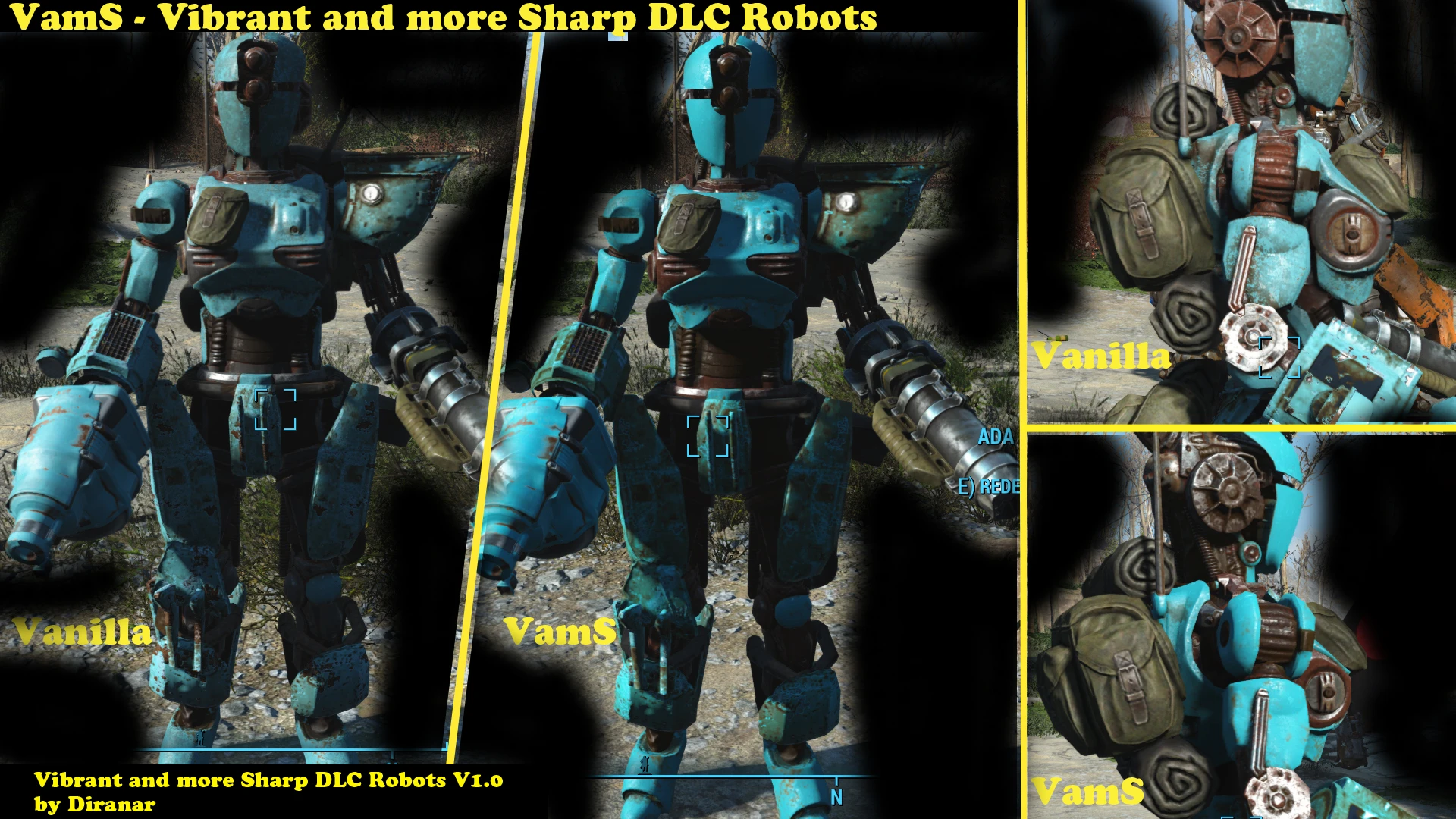
This is a Simple and Quick Retexture of the DLC Robot Parts. I doubled the Vanilla Texture Size, Adjusted the Sharpness of the Textures as well as the Vibrance of the Colors. With these the Robots get an overall Sharper and more Vibrant,
VamS is a simple retexture mod for Fallout 4's DLC robot parts, doubling vanilla texture resolution and enhancing sharpness and color vibrancy. It's for players who want their robots to look crisper and more colorful without changing gameplay. With 1,212 endorsements and 27,298 downloads, it's a popular cosmetic choice.
✨ Key Features
📊 Pros & Cons
✅ Pros
- Community-approved with 1,212 endorsements and over 27k downloads.
- Simple drop-in retexture—no gameplay changes, just visual polish.
- Doubling texture size means noticeably sharper robots in-game.
⚠️ Cons
- Last updated in 2016—may not be compatible with current game patches or DLC updates.
- Only affects DLC robot parts, not base game robots or other creatures.
- No screenshots or installation instructions provided by the author.
For Fallout 4 players who want their Automatron robots to look sharper and more colorful without messing with gameplay. If you're into visual overhauls and don't mind a mod from 2016, this is a quick win. Skip if you're looking for new robot parts or gameplay changes—this is purely cosmetic.
💡 Beginner Tips
- Since it's a texture mod, place it in your Data folder or use a mod manager—either works, but a manager makes uninstalling easier.
- If you're on PC, make sure to enable mods in your Fallout 4 ini files (bEnableFileSelection=1) to see the textures.
- Check if the mod requires the Automatron DLC—it's for DLC robot parts, so you'll need that DLC installed.
📊 Mod Details
- Game
- Fallout 4 Mods
- Author
- Diranar
- Version
- 1.0
- Downloads
- 27,298
- Endorsements
- 1,212
- Category
- Models and Textures
- Created
- 3/25/2016
- Updated
- 4/15/2016
🔧 How to Install Fallout 4 Mods
Download from Nexus.
📖 Full step-by-step install guide for Fallout 4 →
Visit the official mod page for specific installation instructions for this mod.
🎮 Need cheat codes or console commands? Check ur gaming wiki for Fallout 4 commands, item IDs, and more.
Keep browsing — more Fallout 4 mods await