ULG Tool (Ultra Low Graphics)
⚪ Last updated 2021⚠️ Install Order · 2 steps
Install in this order, then this mod last — most mods fail to load without their framework and dependencies in place.
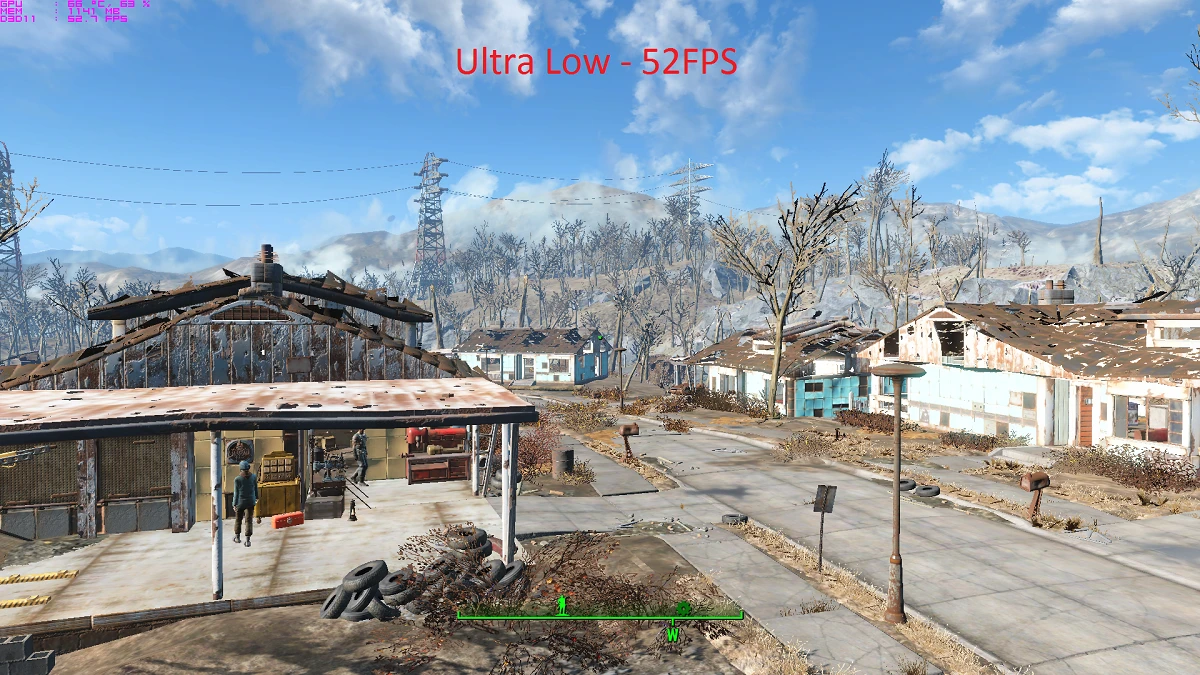
Preview
🔍 Analysis
- 👍 2.6% endorsement rate — high engagement, a strong quality signal
- 🏆 #30 of 76 Visuals and Graphics mods in this game by downloads
📋 About This Mod
ULG (Ultra Low Graphics) Tool
This tool aims to improve performance on old/weak desktops and laptops. It sets many of the graphics settings below the default low limit. This should help increase performance on older computers or laptops. I have seen an average improvement of about 5fps.
Installation Instructions
- Confirm that you have Java installed.
- Download and extract the mod zip file. There should be a .jar file inside.
- Run the .jar file by double clicking it. Open with Java if you are prompted to choose a program.
- You may need to set paths if they are not automatically detected. File -> Set Custom Paths.
- Choose the game you'd like to install on, and click Install.
Uninstall Instructions
- Open the game launcher.
- Go to options, and choose one of the graphics presets; Low, Medium, High, or Ultra.
Requirements
Java - https://www.java.com/download/
Compatibility
Currently incompatible with;
- Nothing that I know of.
2. 2. 0 (2021-03-21) - Netcode improvements, added option to send diagnostic data to improve development and troubleshooting, minor tuning improvements to configs
2. 1. 0 (2021-01-31) - Re-added option to select shadowmap resolution, and re-added "balanced" configs as an install option.
2. 0. 0 - Added support for Skyrim & Skyrim SE.
1. 3. 4 - Minor bugfixes.
1. 3. 3 - Minor net code and GUI bugfixes.
1. 3. 2 - Fixed several lighting glitches. Added option to select shadowmap resolution. Removed Skyrim install option.
1. 3. 1 - Fixed a crash if a log can't be created.
1. 3. 0 - Written from scratch. Initial release.
ULG Tool (Ultra Low Graphics) by Iyzik is a performance-focused mod that provides optimized INI files to boost framerates by reducing shadow quality, disabling godrays, reducing draw distances, and turning off anti-aliasing and ambient occlusion. With over 8,000 endorsements and 319,000 downloads, it's a popular choice for players seeking smoother performance on lower-end systems. Last updated in March 2021, it remains a go-to for visual tweaks.
✨ Key Features
📊 Pros & Cons
✅ Pros
- Huge community trust with 8,322 endorsements and 319,291 downloads.
- Simple INI tweaks that can give a solid FPS boost without needing a new GPU.
- Straightforward setup—just drop in the files and go.
⚠️ Cons
- Last updated in March 2021—might not be tuned for the latest game patches.
- Visual quality takes a hit: shadows, godrays, and draw distances are reduced.
- No detailed documentation on which specific INI settings are changed or how to customize them.
For players on older or low-end PCs who want to squeeze out extra frames in demanding areas. Also great for competitive players who prioritize performance over eye candy. Skip if you're on a high-end rig and care about visual fidelity—this will make the game look noticeably worse.
💡 Beginner Tips
- Make sure to back up your original INI files before replacing them, so you can revert if needed.
- If the mod doesn't work as expected, check that you're placing the INIs in the correct directory (usually the game's root or config folder).
- Combine with a mod manager like Vortex or MO2 for easier installation and uninstallation.
📊 Mod Details
- Game
- Fallout 4 Mods
- Author
- Iyzik
- Version
- 2.2.0
- Downloads
- 319,291
- Endorsements
- 8,322
- Category
- Visuals and Graphics
- Created
- 11/10/2015
- Updated
- 3/21/2021
🔧 How to Install Fallout 4 Mods
Download from Nexus.
📖 Full step-by-step install guide for Fallout 4 →
Visit the official mod page for specific installation instructions for this mod.
🎮 Need cheat codes or console commands? Check ur gaming wiki for Fallout 4 commands, item IDs, and more.
Keep browsing — more Fallout 4 mods await