Tutorial - Adding custom workshop categories with scripts
⚪ Last updated 2016⚠️ Install Order · 2 steps
Install in this order, then this mod last — most mods fail to load without their framework and dependencies in place.
Preview
🔍 Analysis
- 👍 4.9% endorsement rate — high engagement, a strong quality signal
- 🏆 #16 of 19 Modders Resources and Tutorials mods in this game by downloads
📋 About This Mod
This is a simple tutorial showing you how to add custom categories to the workshop menu using scripts without producing compatibility issues. No more compatibility patches!
With this template you can:
- Add new workshop menus and categories without conflicts!
- Add new crafting categories without conflicts!
- Add weapons to leveled lists without conflicts!
- Add whatever you want to whatever formlist you want without conflicts!
As you may know, the workshop categories are defined in formlists. If you want to add a category, you have to add kewords and/or other formlists to the vanilla ones. If two mods edit the same formlist, you will automatically have a compatibility problem.
>>> NEVER EVER EDIT VANILLA FORMLISTS! <<<
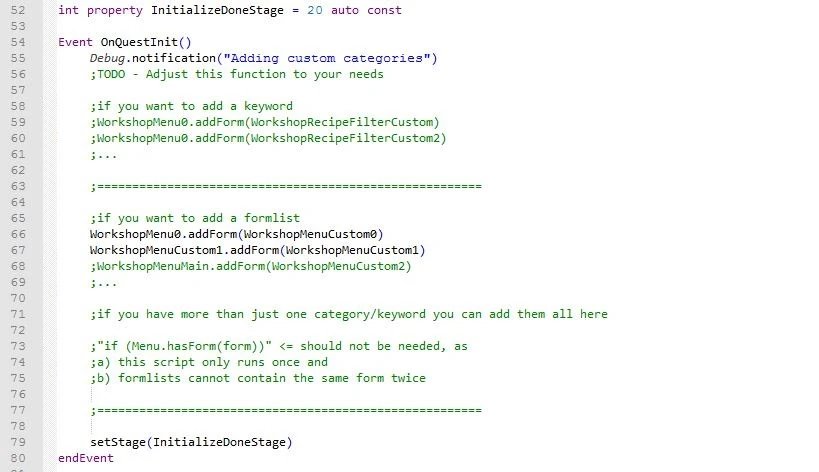
So what else can you do? Formlists can also be edited with scripts (see CK wiki for details). That way multiple mods can add categories to the same menu without conflicting to each other. The only problem is, that you somehow need to automatically run your script. That is what this template was made for. It adds a quest to the game that runs on startup. Here you can add all your categories to the crafting menu.
How to use this template in your mod
-
[]Open up this file and your workshop mod in xEdit.
[
]Copy the quest WorkshopAddCategoriesTemplate to your mod.[]Now switch to CK and fill the properties. Add more if needed.
[]Adjust the script to your needs and rename it. See comments in source code for details.
[]Don't forget to also implement the uninstall function and test disabling your mod!
How to implement an uninstall function
This is important. If you want to uninstall or disable a mod that adds new menus or categories with a script, you have to add an uninstall functionality. Otherwise users will loose the edited menu, as the forms you previously added to them will be "none" then. There are basically three ways you could implement this:
[]Use an uninstall chem, that can be crafted at the chem station. This method will only work before disabling the mod.
[]Use a while loop to check if your mod is still active and remove all "none" values from the vanilla formlist if not.
[]Use the fixer quest, that runs every time you start the game and remove all "none" values from all formlists.
[*]Special cases: In my mod Build
A tutorial mod for modders, teaching how to add custom categories to the workshop menu using scripts without compatibility issues. With 2,783 endorsements and 56,360 downloads, it's a well-received resource. Last updated in 2016, so it may be outdated for current game versions.
✨ Key Features
📊 Pros & Cons
✅ Pros
- Community-approved (2,783 endorsements) — clearly a go-to for this task
- Huge download count (56K) shows it's been useful to many modders
- Teaches a clean method that avoids compatibility headaches
⚠️ Cons
- Last updated in 2016 — likely outdated for current game versions
- It's a tutorial, not a plug-and-play mod — requires scripting knowledge
For modders who want to add custom workshop categories without breaking other mods. Skip if you're a player looking for gameplay changes — this is purely a development resource.
💡 Beginner Tips
- Read the tutorial carefully before starting — it's script-based, so a mistake can cause issues
- Test your custom categories in a separate save to avoid messing up your main game
- If you're new to scripting, consider looking up basic script examples first
📊 Mod Details
- Game
- Fallout 4 Mods
- Author
- DarthWayne
- Version
- 1.2
- Downloads
- 56,360
- Endorsements
- 2,783
- Category
- Modders Resources and Tutorials
- Created
- 4/20/2016
- Updated
- 5/7/2016
🔧 How to Install Fallout 4 Mods
Download from Nexus.
📖 Full step-by-step install guide for Fallout 4 →
Visit the official mod page for specific installation instructions for this mod.
🎮 Need cheat codes or console commands? Check ur gaming wiki for Fallout 4 commands, item IDs, and more.
Keep browsing — more Fallout 4 mods await