Third Rail Nightclub Update Enhanced
⚪ Last updated 2020⚠️ Install Order · 2 steps
Install in this order, then this mod last — most mods fail to load without their framework and dependencies in place.
Preview
🔍 Analysis
- 👍 8.4% endorsement rate — high engagement, a strong quality signal
- 🏆 #14 of 20 Locations - Vanilla mods in this game by downloads
📋 About This Mod
My enhancements to the mod Third Rail Nightclub Mega UPDATE mod
The popular mod Better The Third Rail does not work for me. It starts out as a crowded place but then I have 3 or 4 other mods adding NPCs to the space. In addition I don't like all the NPCs added that sit in one place 24 hours a day. So I use the excellent Third Rail Nightclub Mega UPDATE mod but thought some improvements could be made and I need practice with that evil piece of software called the Creation Kit as 98% of my modding has been with FO4Edit.
My Changes:
(1) Lighting changes
The first issue I had was I use both Visual Enhancer and Commonwealth Visual Overhaul mod which makes area that don't have lights darker. Third Rail Nightclub Mega UPDATE (TRNMU) added some lamps objects that go well with a night club setting but they don't actually emit any light so those areas were very dark for me. I have added a light source to the lamps.
A number of candles were removed from the area but the light sources were left in resulting in flicking candle light where there were no candles.
The default game has some light sources that do not come from actual light object so I removed these fake lighting.
The women's bathroom was cleared of garbage by TRNMU but it was very dark so I added a similar light to the men's bathroom in the default game.
This all left some areas too dark so I turned on some of the lamps in the default game that were turned off. I added another spotlight for the stage exit which highlights the motorcycle. I added a few more lamps with light sources. I added candles to some tables.
(2) NavMeshes
The cleaned out bathroom did not have NavMeshes so followers and NPCs would not go in.
New tables and chairs did not get NavMeshed and the NPCs would try to walk through them.
I moved a few tables by couches to give NPCs more room.
It is not perfect now but works better for NPC pathing.
(3) Other AI changes
The default game NPCs were too static for me so I changed the Third Rail Drifter AI package to make them more lively.
TRNMU removed the stool Magnolia used when not singing so she just stood still on the stage. I assigned her a new stool to take a break at. Similarly the couch assigned to Rufus was removed so I assigned him one of the new ones.
Was a sound source object that looked like was disabled in the default game. When I enabled it the patrons of the third rail now appear to clap and cheer when Magnolia ends a song.
Added some smoking markers and a few other animation spots to the nightclub.
Some of the objects placed on the counter near Charlie the bar tender were being thrown across the room when his arm bumped them. I have turned off the havok physics system for those items.
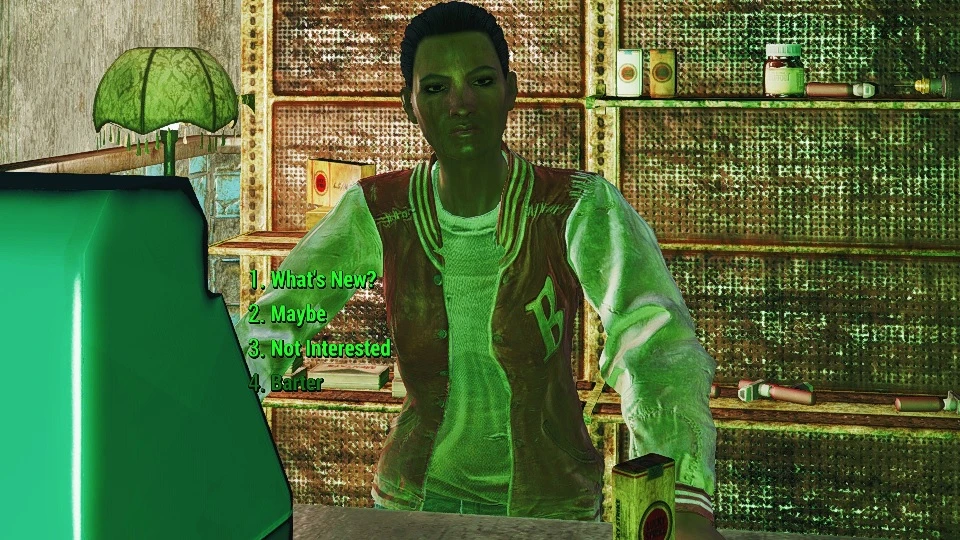
(4) Cigarette Vendor
Is a unused area with cash register upstairs in the default g
📊 Mod Details
- Game
- Fallout 4 Mods
- Author
- Pendan
- Version
- 1.0
- Downloads
- 1,221
- Endorsements
- 102
- Category
- Locations - Vanilla
- Created
- 3/26/2019
- Updated
- 12/30/2020
🔧 How to Install Fallout 4 Mods
Download from Nexus.
📖 Full step-by-step install guide for Fallout 4 →
Visit the official mod page for specific installation instructions for this mod.
🎮 Need cheat codes or console commands? Check ur gaming wiki for Fallout 4 commands, item IDs, and more.
Keep browsing — more Fallout 4 mods await