Targeting HUD and Berry Mentats Enhanced
⚪ Last updated 2016⚠️ Install Order · 2 steps
Install in this order, then this mod last — most mods fail to load without their framework and dependencies in place.
Preview
🔍 Analysis
- 👍 5.8% endorsement rate — high engagement, a strong quality signal
- 🏆 #2 of 11 Weapons and Armour mods in this game by downloads
📋 About This Mod
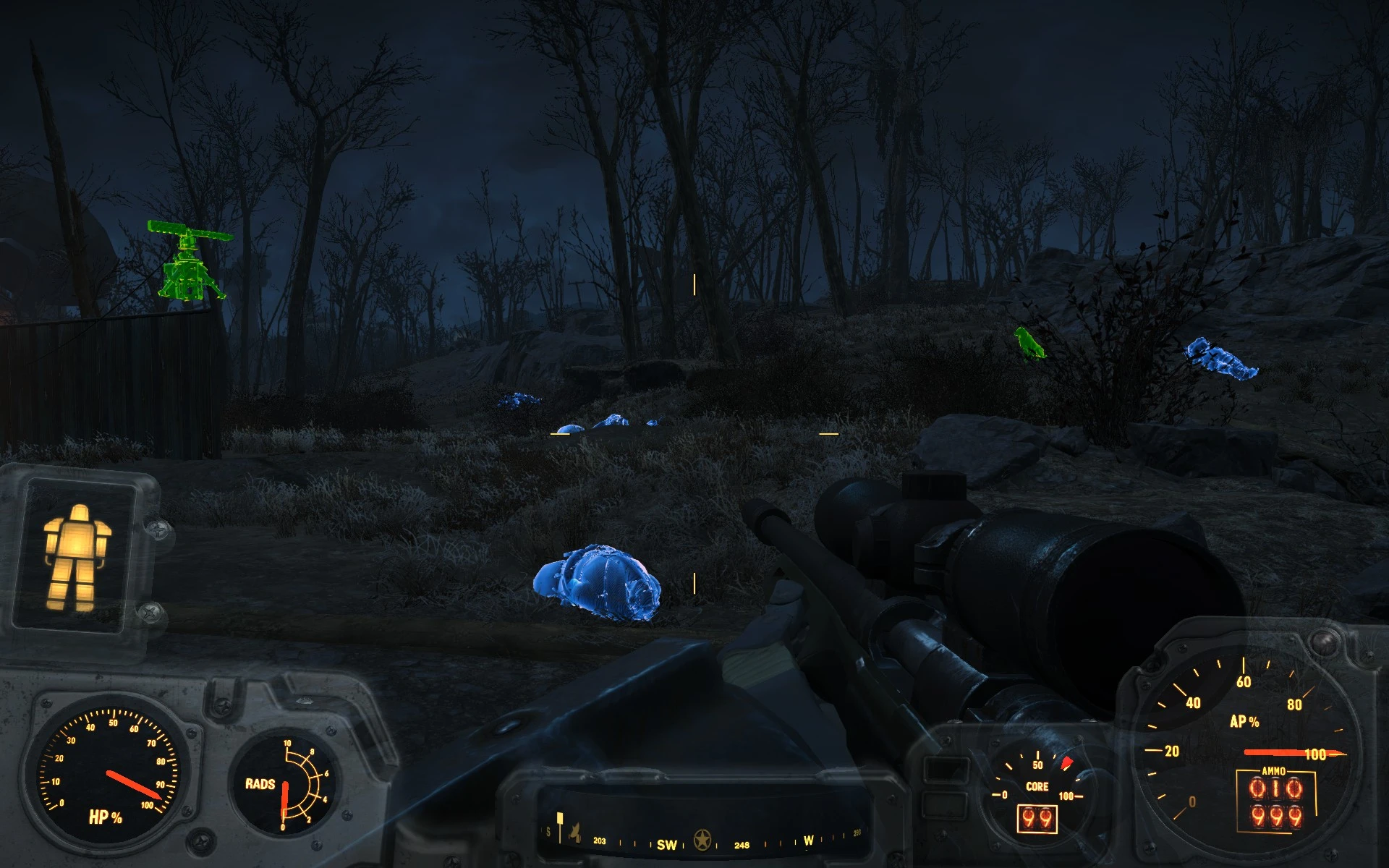
UPDATE v1. 0: I've added custom particle effects for each of the different colors of Berry Mentats effects. I've also modified color values to be a bit more visible in the daytime, though as usual this is not perfect. ------- Like many people playing Fallout 4, I often have difficulty tracking down the bodies of the things I kill in the wasteland, particularly when explosives are involved. Somebody chucks a few grenades and suddenly that Legendary Whatever you were so proud to take down is nowhere to be found, probably gone forever, along with your chances of getting the Legendary loot off of its body. Almost makes me wish Rex's Search and Mark perk had made the transition from New Vegas to Fallout 4. Almost.
What's more maddening is that we have several ways of highlighting the living, who frankly aren't nearly as hard to track down. "Several"... okay, two: Berry Mentats and the Targeting HUD mod for Power Armor. Still, the basic idea is there. Wouldn't it be possible to expand that to the dead?
Unsurprisingly, it turns out the answer is yes. So with a few hours of tinkering, I've got the first part of what I hope to be an elegant solution to the problem.
THE MOD
Targeting HUD Enhanced does pretty much what you'd think: it enhances the Targeting HUD mod. Specifically, it expands what it will highlight to cover corpses, and changes the color of the highlight depending on if it is highlighting a friend (green), enemy (red), or corpse (blue). Highlighting will change in realtime: that is to say, if you provoke a normally friendly NPC into combat with you the highlight will switch from green to red the moment they start attacking. Similarly, killing an NPC or creature will immediately change the highlight from green/red to blue.
Many people asked for some way to turn the Targeting HUD on or off as required. The easiest and most succinct way I could think to do that was to have it turn on and off when your weapon is drawn or holstered, respectively. In other words, the Targeting HUD will now only turn on when you have your weapon out. This does NOT apply to Berry Mentats.
NOTES Although this is out of beta, I'm still tweaking color values and the like. In other words, yes I am aware that things aren't as visible during the daytime. I'm doing my best, but there are limitations due to missing/broken options in the way the game blends shader effects with skins.
If you start this mod while in a suit of Power Armor which has the Targeting HUD, you will need to exit and re-enter the Power Armor for the effect to work. This only needs to be done when you first install the mod; you don't have to do this every time you start the game or anything. You will also need to do the same thing if you uninstall this mod while in a Targeting HUD-equipped su
This Fallout 4 mod enhances the Targeting HUD and Berry Mentats effects to distinguish between friend and foe with different highlights, and also highlights corpses. It's a quality-of-life improvement for players who use these effects frequently, with a strong community following (2,929 endorsements).
✨ Key Features
📊 Pros & Cons
✅ Pros
- Community favorite with 2,929 endorsements and over 50k downloads
- Makes combat awareness way better—no more shooting your own guys
- Corpse highlighting is a lifesaver for looting in tall grass
⚠️ Cons
- Last updated in 2016—might have issues with newer game patches or DLC
- Only affects two specific effects—if you don't use them, this mod does nothing for you
For Fallout 4 players who rely on Targeting HUD or Berry Mentats and want clearer target identification. If you're tired of friendly fire or losing corpses in the wasteland, this is a must-have. Skip if you rarely use these effects—it won't change your game otherwise.
💡 Beginner Tips
- Make sure to load this mod after any mods that alter Targeting HUD or Berry Mentats to ensure the changes apply.
- If you're using a mod manager, enable this mod and check for conflicts with other HUD mods.
- Test in a settlement with NPCs to see the friend/foe highlighting before heading into combat.
📊 Mod Details
- Game
- Fallout 4 Mods
- Author
- Yukichigai
- Version
- 1.0
- Downloads
- 50,559
- Endorsements
- 2,929
- Category
- Weapons and Armour
- Created
- 1/19/2016
- Updated
- 5/8/2016
🔧 How to Install Fallout 4 Mods
Download from Nexus.
📖 Full step-by-step install guide for Fallout 4 →
Visit the official mod page for specific installation instructions for this mod.
🎮 Need cheat codes or console commands? Check ur gaming wiki for Fallout 4 commands, item IDs, and more.
Keep browsing — more Fallout 4 mods await