Smores' Bobby Pin Box
⚪ Last updated 2019⚠️ Install Order · 2 steps
Install in this order, then this mod last — most mods fail to load without their framework and dependencies in place.
Preview
🔍 Analysis
- 👍 3.1% endorsement rate — high engagement, a strong quality signal
- 🏆 #85 of 241 Models and Textures mods in this game by downloads
📋 About This Mod
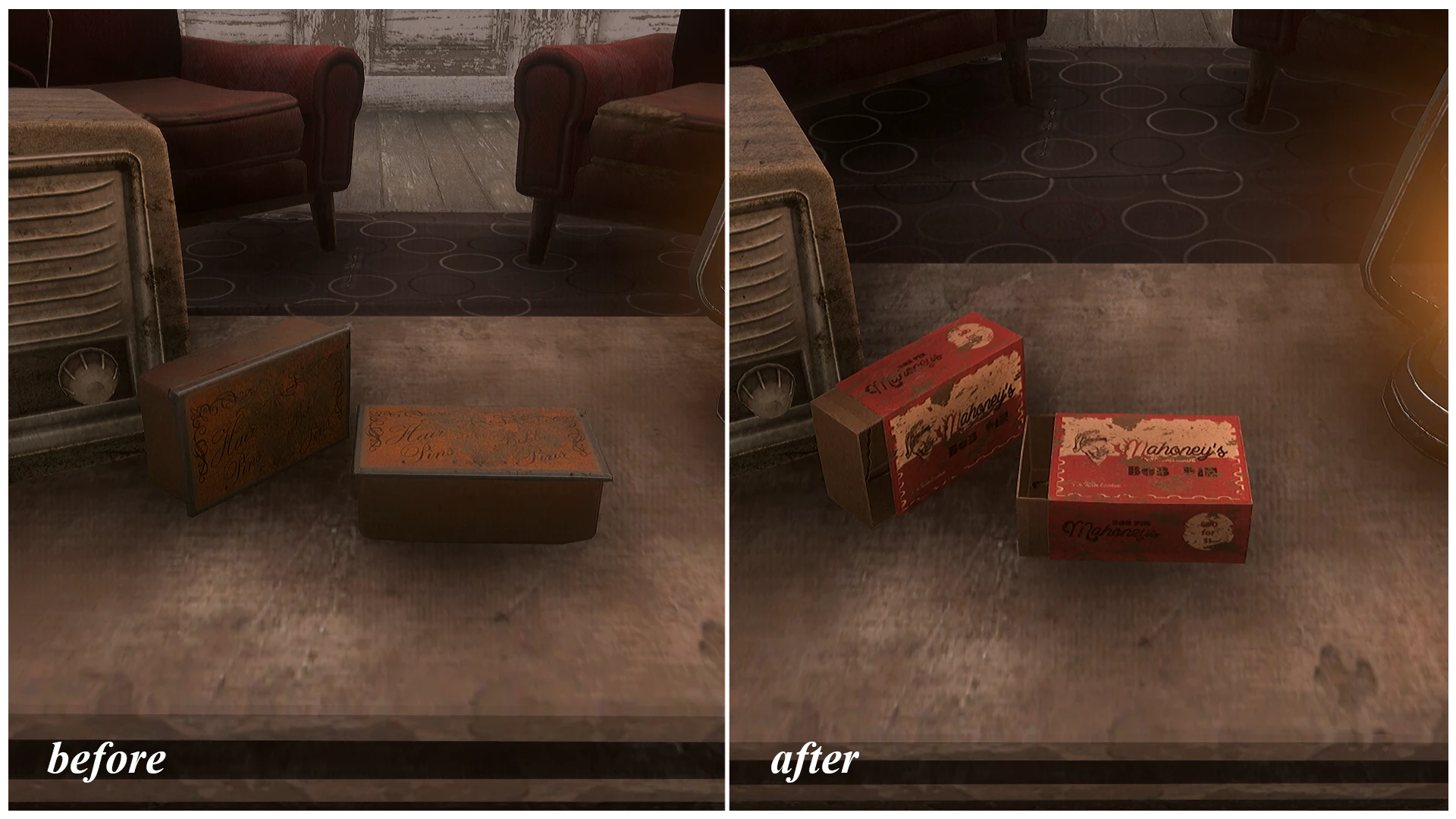
This mod is a very simple model and texture placement for the default bobby pin box in Fallout 4.
I found the original very boring, so I wanted to see if I could fix it. This new model replaces the tin can look with a matchbox style container, opened just slightly to let you see the bobby pins inside. Textures are 2048x2048, instead of the default 512x512 textures that came with the game.
This is my first mod, so please let me know if there's anything I need to work on.
Install with your mod manager of choice. Should be compatible with anything that doesn't modify the bobby pin box textures or model.
Smores' Bobby Pin Box is a simple cosmetic mod that replaces the default bobby pin box model with new, higher-quality textures for a more unique look. It's a lightweight, no-frills texture upgrade for Fallout 4 players who want to freshen up a common item. With 604 endorsements and 19,321 downloads, it's a popular choice for visual variety.
✨ Key Features
📊 Pros & Cons
✅ Pros
- Community-approved with 604 endorsements and over 19k downloads.
- Simple drop-in replacement—no gameplay changes, just a visual upgrade.
- Lightweight mod that won't impact performance.
⚠️ Cons
- Last updated in 2019—might not be compatible with the latest game patches.
- Only affects the bobby pin box, so the visual change is very minor.
- No screenshots or detailed description, so you can't preview the new look before installing.
For Fallout 4 players who want to add a bit of visual flair to a common item without overhauling the game. If you're a collector of small texture mods or just want a fresh look for your bobby pins, this is for you. Skip if you're looking for gameplay changes or major visual overhauls—this is purely cosmetic.
💡 Beginner Tips
- Since it's a simple texture replacer, just drop the files into your Data folder or use a mod manager like Vortex.
- Make sure to enable the mod in your load order—if you're using a mod manager, it should handle it automatically.
- If you're on PC, check if the mod requires any DLC or updates; if you're on console, verify compatibility with your game version.
📊 Mod Details
- Game
- Fallout 4 Mods
- Author
- smores
- Version
- 1.1
- Downloads
- 19,321
- Endorsements
- 604
- Category
- Models and Textures
- Created
- 7/22/2019
- Updated
- 7/22/2019
🔧 How to Install Fallout 4 Mods
Download from Nexus.
📖 Full step-by-step install guide for Fallout 4 →
Visit the official mod page for specific installation instructions for this mod.
🎮 Need cheat codes or console commands? Check ur gaming wiki for Fallout 4 commands, item IDs, and more.
Keep browsing — more Fallout 4 mods await