Scope HUD - Rangefinder
🟡 Updated this year⚠️ Install Order · 2 steps
Install in this order, then this mod last — most mods fail to load without their framework and dependencies in place.
Preview
🔍 Analysis
- 👍 4.2% endorsement rate — high engagement, a strong quality signal
- 🏆 #20 of 157 Gameplay mods in this game by downloads
📋 About This Mod
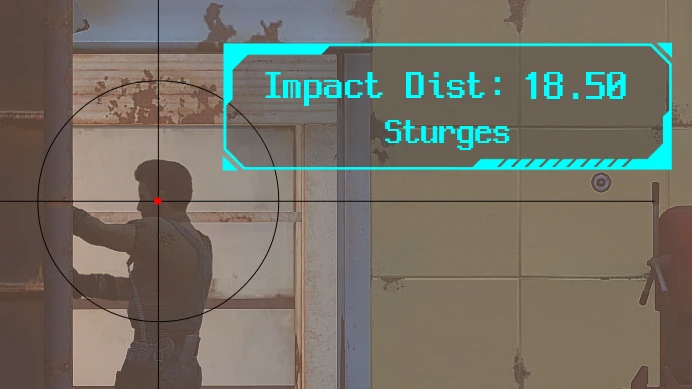
When aiming with a scoped weapon, a HUD displaying the impact point and distance will appear.
jbbchxnluag
When aiming with a scoped weapon, a HUD will appear showing the predicted impact point calculated based on bullet drop and the distance to that point. The position, size, and color of the HUD can be fully customized through MCM to suit the user's preferences. It works through F4SE and SWF, and will function with any weapon, whether vanilla or mod-added, as long as the weapon's parts have the 'HasScope' or 'dn_HasScope' keywords.
If you want to control the HUD appearance using keywords other than HasScope, please refer to the explanation in the Article tab.
Additionally, weapons with 0 damage and a zoom multiplier of 2 or higher are classified as binoculars or telescopes, and the HUD will always be displayed unless a keyword from the disable keyword list is present.
This mod does not work with the Next-Gen version of the game.
The predicted impact point is displayed based on the ammunition used by the weapon. If the ammunition is affected by gravity, the impact point will be calculated and shown below the center of the screen. The calculation of projectile drop is not based on pre-entered values but instead dynamically reads the weapon's Projectile speed and gravity weight information. This means that even weapons added by non-vanilla mods are accurately handled.
To enhance realism, the impact point marker increases in size at shorter distances and decreases as the distance grows. If you prefer a fixed size for the impact point, you can adjust it in the MCM menu.
You can find the settings in the MCM under 'Scope HUD - Rangefinder'. From there, you can adjust various functional settings, including the HUD's color and position, to your preference.
The HUD display also takes the weapon's keyword information into account, but some modded weapons use custom keywords or other methods, which may prevent the HUD from appearing. In this case, you can use the "Display HUD based on zoom level" option, or follow the steps in the Article tab to configure it in more detail.
At the top of the MCM menu, you can find the 'Open HUD Type / Color / Size Adjustment Menu'. Click it to enable it, then close the MCM. The HUD customization menu, as shown above, will appear. You can select the HUD type to display and adjust its color and size by clicking the HUD type button at the top left.
To set the HUD size, click the number displayed next to 'Size' at the top right and enter a number between 30 and 200. Please use the
📊 Mod Details
- Game
- Fallout 4 Mods
- Author
- morita_K
- Version
- 2.1.5
- Downloads
- 4,400
- Endorsements
- 185
- Category
- Gameplay
- Created
- 2/19/2025
- Updated
- 10/15/2025
🔧 How to Install Fallout 4 Mods
Download from Nexus.
📖 Full step-by-step install guide for Fallout 4 →
Visit the official mod page for specific installation instructions for this mod.
🎮 Need cheat codes or console commands? Check ur gaming wiki for Fallout 4 commands, item IDs, and more.
Keep browsing — more Fallout 4 mods await