Rotate or move any object or npc with a keypress (script)
⚪ Last updated 2015⚠️ Install Order · 2 steps
Install in this order, then this mod last — most mods fail to load without their framework and dependencies in place.
Preview
🔍 Analysis
- 👍 8.0% endorsement rate — high engagement, a strong quality signal
- 🏆 #5 of 20 Utilities mods in this game by downloads
📋 About This Mod
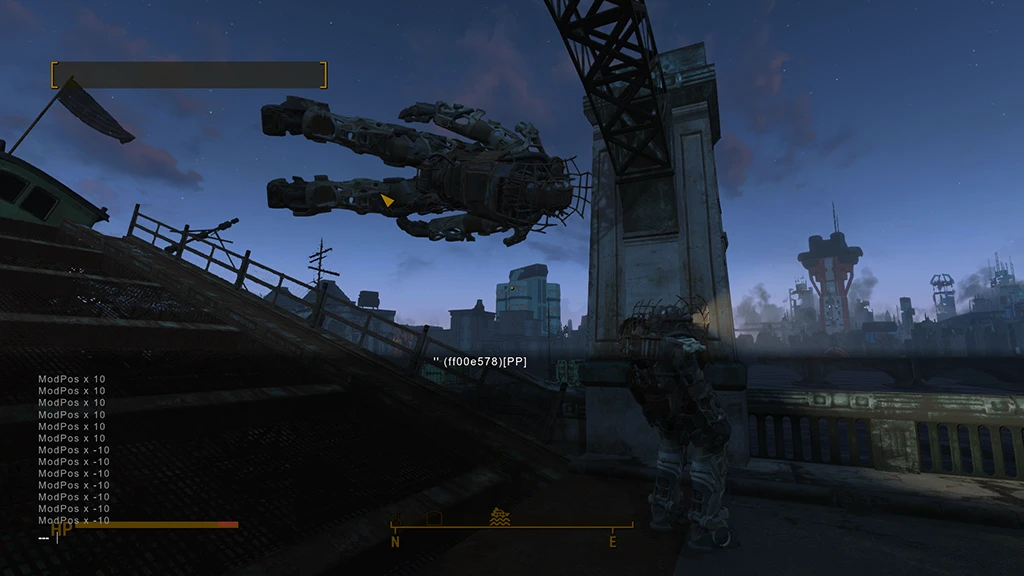
Hey there. I got fed up with settlement building and constant microadjusting and workarounds so I wrote myself a small autohotkey script that just opens console and enters modification values so that you dont have to. I recommend setting F12(and maybe F10 slowing is more useful from my expirience, F11) on your mouse additional keys. This way you wont need to move your hands from usual layout. Thats what I use myself.
IMPORTANT(Bugs):
Probably fixed in 1. 3 - Try not to use commands that "require console to be CLOSED" while in building mode Game has a weird bug where it sometimes starts to treat "wasd" as arrow keys, so you wont be able to move. To FIX this go into building mode and spam "wasd" and arrow keys together.
Fixed in 1. 3 - Sometimes script doesnt register hotkey to be released, so it starts to move an object or rotate it by itself. To FIX this just tap stuck button (for example "W", you dont need to hold F12 for fix) again if it becomes "stuck"
IF YOU HAVE KEYBOARD LAYOUT OTHER THAN ENGLISH AND CONSOLE DOESN'T OPEN WITH "~" KEY SKIP TO THE ORANGE TEXT BELOW.
Running script as Administrator is recommended, especially if it seems not to work (system protection prevents unknown software from executing keypresses for obvious reasons). If you feel paranoid you can look into script code with notepad and see what it does.
Why you need this? Oh boy, even if you dont build anything this thing is a must-have:
[]Helps you build stuff a lot (obviously) []Move stuck NPCs! Yes! Damn questgiver tells you to follow him and then runs into a corner and stays there running? Meh, just move that sucker! Same with stuck enemies (if you want to give them fair chance or just move them over an edge of a building and wave goodbye) []Put your follower into powearmor, sneak up on an enemy, then hold control and place follower some height above an enemy - BAM! []See a really nice bucket/trashcan/barrel that you can kick, but cant pick up? Pfff, hold control and move that shit on top of someones head! []Want a ceiling based turret in your settlement? Just press few buttons! []POWER ARMORS! We all have tons of them, want to put themA simple Autohotkey script that spams the game console with modpos/modangle commands to adjust object position and angle in the world. Helps building settlements, moving stuck NPCs or enemies, and placing items on NPCs. 444 endorsements, last updated December 2015.
✨ Key Features
📊 Pros & Cons
✅ Pros
- Community-approved with 444 endorsements and over 5,500 downloads
- Solves a real pain point for settlement builders: fine-tuning object placement
- Useful for rescuing stuck NPCs and adding fun props to characters
⚠️ Cons
- Requires Autohotkey and manual script setup, which may intimidate non-technical users
- Spamming console commands could potentially cause performance hiccups if used excessively
- Compatibility risk with mods that alter console commands or settlement building mechanics
For Fallout 4 settlement builders who want precise control over object placement without fiddly vanilla snapping. Also for players who enjoy creative roleplay by putting items on NPCs. Skip if you prefer pure in-game building tools or dislike external scripts.
💡 Beginner Tips
- Make sure you have Autohotkey installed and run the script as administrator to ensure it can send keystrokes to the game.
- Test the script in a small settlement first to get a feel for the keypresses and console command behavior.
- Disable the script when not building to avoid accidental console spam during combat or dialogue.
📊 Mod Details
- Game
- Fallout 4 Mods
- Author
- zhuliks
- Version
- 1.3
- Downloads
- 5,565
- Endorsements
- 444
- Category
- Utilities
- Created
- 11/24/2015
- Updated
- 12/13/2015
🔧 How to Install Fallout 4 Mods
Download from Nexus.
📖 Full step-by-step install guide for Fallout 4 →
Visit the official mod page for specific installation instructions for this mod.
🎮 Need cheat codes or console commands? Check ur gaming wiki for Fallout 4 commands, item IDs, and more.
Keep browsing — more Fallout 4 mods await