Radrose Usability Enhancements - Improved DEF_UI plus VIS patch collection
⚪ Last updated 2021⚠️ Install Order · 4 steps
Install in this order, then this mod last — most mods fail to load without their framework and dependencies in place.
Preview
🔍 Analysis
- 👍 3.2% endorsement rate — high engagement, a strong quality signal
- 🏆 #28 of 82 User Interface mods in this game by downloads
📋 About This Mod
Radrose Usability Enhancements
New from 3. 0! Fully standalone, no other sorting mods required
New from 3. 0! Experimental compatibility with VIS-G Item Sorting
Includes item sorting patches for over 200 popular mods
Automatically installs patches for your active mods
New icons and categories for the Pip-Boy, inventory, and trading screens!
Further improves Fallout 4 inventory management
FEATURES
------------------------------------------------
Adds item sorting and icons on Pip-Boy and trading screens
- Sorting patches for many companion, quest, and gameplay mods!
- More Pip-Boy categories to keep inventory organized and find items easier
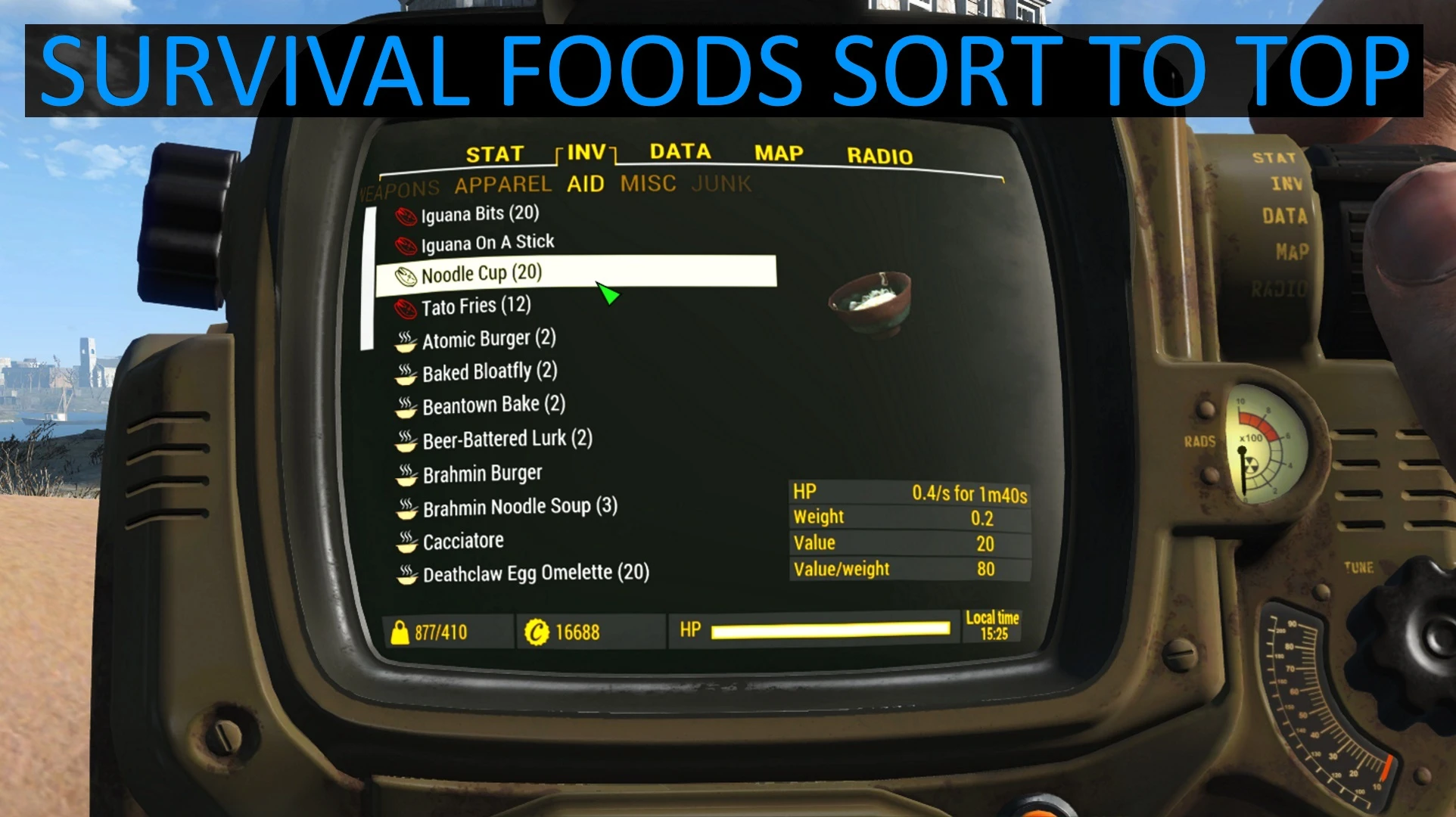
- Survival foods useful for hunger sort to top so you don't waste time searching
- Unique icons for different food types, and new subcategory for food crafting ingredients
- Junk items used in crafting categorized separately as "Components"
- Scrapping components shown for all items
- Realistic and consistent item weights, vanilla balanced for realism and applied to all mod patches
- Consistent take/drop sounds: full empty bottles sound different, and similar items make similar sounds
- Color Pip-Boy icons are optionally supported! (See Compatibility notes below)
- Optionally craft workbenches without "Local Leader" perk
- Updated Trade and Container tabs to better match Pip-Boy categories
- Patches for older mods updated to fix features broken by AWKCR 5+
Recent Updates:
- New! Version 3. 0. 2: RUE now standalone, VIS not required. Experimental support for VIS-G and AWKCR 8. 6
- Version 2. 7. 5: Added 8 new patches, updated 9, and updated compatibility for AWKCR 5. 7
- Version 2. 7. 4: Added 9 new mod patches and updated 11 to latest version of mod
- Version 2. 7. 3: Updated for Sim Settlements 3. 3. 0, added Seddo's quest mods, fixed installer
- Version 2. 7: Radio station icons, updates for Sim Settlements, America Rising, Chinese Stealth Suit
- Version 2. 6: SimSettlements AddOn patches, new Melee and Unique weapon icons
Radrose Usability Enhancements is a comprehensive sorting and categorization overhaul for DEF_UI and Valdacil's Item Sorting, adding VIS sorting patches for numerous popular mods. With over 3,200 endorsements and 100,000 downloads, it's a well-established utility for Fallout 4 players seeking improved inventory management.
✨ Key Features
📊 Pros & Cons
✅ Pros
- Community favorite with 3,264 endorsements and over 100k downloads—clearly a go-to for sorting
- Takes the pain out of inventory clutter by combining DEF_UI and VIS into one cohesive setup
- Covers a wide range of popular mods with sorting patches, so your loot stays organized even with big load orders
⚠️ Cons
- Last updated in April 2021—might not play nice with newer mods or game updates, so check compatibility
- Requires DEF_UI and Valdacil's Item Sorting as dependencies, which adds setup complexity
For Fallout 4 players who run heavy mod lists and want their inventory to make sense without endless scrolling. If you're already using DEF_UI or Valdacil's sorting, this is a must-have. Skip if you're on console or prefer a vanilla UI experience.
💡 Beginner Tips
- Make sure you install DEF_UI and Valdacil's Item Sorting first, then load Radrose after them in your mod manager.
- Use a mod manager like Vortex or MO2 to handle the patches—manual installation can lead to missing files.
- Check the mod's posts section for any compatibility notes with your other mods, especially if you're using newer releases.
📊 Mod Details
- Game
- Fallout 4 Mods
- Author
- takatoriyama
- Version
- 3.0.2
- Downloads
- 100,437
- Endorsements
- 3,264
- Category
- User Interface
- Created
- 9/17/2016
- Updated
- 4/7/2021
🔧 How to Install Fallout 4 Mods
Download from Nexus.
📖 Full step-by-step install guide for Fallout 4 →
Visit the official mod page for specific installation instructions for this mod.
🎮 Need cheat codes or console commands? Check ur gaming wiki for Fallout 4 commands, item IDs, and more.
Keep browsing — more Fallout 4 mods await