Radio Music Manager
⚪ Last updated 2018⚠️ Install Order · 2 steps
Install in this order, then this mod last — most mods fail to load without their framework and dependencies in place.
Preview
🔍 Analysis
- 👍 6.8% endorsement rate — high engagement, a strong quality signal
- 🏆 #10 of 19 Utilities mods in this game by downloads
📋 About This Mod
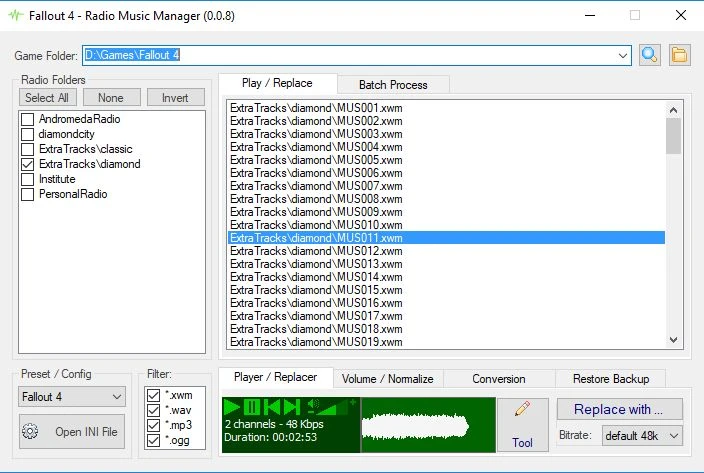
Tool for: Easy replacement of music files, Conversion of WAV files to XWM, Normalize audio volume. Batch process or one by one.
( Author with bad English. Translation by Google)
======================================================================
- Want to replace any music that you do not like for one that likes a lot. It does.
- Want to convert songs from WAV format that taking up 2 Gbyte of space for XWM with 200 Mbytes. It does.
- Are some of the radio songs too loud while others are too low? It can adjust the volume easily.
- Listen to the music of Fallout 4 Radios directly from the Windows Desktop (now in 0. 0. 12 support BA2 packs).
What does not do
======================================================================
This app for now only works with some radio mod installed with loose files. It does not work if the audio files are in BA2 packets. In the future, once it is well structured, it will have support for BA2 packets.
- ( in the implementation phase) -
Tips / Suggestion:
======================================================================
1) Do you want a radio with your favorite songs?
Install Standalone PipPOD (junior99au and shadowslasher410), it comes with mute traks so you can replace for your favorite songs.
Can also install 50 Tracks for PipPOD Standalone Radio (Skywatcher68) (1. 1 Gbytes) or 50 Atom Cats PipPOD tracks (Skywatcher68) (1. 2 Gbytes) and then convert them to XWM (100 Mbytes)
2) Creators of Radio Mods should convert the songs to 64 Kbps or 96 Kbps and the voice of the broadcasters to 48kbps or less. For this must have the original high quality wave or mp3 with 160 ~ 320 kbps.
Do not convert low bitrate audio to high bitrate, this will not increase the sound quality ... example, XWM 48kbps => WAV => XWM 160kbps ... will continue with lower quality but with high bitrate and taking up more space.
Conversion from WAV to XWM - comparison of file lengths and percentages:
- Original WAV file: 20,118,108 bytes = 100 %
- XWM 192kbps: 2,765,564 bytes = 14 %
- XWM 96kbps: 1,382,782 bytes = 7 %
- XWM 48kbps: 694,828 bytes = 4 %
Instalation:
========================================================================
- It does not require installation, just extract the contents in some empty folder.
- Run "FO4RadioManager.exe".
- If the application has not found the Folder where the Game is installed, select the Game Folder.
📊 Mod Details
- Game
- Fallout 4 Mods
- Author
- APipino
- Version
- 0.0.11
- Downloads
- 2,491
- Endorsements
- 170
- Category
- Utilities
- Created
- 6/9/2018
- Updated
- 7/10/2018
🔧 How to Install Fallout 4 Mods
Download from Nexus.
📖 Full step-by-step install guide for Fallout 4 →
Visit the official mod page for specific installation instructions for this mod.
🎮 Need cheat codes or console commands? Check ur gaming wiki for Fallout 4 commands, item IDs, and more.
Keep browsing — more Fallout 4 mods await