Power Armors Redone - 4K 2K HD
⚪ Last updated 2024⚠️ Install Order · 2 steps
Install in this order, then this mod last — most mods fail to load without their framework and dependencies in place.
Preview
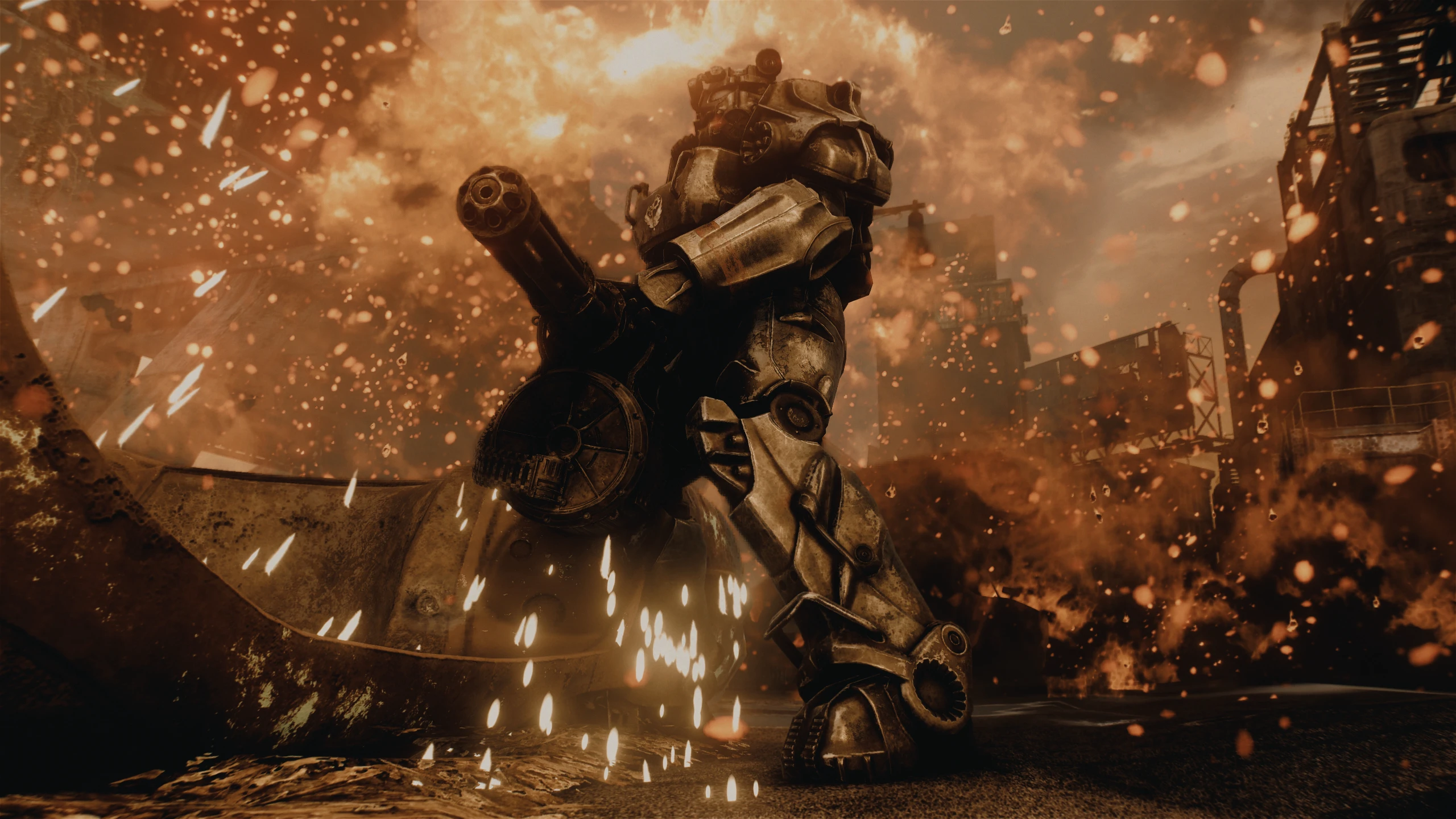
🔍 Analysis
- 👍 1.3% endorsement rate — high engagement, a strong quality signal
- 🏆 #189 of 271 Models and Textures mods in this game by downloads
📋 About This Mod
This is a texture replacer pack for all Vanilla and DLC Power Armors using the official HD DLC textures as a base. 2K and 4K resolutions available.
I tried my best to stay as close as possible to the original look and feel of the game and simply added as much detail as I could.
A lot of the detail has been added to the normal maps (the files that handle bumps and the like) , so the amount of detail you see depends on the lighting situation.
Optional Files
• Power Armor Frame 4K Dark Steel
Just a darker version of the Power Armor frame.
Only available in 4K because the added detail just looks like a blurry mess in 2K.
• X-01 Whiter Institute Pain job
Whiter Institute paint job for the X-01 PA. The vanilla texture has a yellow hue.
• Muted_Palettes_for_T45_T60_and_T51
The T45, T60 and T51 Power armors utilize palette files to colorize some of the paint jobs (mostly the bare metal ones)
This optional file contains less saturated palette files that will make rust look more gray instead of brown.
Note that this has the side effect of turning army green color to gray, since the palette is shared with different paint jobs.
This file was made by request, so it's not really supported.
Requirements
Note that since these are just textures, DLCs are NOT required even though textures for DLC Power Armors are included.
Performance
The mod is available in both 2K and 4K resolutions, as well as a hybrid 4k+2k optional download.
I have uploaded both Loose files and BA2 versions of the mod since that may also help with performance depending on your hardware (for some people BA2 files load faster and reduce stuttering)
The ESP plugin included with the BA2 versions is ESL flagged.
Installation
For best results please use a Mod Manager such as Mod Organizer 2 or Vortex.
• Loose Files version:
1. Open your Fallout4.ini file found at 'Documents/My Games/Fallout4/Fallout4.ini" with a text editor such as Notepad.
2. Change the line that reads "sResourceDataDirsFinal=STRINGS\" to read "sResourceDataDirsFinal=STRINGS\, textures\"
3. Download with preferred Mod Manager and install like any other mod.
• BA version:
1. Download with preferred Mod Manager and install like any other mod.
* If installing manually, extract the 7z file to your Fallout4 game directory (ultimately placing a "textures" folder in your already
existing Data directory)
Manual installation is NOT s
A comprehensive retexture mod for all Power Armors in Fallout 4, including DLCs, available in 2K and 4K resolutions. With over 203,000 downloads and 2,710 endorsements, it's a popular choice for players seeking high-definition visual upgrades.
✨ Key Features
📊 Pros & Cons
✅ Pros
- Community favorite with 2,710 endorsements and 203k downloads
- Covers every Power Armor in the game, including DLCs
- Choose between 2K and 4K to balance quality and performance
⚠️ Cons
- Last updated in April 2024—may not be compatible with future game patches
- Large 4K textures can be demanding on VRAM for lower-end systems
For Fallout 4 players who want their Power Armor to look sharper and more detailed without changing gameplay. Ideal for modders who enjoy visual overhauls and have the hardware to handle 4K textures. Skip if you prefer gameplay-altering mods or have a low-end PC.
💡 Beginner Tips
- If you're using a mod manager like Vortex or Mod Organizer 2, install the 2K version if you have a mid-range GPU to avoid performance hits.
- Make sure to load this mod after other texture mods to ensure it takes priority in the load order.
- Check the mod's file section for optional files—sometimes authors provide separate downloads for 2K and 4K, so pick the one that suits your system.
📊 Mod Details
- Game
- Fallout 4 Mods
- Author
- Nukanist
- Version
- 1.2.3
- Downloads
- 203,565
- Endorsements
- 2,710
- Category
- Models and Textures
- Created
- 11/13/2017
- Updated
- 4/19/2024
🔧 How to Install Fallout 4 Mods
Download from Nexus.
📖 Full step-by-step install guide for Fallout 4 →
Visit the official mod page for specific installation instructions for this mod.
🎮 Need cheat codes or console commands? Check ur gaming wiki for Fallout 4 commands, item IDs, and more.
Keep browsing — more Fallout 4 mods await