Polymer Stock for Double-Barrel Shotgun
⚪ Last updated 2016⚠️ Install Order · 2 steps
Install in this order, then this mod last — most mods fail to load without their framework and dependencies in place.
Preview
🔍 Analysis
- 👍 3.1% endorsement rate — high engagement, a strong quality signal
- 🏆 #41 of 228 Models and Textures mods in this game by downloads
📋 About This Mod
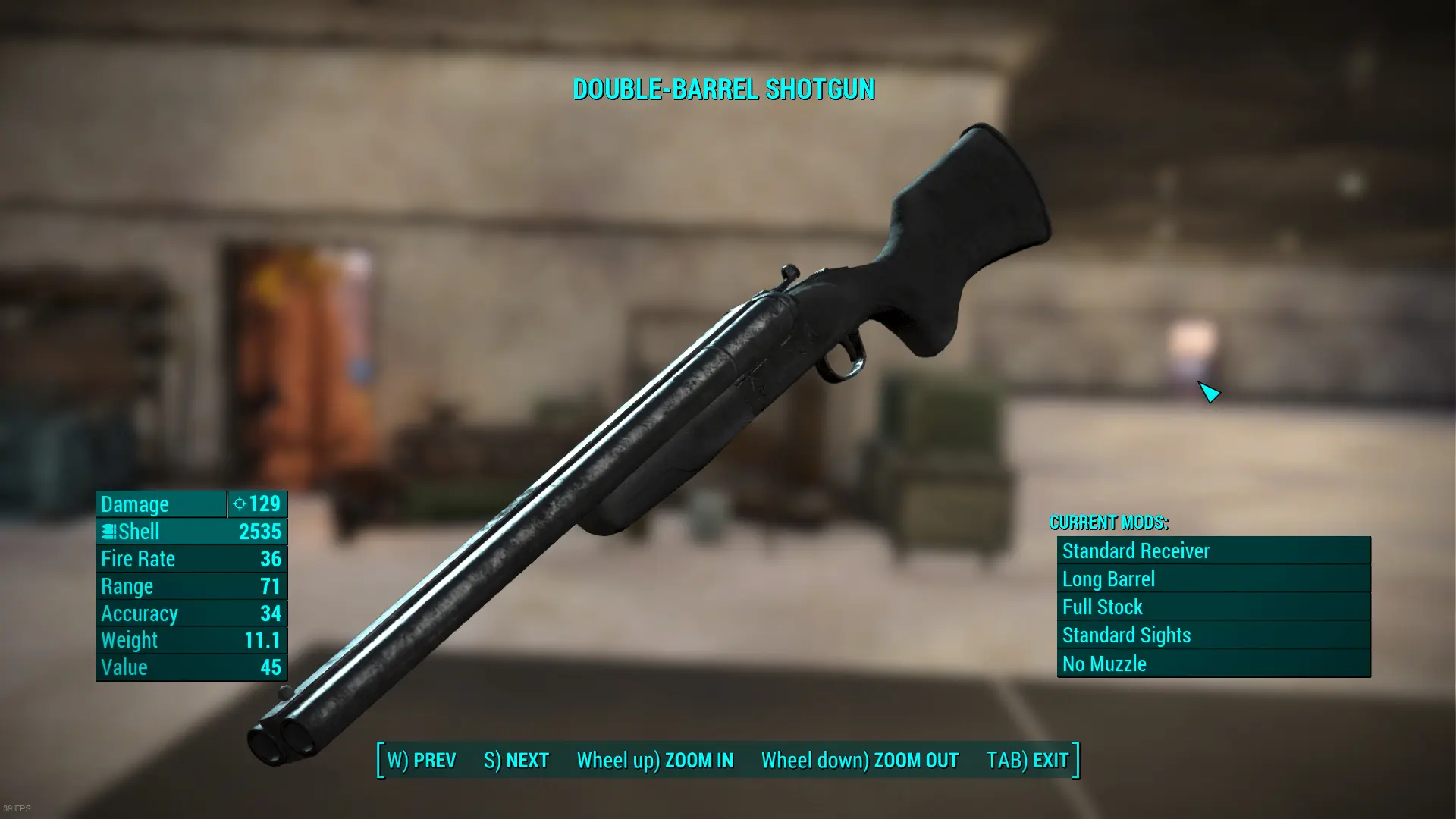
Replaces the wooden stock with more modern polymer stock, and also slightly modifies the metallic parts. Textures were done with Blender and Paintshop Pro, and are at 2k (stock and receiver) and 1k (barrels and muzzle brake) resolution. If the NMM installation doesn't work, the file can be manually installed by extracting the archive to the Data folder in your game install location.
My other retextures: Parang Machete (original by Dhegonus) M9 pistol (original by ff7cloudstrife) Industrial objects retexture
A compact cosmetic mod for Fallout 4 that swaps the double-barrel shotgun's wooden stock for a modern polymer version and tweaks the metallic parts. With 257 endorsements and 8,196 downloads, it's a niche visual upgrade for players who want a more contemporary look on their shotgun.
✨ Key Features
📊 Pros & Cons
✅ Pros
- Community-approved with 257 endorsements and over 8,000 downloads.
- Gives the double-barrel shotgun a fresh, modern look without overhauling the whole weapon.
- Lightweight cosmetic change that won't affect gameplay balance.
⚠️ Cons
- Only affects the double-barrel shotgun, so if you're not a fan of that weapon, this mod is useless to you.
- Last updated in 2016, so it may not be compatible with newer game patches or DLC.
- No preview images or detailed description, so you're taking a gamble on the visual result.
For Fallout 4 players who use the double-barrel shotgun and want a more tactical, polymer look instead of the classic wood. Skip if you're looking for gameplay changes or if you rarely use this weapon.
💡 Beginner Tips
- Since it's a simple texture/model replacer, you can install it manually by dropping the files into your Data folder, but using a mod manager like Nexus Mod Manager or Vortex makes uninstalling easier.
- If you're on PC, make sure to enable mods in your Fallout 4 settings (or use the mod manager's deployment) so the game loads custom assets.
- Check if the mod conflicts with other shotgun retextures or overhaul mods—if you have any, load this one after them to ensure it takes effect.
📊 Mod Details
- Game
- Fallout 4 Mods
- Author
- Junnari
- Version
- 1.0
- Downloads
- 8,196
- Endorsements
- 257
- Category
- Models and Textures
- Created
- 1/18/2016
- Updated
- 1/18/2016
🔧 How to Install Fallout 4 Mods
Download from Nexus.
📖 Full step-by-step install guide for Fallout 4 →
Visit the official mod page for specific installation instructions for this mod.
🎮 Need cheat codes or console commands? Check ur gaming wiki for Fallout 4 commands, item IDs, and more.
Keep browsing — more Fallout 4 mods await