Nuka Cola Cherry GLOW
⚪ Last updated 2015⚠️ Install Order · 2 steps
Install in this order, then this mod last — most mods fail to load without their framework and dependencies in place.
Preview
🔍 Analysis
- 👍 9.2% endorsement rate — high engagement, a strong quality signal
- 🏆 #191 of 214 Models and Textures mods in this game by downloads
📋 About This Mod
Description:
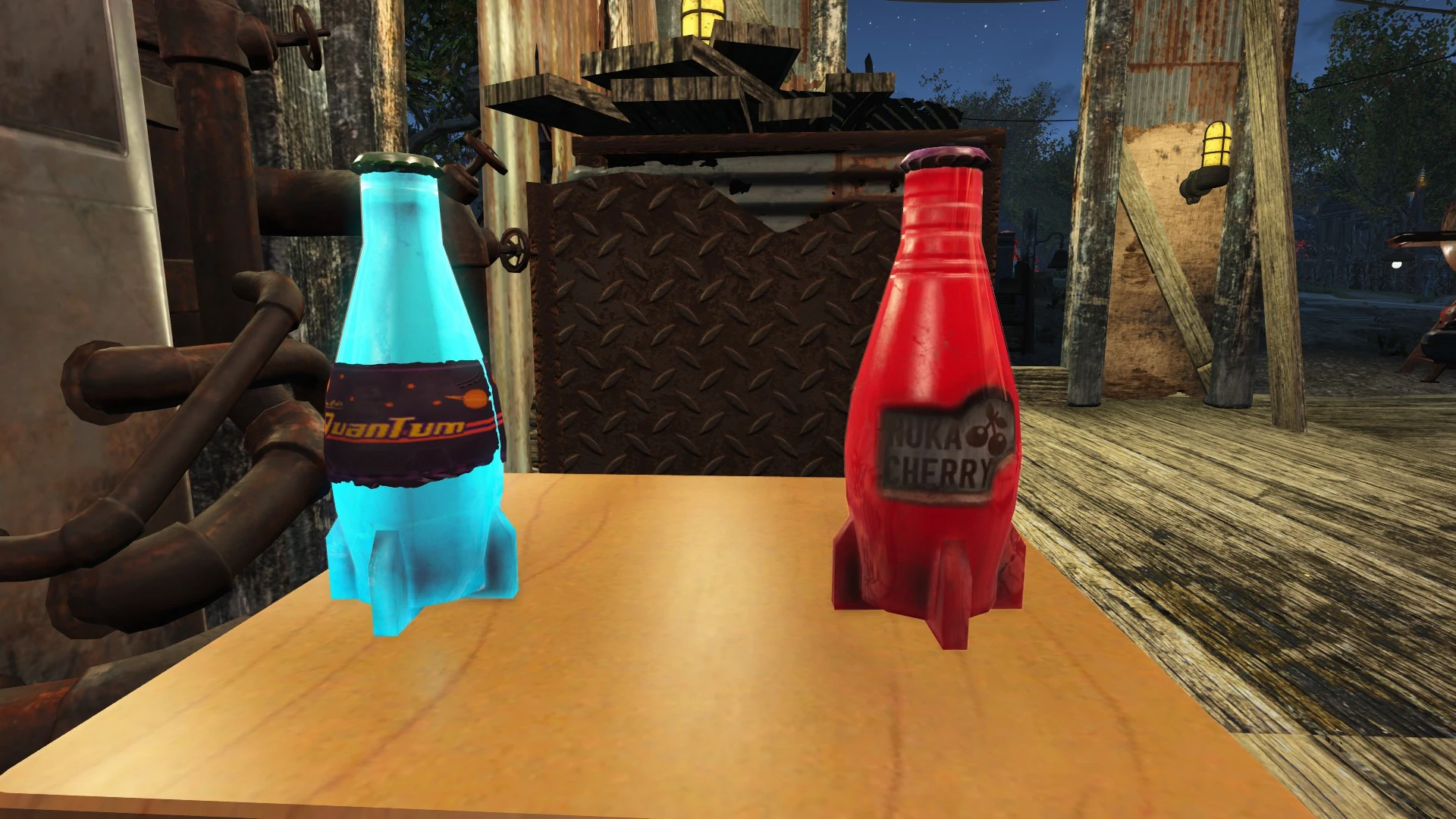
Makes the Nuka Cola Cherry glow similar to how the Nuka Cola Quantum does. Special thanks to herpderp2332 for helping me figure out how to do this!
I am aware that a similar mod was just released by Tymoteus found here, but I have actually been sitting on this one for over a month at that point because I was unable to fix one bug (which may not even be able to be fixed, and his mod has the same issue, so "meh"). I figured it was time to either "sh*t or get off the pot" as they say...
The largest difference between our two mods is that my version does not cause the logo to glow (similar to how Nuka-Cola Quantum looks).
===========
==================
How To Install:
Put the "meshes", "textures" and "materials" folders in your "Fallout 4/Data" directory.
If you haven't already made the required .ini edits in order for the game to load loose files, here's what you do:
- Open up Fallout.ini (for Windows, this is found at "C:\Users\<YOUR_NAME>\Documents\My Games\Fallout4"), and make the following changes to the section:
bInvalidateOlderFiles=1
sResourceDataDirsFinal=
If you still have remnants of the old "fix" for forcing the game to load loose files in your Skyrim.ini file that I mentioned above, you should remove them.
Now all loose files should load properly! :]
I HIGHLY recommend you set both Fallout.ini and Falloutprefs.ini to "read only", or else the game (may) will revert your changes and/or make other changes you don't want without asking you first...
You no longer need to do the above since the Creation Kit was official released!
=====================
How To Uninstall:
Simply delete the files - the game will go back to using the default ones packed inside the various ".ba2" archives.
You should really leave the .ini changes, though, as pretty much all mods will need them in order to function at all.
=====================
Known Bugs/Issues:
- There is currently some weird shiny effect when you "inspect" the item in your inventory. I gave up trying to figure out how to fix this, as it's an extremely minor problem anyways... I'm pretty sure this is an engine bug anyways...
It looks like this (again, this will ONLY show up like this if you try to "inspect" it from within your inventory, with the "inspect" option):
EDIT: This almost certainly an engin
📊 Mod Details
- Game
- Fallout 4 Mods
- Author
- Ulithium_Dragon
- Version
- 1.0
- Downloads
- 3,575
- Endorsements
- 328
- Category
- Models and Textures
- Created
- 12/18/2015
- Updated
- 12/18/2015
🔧 How to Install Fallout 4 Mods
Download from Nexus.
📖 Full step-by-step install guide for Fallout 4 →
Visit the official mod page for specific installation instructions for this mod.
🎮 Need cheat codes or console commands? Check ur gaming wiki for Fallout 4 commands, item IDs, and more.
Keep browsing — more Fallout 4 mods await