Modern Weapon Replacer - FN P90
🟡 Updated this year⚠️ Install Order · 2 steps
Install in this order, then this mod last — most mods fail to load without their framework and dependencies in place.
Preview
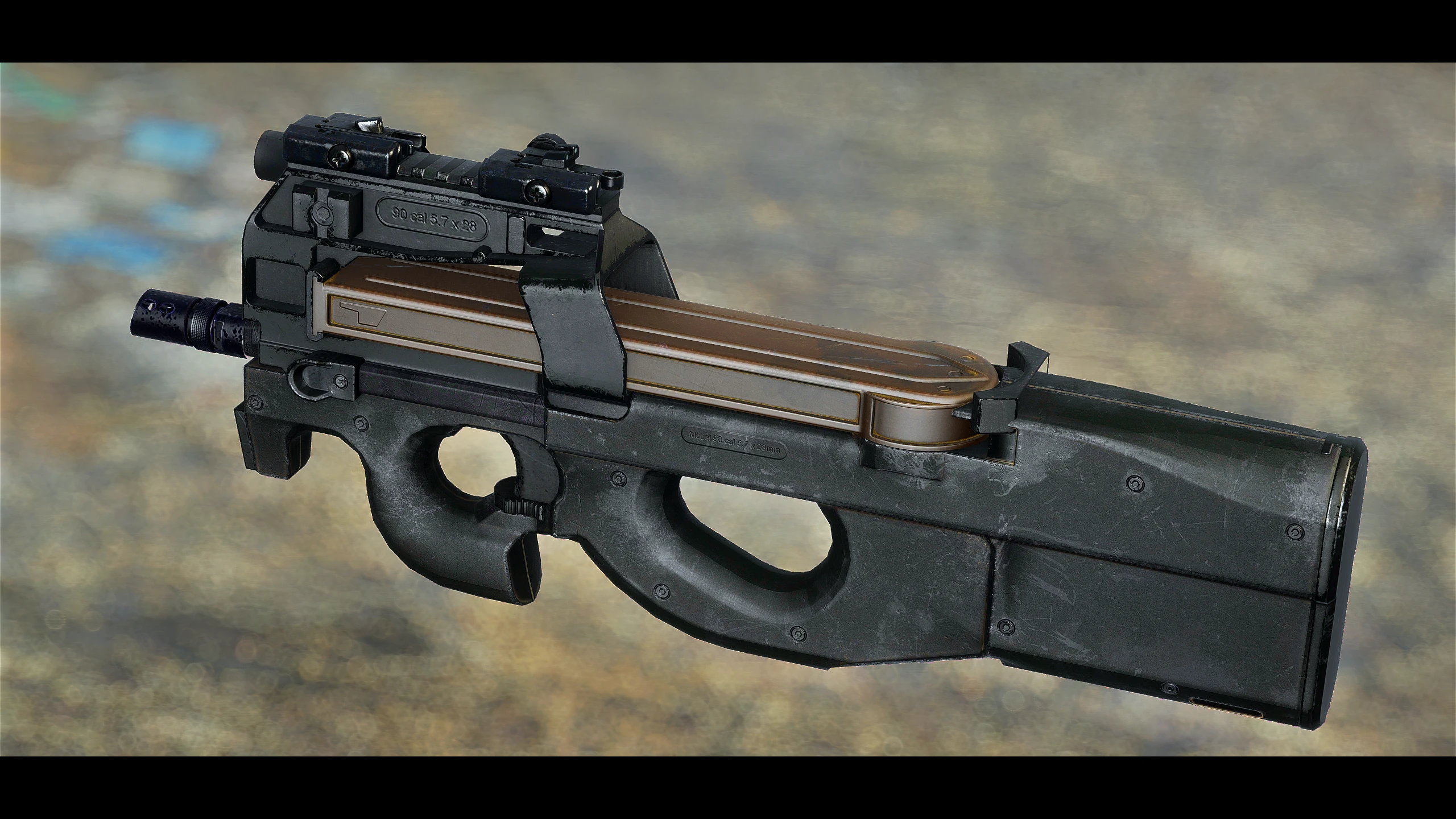
🔍 Analysis
- 👍 2.1% endorsement rate — high engagement, a strong quality signal
- 🏆 #335 of 337 Weapons mods in this game by downloads
📋 About This Mod
Replaced weapons will spawn with the following modifications:
-
[]All replaced weapons will be named "P90" in-game and will follow the instance naming conventions
[
]Replaced weapons will spawn with the ". 45 Ammo Conversion" modification and NPC's will use . 45 ammunition[]Replaced weapons will spawn with the Hardened Receiver
[]Replaced weapons will spawn with a random barrel
[]Replaced weapons will spawn with a random magazine
[]Replaced weapons may spawn with either a silencer or no muzzle attachment
[]Replaced weapons will spawn with a random ammo type
[]Common weapon drops and loot will spawn with a selected pool of red dot sights or iron sights. Rarer weapon drops and loot will randomly spawn with any red dot optic or iron sight
- Common weapon drops and loot will spawn with no rail attachments. Rarer weapon drops and loot will randomly spawn with a rail attachment
Optional plugins are included that completely override Super Mutant leveled lists and gives them either melee weapons, miniguns, or missile launchers. Place the Super Mutant Leveled List Override esp very low in your load order to allow it to win any leveled list conflicts
Compatibility
- Plugins are available that are compatible with Tactical Reload Framework by Bwones and the FN P90 tactical reload patch from Tactical Reload Patch Repository by Rom7977
Installation1. Download and install: FN P90 by TheShinyHaxorus: https://www.nexusmods.com/fallout4/mods/228712. Make sure the esp for that mod is activated and all the assets from it are in your Fallout 4 data folder
3. Install this mod. Select the replacers you want in the installer and click finish
Troubleshooting1. Place the replacer esp(s) lower or last in your load order. It's possible you have another mod activated that is overwriting the replacer data or your mod manager is auto sorting the esp's in a poor configuration2. If an NPC/Companion weapon is broken, you can individually update them by entering the console, selecting the NPC, and entering the "Resurrect" console command. You will have to do this one-by-one for each NPC. If the NPC/Companion isn't equipping their replaced weapon after the resurrect command, open the console, select them, then enter the "openactorcontainer 1" console command. You can use this console command to view their inventory and force them to equip their replaced weapon and ammo or force them to equip another weapon altogether
3. Take the replaced weapon to a weapon workbench and
This mod replaces several vanilla weapons with TheShinyHaxorus' FN P90 model, offering a modern tactical look. It's a simple cosmetic swap for Fallout 4 players who want a P90 without adding new weapons. With 516 endorsements and recent updates, it's a popular choice for weapon reskins.
✨ Key Features
📊 Pros & Cons
✅ Pros
- Community favorite with 516 endorsements and over 24k downloads
- Recently updated (January 2026), so it's likely compatible with current game versions
- Gives your arsenal a modern tactical look without adding new weapons to the loot pool
⚠️ Cons
- Only replaces vanilla weapons, so you won't get the P90 as a standalone weapon
- May conflict with other weapon replacement mods that touch the same vanilla weapons
- Visual-only change; no gameplay or balance alterations
For Fallout 4 players who want a sleek, modern P90 model on their existing weapons without adding new items to the game. If you're after a new weapon with unique stats or animations, this isn't it—it's purely a visual swap.
💡 Beginner Tips
- Use a mod manager like Vortex or Mod Organizer 2 to install and manage this mod easily.
- Check your load order to ensure no other weapon replacement mods are overwriting the same vanilla weapons.
- If you're on PC, make sure you have the necessary DLCs if the mod requires them (though not specified, it's a good practice).
📊 Mod Details
- Game
- Fallout 4 Mods
- Author
- cyanide4suicide
- Version
- 2.2
- Downloads
- 24,318
- Endorsements
- 516
- Category
- Weapons
- Created
- 8/13/2018
- Updated
- 1/14/2026
🔧 How to Install Fallout 4 Mods
Download from Nexus.
📖 Full step-by-step install guide for Fallout 4 →
Visit the official mod page for specific installation instructions for this mod.
🎮 Need cheat codes or console commands? Check ur gaming wiki for Fallout 4 commands, item IDs, and more.
Keep browsing — more Fallout 4 mods await