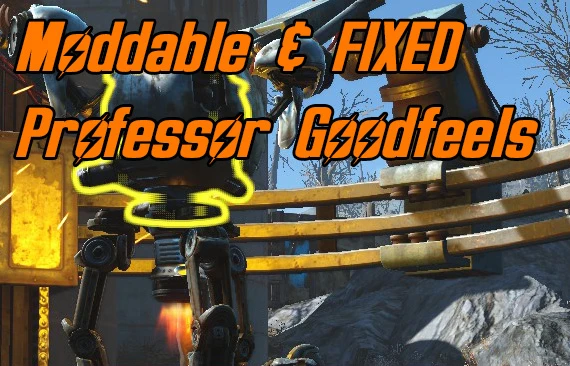
Moddable and FIXED Professor Goodfeels (Automatron)
⚪ Last updated 2016⚠️ Install Order · 2 steps
Install in this order, then this mod last — most mods fail to load without their framework and dependencies in place.
Preview
🔍 Analysis
- 👍 6.0% endorsement rate — high engagement, a strong quality signal
- 🏆 #16 of 59 NPC mods in this game by downloads
📋 About This Mod
"Woah, man. Groovy!" - Professor Goodfeels
WHAT IT DOES
1) THE FIX (Automatron DLC not needed)
Fixes Professor Goodfeels in Sunshine Tidings co-op: stopping him from disappearing and adding some minor tweaks:
- Makes him protected, so he can't be killed.
- Unlike in vanilla FO4 forces him to help allies.
- Makes him commandable like any settler (see "How To Use In The Game" section)
2) MAKING HIM MODDABLE (Automatron DLC needed)
Optionally makes him fully moddable as an Automatron.
The compilation of my robot settler fixes is out! It contains this mod as well!
Moddable Robot Settlers Compilation
Also check out the video!
y2k808E9H6w
HOW TO INSTALL
Extract the contents of the rar file to your Fallout4/data folder.
Enable FIXEDGoodfeels_no_DLC_needed.esp for the fix using a mod manager or manually.
Enable FIXEDGoodfeels_no_DLC_needed.esp and ModdableGoodfeels.esp for the fix and making him moddable with the Automatron DLC using a mod manager or manually.
Ensure these lines appear in either your Fallout4Prefs.ini or Fallout4Custom.ini:
bInvalidateOlderFiles=1
sResourceDataDirsFinal=
If you have trouble installing mods, check these tutorials by Gopher:
- Enabling Mods for FALLOUT 4
- FALLOUT 4: Installing Mods on PC (MANUALLY)
COMPATIBILITY
Making him moddable needs Fallout 4 Automatron DLC.
"Handy Hats and Armors" (Current version 1. 31) by -Ren- will hide Torso and Legs mods on any Vanilla Ms. Nany / Mr. Handy / Mr. Gutsy NPC's including Codsworth because -Ren- deleted "ap_Bot_BotCore" and "ap_Bot_BotLegs" keywords from APPR record entry in the Mr. Handy Race which is needed by DLC Automatron. Thanks to fernicar for reporting me this!
HOW TO USE IN THE GAME
1) For fixing Goodfeels install the mod, start the game, and if you've already visited Sunshine Tidings, and Professor Goodfeels is gone, open the console and type:
prid 000d5221
player.moveto 000d5221
You will be teleported to the location of Professor Goodfeels. Now he won't disappear anymore.
2) For making him commandable on a settlement and stopping him from wondering
This mod fixes Professor Goodfeels in Sunshine Tidings co-op, preventing him from disappearing and adding minor tweaks. It optionally makes him fully moddable as an Automatron, but the Automatron DLC is only required for that feature. A popular quality-of-life fix for Fallout 4 players.
✨ Key Features
📊 Pros & Cons
✅ Pros
- Community favorite with 2,250 endorsements and 37,616 downloads
- Fixes a real annoyance—Goodfeels vanishing—so your settlement stays groovy
- Optional Automatron integration adds modding potential without forcing the DLC on you
⚠️ Cons
- Last updated in 2016, so it may not be tested with the latest Fallout 4 patches
- The base fix is minor; if you don't care about Goodfeels, this won't change much
- No detailed changelog or install instructions beyond the brief description
For Fallout 4 players who love settlement life and want to keep Professor Goodfeels around without him glitching out. Also for Automatron owners who want to customize him as a robot companion. Skip if you never visit Sunshine Tidings or don't care about NPC fixes.
💡 Beginner Tips
- If you use the Automatron modding feature, make sure you have the Automatron DLC installed and enabled before loading this mod.
- Place this mod in your load order after any other mods that affect Sunshine Tidings co-op to avoid conflicts.
- If Goodfeels still disappears, try fast-traveling away and back to reset the cell.
📊 Mod Details
- Game
- Fallout 4 Mods
- Author
- CDante
- Version
- 1.0
- Downloads
- 37,616
- Endorsements
- 2,250
- Category
- NPC
- Created
- 3/30/2016
- Updated
- 3/30/2016
🔧 How to Install Fallout 4 Mods
Download from Nexus.
📖 Full step-by-step install guide for Fallout 4 →
Visit the official mod page for specific installation instructions for this mod.
🎮 Need cheat codes or console commands? Check ur gaming wiki for Fallout 4 commands, item IDs, and more.
Keep browsing — more Fallout 4 mods await