Main Menu Replacer - The Glowing Sea Radstorm
⚪ Last updated 2015⚠️ Install Order · 2 steps
Install in this order, then this mod last — most mods fail to load without their framework and dependencies in place.
Preview
🔍 Analysis
- 👍 4.2% endorsement rate — high engagement, a strong quality signal
- 🏆 #10 of 25 Miscellaneous mods in this game by downloads
📋 About This Mod
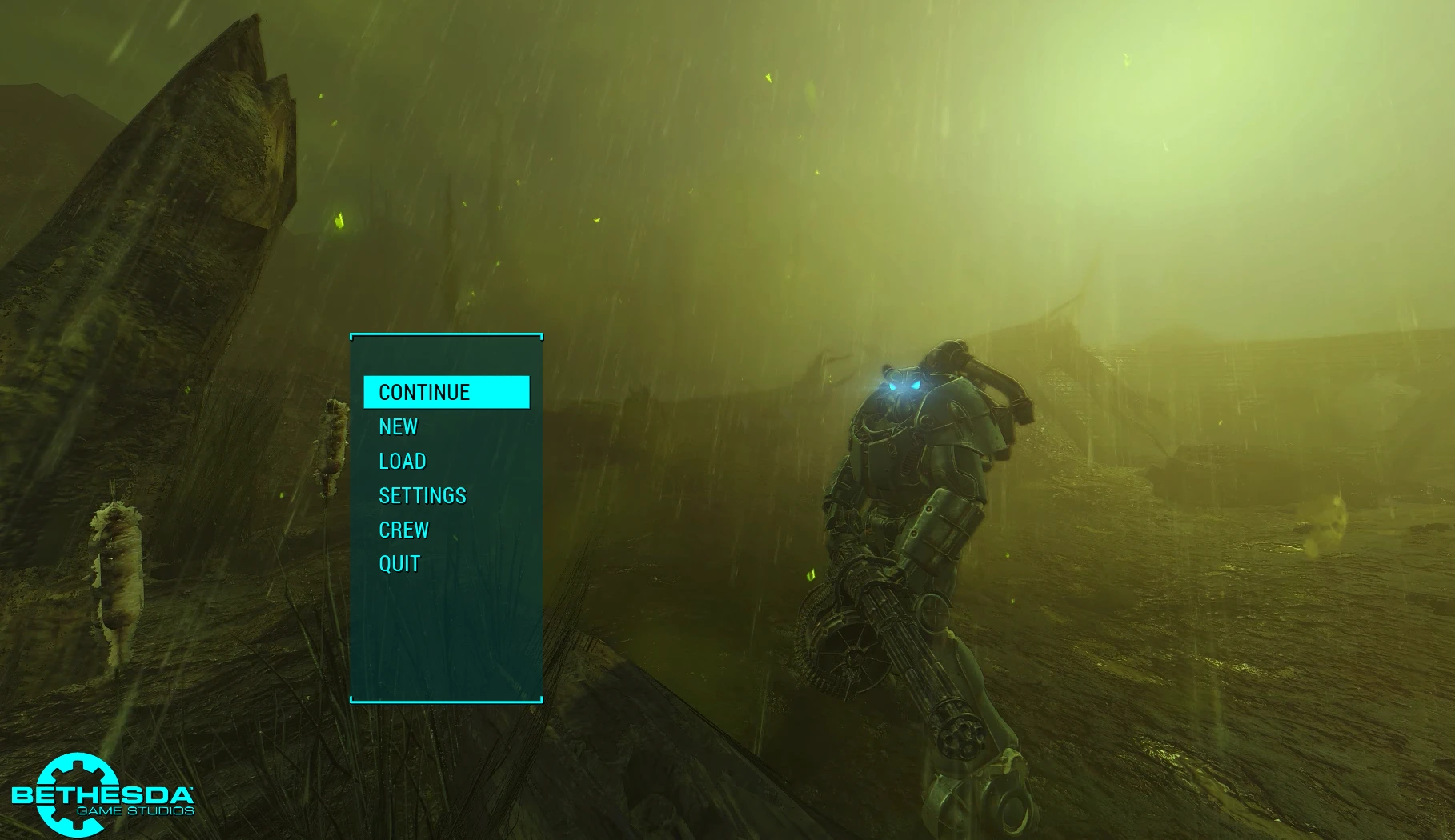
A simple title screen replacer with the Sole Survivor in X-01 Power Armor, standing during a rainy radstorm in The Glowing Sea.
Music is "The Brotherhood of Steel / Metallic Monks" from Fallout 1.
Installation:
1.) Move, rename, or backup your "MainMenuLoop.bk2" file under \Fallout 4\Data\Video (not necessary if you're using Mod Organizer).
2.) Extract the files into your main Fallout 4 folder, or use your preferred mod manager.
3.) Follow the steps under "How to enable Fallout 4 mods". Alternatively, you can use Bilago's Fallout 4 Configuration Tool.
NOTE
: The game will play the default audio the first time you start the game. Restart it, and it should load the new audio just fine from then on. ______________________________________________________________________________________________________________Version 2 changes:
- Recorded new video with FRAPS with lossless RGB enabled to ensure maximum possible quality. Trimmed video in Adobe Premiere Pro and encoded to 100 Mbps. Encoded to 50 Mbps when converting to Bink video. Final file size is 239 MB.
- Replaced Assault Rifle with Minigun.
- Speed of the music playback is slightly increased (~3%) to keep audio and video synchronized between loops.
- Spun the minigun at the beginning and end of video to ensure the animation remains synchronized between video loops.
- Camera orientation slightly altered to make flashlight lens flare visible.
- Improved a few of the graphics options (mainly shadow quality and AA).
- Time of day is a few hours later so that the sky and mountains are more visible.
- ______________________________________________________________________________________________________________
Tools used:
Video recorded with FRAPS.
Video and audio edited with Adobe Premiere Pro.
Video converted to Bink video with RAD Video Tools.
Audio converted to .xwm format with MultiXwm.
A simple title screen replacer for Fallout 4, featuring the Sole Survivor in X-01 Power Armor standing in a rainy radstorm in The Glowing Sea. Purely cosmetic, with 815 endorsements and last updated in 2015.
✨ Key Features
📊 Pros & Cons
✅ Pros
- Community favorite with 815 endorsements
- Immersive and atmospheric for Fallout 4 fans
- Simple drop-in installation
⚠️ Cons
- Last updated in 2015 – may not be compatible with the latest game patches
- Purely cosmetic – no gameplay changes
For Fallout 4 players who want a fresh, atmospheric main menu without altering gameplay. Perfect for fans of the Glowing Sea and power armor aesthetics. Skip if you're looking for gameplay overhauls – this is purely visual.
💡 Beginner Tips
- Place the file in your Fallout 4 Data folder and enable it in the launcher or mod manager.
- If the menu doesn't change, check that the mod is activated in your load order.
- Since it's from 2015, test with your current game version – if it fails, consider using a mod manager to force overwrite.
📊 Mod Details
- Game
- Fallout 4 Mods
- Author
- AudieMurphy135
- Version
- 2.01
- Downloads
- 19,329
- Endorsements
- 815
- Category
- Miscellaneous
- Created
- 12/8/2015
- Updated
- 12/15/2015
🔧 How to Install Fallout 4 Mods
Download from Nexus.
📖 Full step-by-step install guide for Fallout 4 →
Visit the official mod page for specific installation instructions for this mod.
🎮 Need cheat codes or console commands? Check ur gaming wiki for Fallout 4 commands, item IDs, and more.
Keep browsing — more Fallout 4 mods await