Longer Distance PipBoy and Spotlights (With Optional PipBoyShadows)
⚪ Last updated 2015⚠️ Install Order · 2 steps
Install in this order, then this mod last — most mods fail to load without their framework and dependencies in place.
Preview
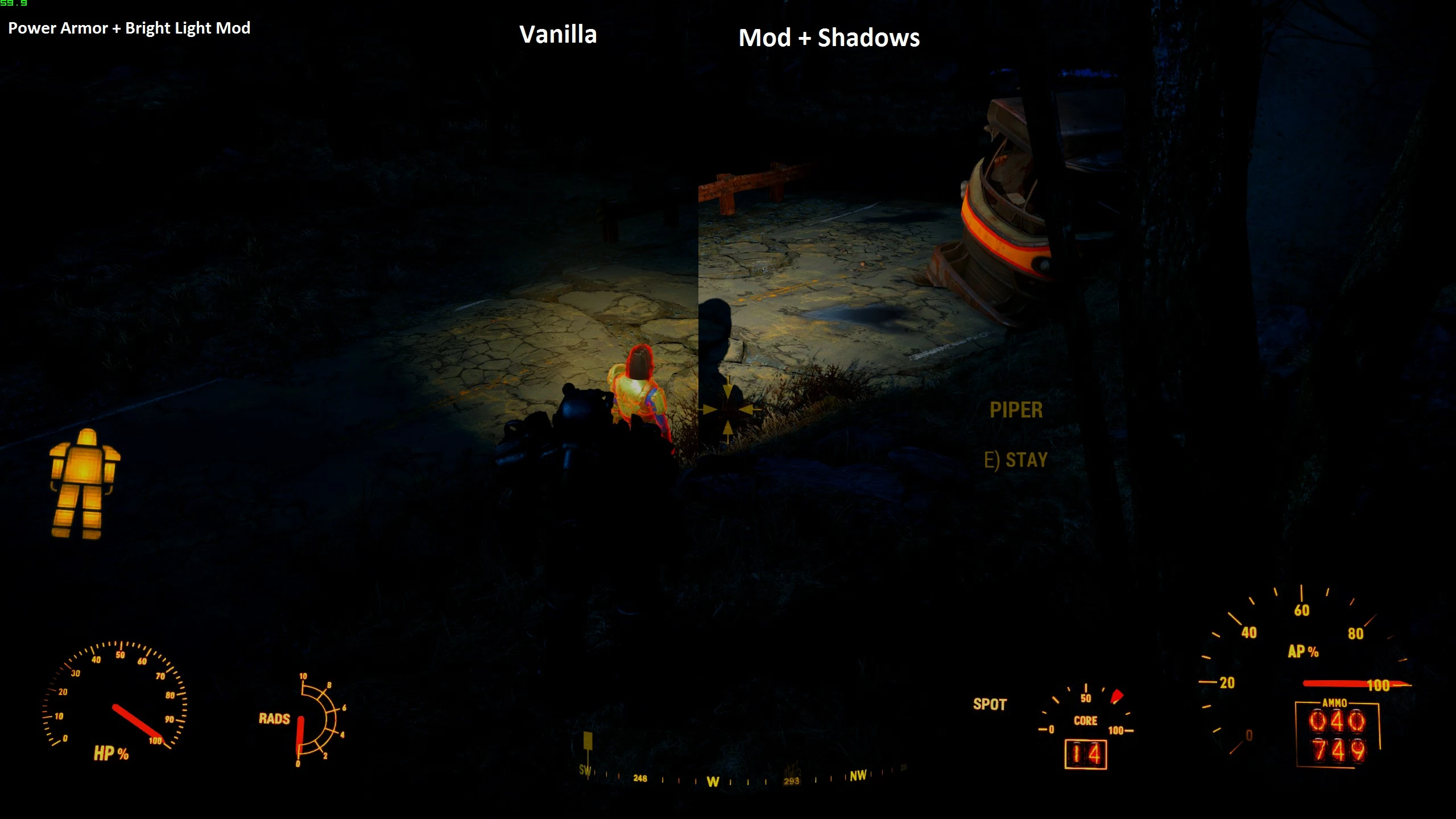
🔍 Analysis
- 👍 6.4% endorsement rate — high engagement, a strong quality signal
- 🏆 #38 of 50 Visuals and Graphics mods in this game by downloads
📋 About This Mod
I wanted to say thank you to McGuffin for allowing me to include his mod PipBoyShadows into this mod. Basically his mod enables shadows to be cast from the Pipboy and player spotlights - in my opinion making the game look much better.
His mod can be found here, I suggest that if you want to use the version of this file with included shadows that you read his description to know a bit more about it. However, I will do my best to sum up his description: the Pipboy light is a bit buggy with some shadows, and you may see a performance hit. However I think the positives outweigh the negatives as it gets rid of that weird "aura" look that the Pipboy has by default.
Anyway, I thought that the player lighting ingame kinda fell short, literally. I wanted my spotlight and Pipboy light to not necessarily be brighter, but shine further - this mod does exactly that. All lights have had their range increased by 50%.
LongerDistanceLightsNoShadows.esp - Only longer distance for the Pipboy and spotlights. No shadows. Use this if you don't want shadows or your PC can't handle the performance hit.
LongerDistanceLightsWithPipBoyShadows.esp - Longer distance and shadows. Recommended.
LongerDistanceLightsWithPipBoyShadows - No PipShadows.esp - Same as above, but no shadows on the Pipboy. Use this if you don't want to deal with the sometimes glitchy Pipboy shadows.
Default Pip Length - Each of the above has one of these variants. The only difference is that the Pipboy shines the default length, made by request.
Installation
-If you already use PipBoyShadows then delete that .esp file and remove the relevant line from plugins.txt
-Choose your .esp file
-Paste your .esp file into your Fallout4\Data directory (Use only one!)
-Go to C:\Users\YourName\AppData\Local\Fallout4, find plugins.txt and add the name or your .esp file to the end (So add a new line that says LongerDistanceLightsWithPipBoyShadows.esp or LongerDistanceLightsNoShadows.esp). Save your plugins.txt and use file explorer to make it read only (right click, check ready only, hit apply).
-Go somewhere dark and use your lights.
-(Optional) To enable shadows from NPC lights (companions in power armor for example) set bAllowShadowcasterNPCLights = 1 in your fallout4prefs.ini file, under .
I recommend this mod for usage with a ReShade preset that makes the game nights and interiors darker. I personally use Silk Shadows preset, I like the way it makes the game look.
This mod was created with Fo4Edit. If you enjoy this mod then endorse please. If you have any problems post them in the comments.
This Fallout 4 mod extends the range of the Pip-Boy light, miner helmet light, and power armor light, with an optional shadows feature. It's a simple quality-of-life improvement for players who find the default light distance too short. With over 1,000 endorsements, it's a community favorite for visual tweaks.
✨ Key Features
📊 Pros & Cons
✅ Pros
- Community-approved with 1,011 endorsements and nearly 16k downloads.
- Makes exploring dark areas way less annoying—you can actually see what's ahead.
- Optional shadows add a nice touch for those who want more realistic lighting.
⚠️ Cons
- Last updated in 2015, so it might not be compatible with the latest game patches or DLC.
- No version info provided, so you're gambling on whether it works with your setup.
- Could conflict with other lighting overhaul mods that tweak the same values.
For Fallout 4 players who hate stumbling in the dark and want a quick fix for short light ranges. Perfect for explorers and looters who spend a lot of time in dungeons and ruined buildings. Skip if you're using a comprehensive lighting overhaul that already adjusts these distances.
💡 Beginner Tips
- If you're using a mod manager like Nexus Mods' Vortex, just download with the manager and it'll handle installation automatically.
- Make sure to check if you have any other lighting mods installed—this one might override or be overridden by them.
- Test the light distance in a dark interior like a subway tunnel to see if the increase feels right for you.
📊 Mod Details
- Game
- Fallout 4 Mods
- Author
- chiknnwatrmln
- Version
- .5
- Downloads
- 15,886
- Endorsements
- 1,011
- Category
- Visuals and Graphics
- Created
- 11/21/2015
- Updated
- 11/24/2015
🔧 How to Install Fallout 4 Mods
Download from Nexus.
📖 Full step-by-step install guide for Fallout 4 →
Visit the official mod page for specific installation instructions for this mod.
🎮 Need cheat codes or console commands? Check ur gaming wiki for Fallout 4 commands, item IDs, and more.
Keep browsing — more Fallout 4 mods await