Less Shiny Chemistry Station Glasses
⚪ Last updated 2020⚠️ Install Order · 2 steps
Install in this order, then this mod last — most mods fail to load without their framework and dependencies in place.
Preview
🔍 Analysis
- 👍 0.3% endorsement rate
- 🏆 #66 of 76 Visuals and Graphics mods in this game by downloads
📋 About This Mod
Description
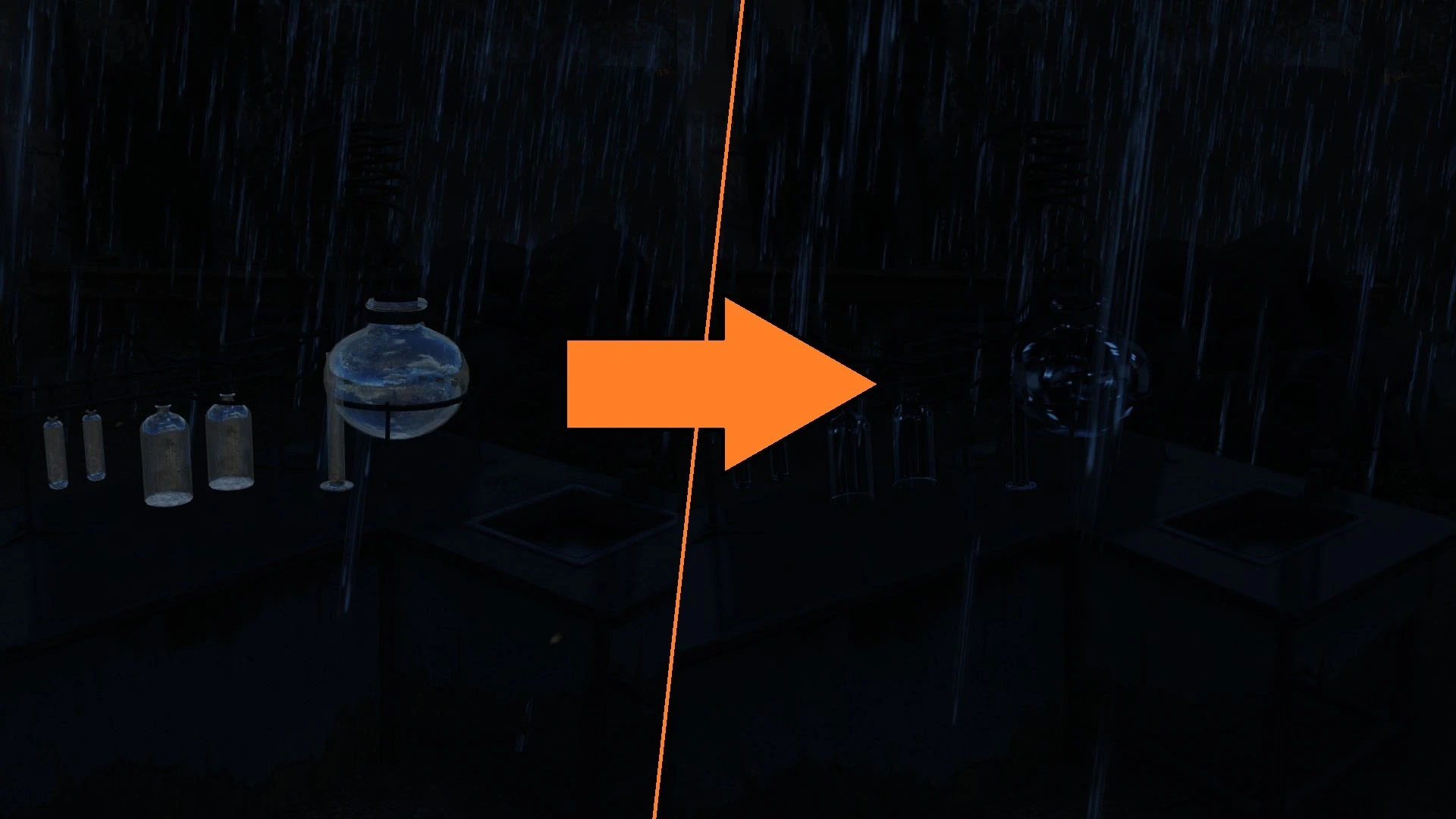
Ever since I started to play Fallout 4 with Darker Nights that makes the night immersively dark, the tube and beaker parts of the chemistry station are always an eyesore to me: they're glowing at night, keep telling me their annoying existence. So I made some adjustment to make them better in my opinion:
Firstly, I retextured the glass part. Now they are darker and much more translucent;
Secondly, I tweaked the material file, decreased the alpha value to also make the glass parts more transparent.
And in the file section comes two different version with different material tweaks:
One disabled the environment mapping, making the glass parts totally invisible in dark night, but less like glass to some degree;
The other one copied the environment mapping settings from other glass item like beaker (which looks good in vanilla). The glass parts still glow a little bit, but much better than vanilla.
Installation
Pick one file of your flavor and download by your mod manager, install and active; or manually download and extract the file, copy Materials and Textures folder to your \Fallout 4\Data folder.
Uninstallation
Delete from your mod manager, or manually detele the following file:
\Fallout 4\Data\Materials\SetDressing\Workstations\WorkstationChemistryA02. BGEM, WorkstationChemistryB02. BGEM
\Fallout 4\Data\Textures\SetDressing\Workstations\WorkstationChemistryA02_d.dds, WorkstationChemistryB02_d.dds
A small visual tweak for Fallout 4 that reduces the shininess of chemistry station glasses, especially at night. Ideal for players using darker nights mods who find the default reflections distracting. With 509 endorsements and 158,607 downloads, it's a popular quality-of-life fix.
✨ Key Features
📊 Pros & Cons
✅ Pros
- Community-approved with 509 endorsements and over 158k downloads.
- Solves a specific visual annoyance for darker nights users.
- Lightweight and focused—does exactly what it says without extra bloat.
⚠️ Cons
- Last updated in 2020—may not be compatible with the latest Fallout 4 updates or DLC.
- Only affects chemistry station glasses, so its impact is limited to one object type.
For Fallout 4 players who use darker nights mods and find the shiny chemistry station glasses immersion-breaking. Also for anyone who wants a quick visual polish without overhauling the whole game. Skip if you don't care about chemistry station aesthetics or play in well-lit environments.
💡 Beginner Tips
- If you're using a mod manager like Vortex or NMM, just download and install—it will handle the file placement automatically.
- For manual install, drop the files into your Fallout 4 Data folder and ensure the mod is enabled in your load order.
- Test at night in-game to see the difference; if the glasses still look too shiny, check if another mod is overriding the textures.
📊 Mod Details
- Game
- Fallout 4 Mods
- Author
- 103Sakamoto
- Version
- 1.0
- Downloads
- 158,607
- Endorsements
- 509
- Category
- Visuals and Graphics
- Created
- 4/25/2020
- Updated
- 4/25/2020
🔧 How to Install Fallout 4 Mods
Download from Nexus.
📖 Full step-by-step install guide for Fallout 4 →
Visit the official mod page for specific installation instructions for this mod.
🎮 Need cheat codes or console commands? Check ur gaming wiki for Fallout 4 commands, item IDs, and more.
Keep browsing — more Fallout 4 mods await