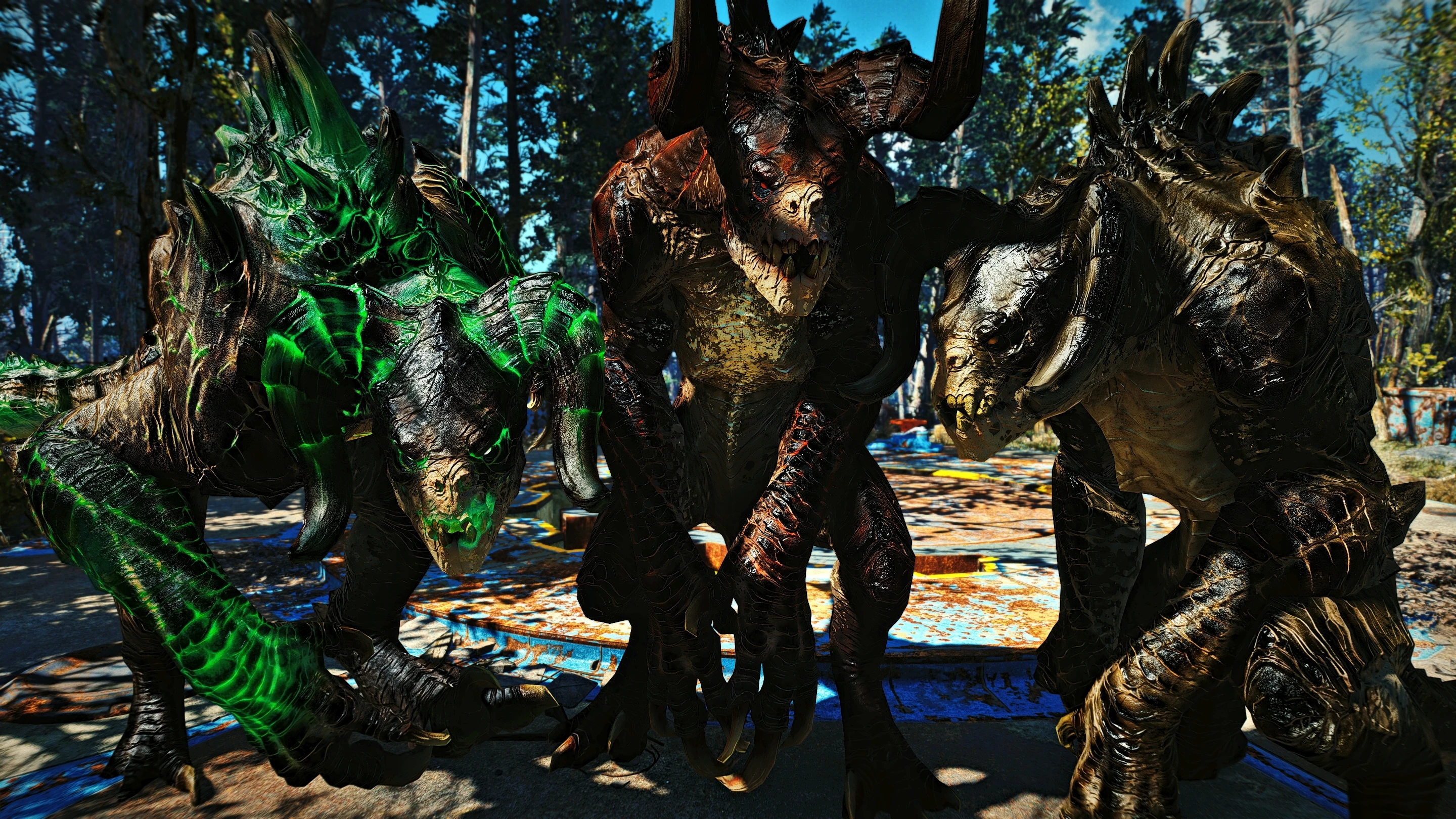
LC's UHD Deathclaw
⚪ Last updated 2022⚠️ Install Order · 3 steps
Install in this order, then this mod last — most mods fail to load without their framework and dependencies in place.
Preview
🔍 Analysis
- 👍 0.5% endorsement rate
- 🏆 #234 of 271 Models and Textures mods in this game by downloads
📋 About This Mod
This is a texture replacer mod for the Deathclaw and all their variants. Downsampled and then upscaled
by over 4x the size with the help of machine learning.
I performed a total of three passes with different upscaling models in order to draw out as much detail as possible.
All of my upscaled textures have been compressed with the same compression algorithms as seen in the original vanilla textures these are based on. These are vanilla accurate textures through and through minus all the horrible blurriness and pixelation.
This means performance will be very similar if not identical to vanilla with this mod on and off.
Beautify your Wasteland and download now, what are you waiting for!
---
What resolution are these textures?
They're available in 4k and 2k resolutions, or 4096x4096 & 2048x2048 in booth loose and BA2 formats for your convenience.
Can this mod cause me lag?
These textures are identical to size as the vanilla hi-res textures they're based on. Furthermore they've been compressed using the same compression methods as its vanilla counterparts and as such performance will be near identical, more so if you're using BA2.
Which format should I choose?
Whatever works best with your load order. If you use a ton of loose texture mods you risk having having my BA2 overwritten without your knowledge. My advice to you is to download my loose file first and see if your mod manager reports any conflicts. If the answer is no then pick BA2 and load it appropriately so it doesn't get overwritten by another BA2.
LC's UHD Deathclaw is a texture replacer for Fallout 4 that upscales the Deathclaw's HI-RES DLC textures using machine learning, covering all variants. With 749 endorsements and 165,961 downloads, it's a popular choice for players wanting sharper Deathclaws without a performance hit.
✨ Key Features
📊 Pros & Cons
✅ Pros
- Community favorite with 749 endorsements and over 165k downloads
- No performance cost since file size matches the DLC textures
- Improves visual quality across all Deathclaw variants
⚠️ Cons
- Last updated in April 2022, so may not be tested with the latest game patches
- Only affects Deathclaws, so if you want other creatures upscaled, this won't help
- Requires the HI-RES DLC textures as a base, so you need that DLC installed
For Fallout 4 players who want sharper Deathclaws without sacrificing performance. If you're a texture enthusiast looking for a quick visual upgrade, this is a solid pick. Skip if you're not bothered by vanilla Deathclaw textures or want more comprehensive creature overhauls.
💡 Beginner Tips
- Make sure you have the official HD Texture Pack installed, as this mod replaces those textures.
- Place the mod files in your Data folder or use a mod manager like Vortex for easy installation.
- If you're using other Deathclaw texture mods, load this one after them to ensure it takes priority.
📊 Mod Details
- Game
- Fallout 4 Mods
- Author
- Lunavelle
- Version
- 1
- Downloads
- 165,961
- Endorsements
- 749
- Category
- Models and Textures
- Created
- 4/19/2022
- Updated
- 4/19/2022
🧩 Commonly Used Together
Users add these mods to the same collections — a real compatibility signal, not an AI guess.
🔧 How to Install Fallout 4 Mods
Download from Nexus.
📖 Full step-by-step install guide for Fallout 4 →
Visit the official mod page for specific installation instructions for this mod.
🎮 Need cheat codes or console commands? Check ur gaming wiki for Fallout 4 commands, item IDs, and more.
Keep browsing — more Fallout 4 mods await