Key Brackets
⚪ Last updated 2017⚠️ Install Order · 2 steps
Install in this order, then this mod last — most mods fail to load without their framework and dependencies in place.
Preview
🔍 Analysis
- 👍 3.2% endorsement rate — high engagement, a strong quality signal
- 🏆 #61 of 99 User Interface mods in this game by downloads
📋 About This Mod
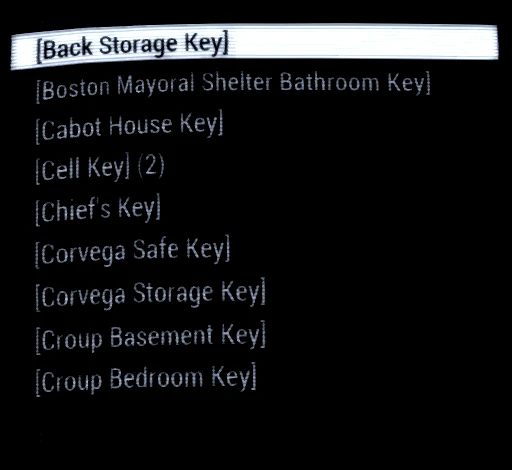
Keys you find a lot of them! They fill up your inventory making it hard to find that important note you just found, or that interesting holotape. This mod simply puts [ ] around all the key & password names moving them to the bottom of the misc menu. Making important stuff float to the top like cream!
It has no other effect on the game.
UPDATES
I have added some missing keys in the far harbor .esp bringing it up to 1. 1. All others .esp are at 1. 0 as I am unaware of any missing keys in them so they don't need updating. Thank you JunkHeaper for pointing this out. :)I have made a .esp containing all DLC keys in [ ]. So if you have all the DLC you can use this instead of having them separated.
NOTES There are mods like keynuker that move all keys to a submenu. But the keynuker mod makes Fallout some times crash to desktop when trying to play nuka world.
There is also DEF_UI that has an updated version of keynuker that works but that changes a lot other stuff as well.
This is just a little alternative for the people who don't want to use them.
Have Fun :)
Key Brackets is a tiny UI tweak for Fallout 4 that adds brackets around key names in the inventory, moving them to the bottom of the misc menu for easier sorting. With 228 endorsements and 7,170 downloads, it's a simple quality-of-life fix for players who want cleaner inventory organization.
✨ Key Features
📊 Pros & Cons
✅ Pros
- Community-approved (228 endorsements) for a niche UI fix
- Lightweight and does exactly what it says—no bloat
- Solves a real annoyance for inventory hoarders
⚠️ Cons
- Last updated in 2017, so may not be compatible with newer game patches or DLC
- Only affects key names—doesn't reorganize other misc items
- Potential conflicts with other UI mods that alter the misc menu
For Fallout 4 players who hate scrolling through a cluttered misc menu and want keys grouped at the bottom. It's a purely cosmetic QoL mod—skip if you're looking for gameplay changes or a full inventory overhaul.
💡 Beginner Tips
- Place the file in your Fallout 4 Data folder or use a mod manager like Vortex for easy installation.
- If you use other UI mods, test load order—put Key Brackets after them to ensure it works.
- No need to start a new game; it works on existing saves.
📊 Mod Details
- Game
- Fallout 4 Mods
- Author
- moriartykain
- Version
- 1.1
- Downloads
- 7,170
- Endorsements
- 228
- Category
- User Interface
- Created
- 9/30/2016
- Updated
- 2/9/2017
🔧 How to Install Fallout 4 Mods
Download from Nexus.
📖 Full step-by-step install guide for Fallout 4 →
Visit the official mod page for specific installation instructions for this mod.
🎮 Need cheat codes or console commands? Check ur gaming wiki for Fallout 4 commands, item IDs, and more.
Keep browsing — more Fallout 4 mods await