Just another modmanager
⚪ Last updated 2016⚠️ Install Order · 2 steps
Install in this order, then this mod last — most mods fail to load without their framework and dependencies in place.
Preview
🔍 Analysis
- 👍 6.7% endorsement rate — high engagement, a strong quality signal
- 🏆 #19 of 19 Utilities mods in this game by downloads
📋 About This Mod
A simple mod manager I wrote for myself. It does not have any installation or uninstallation functionality, as I personally prefer to install all my mods manually. Maybe I will add such features later on though.
W H A T T H I S A P P L I C A T I O N D O E S D O
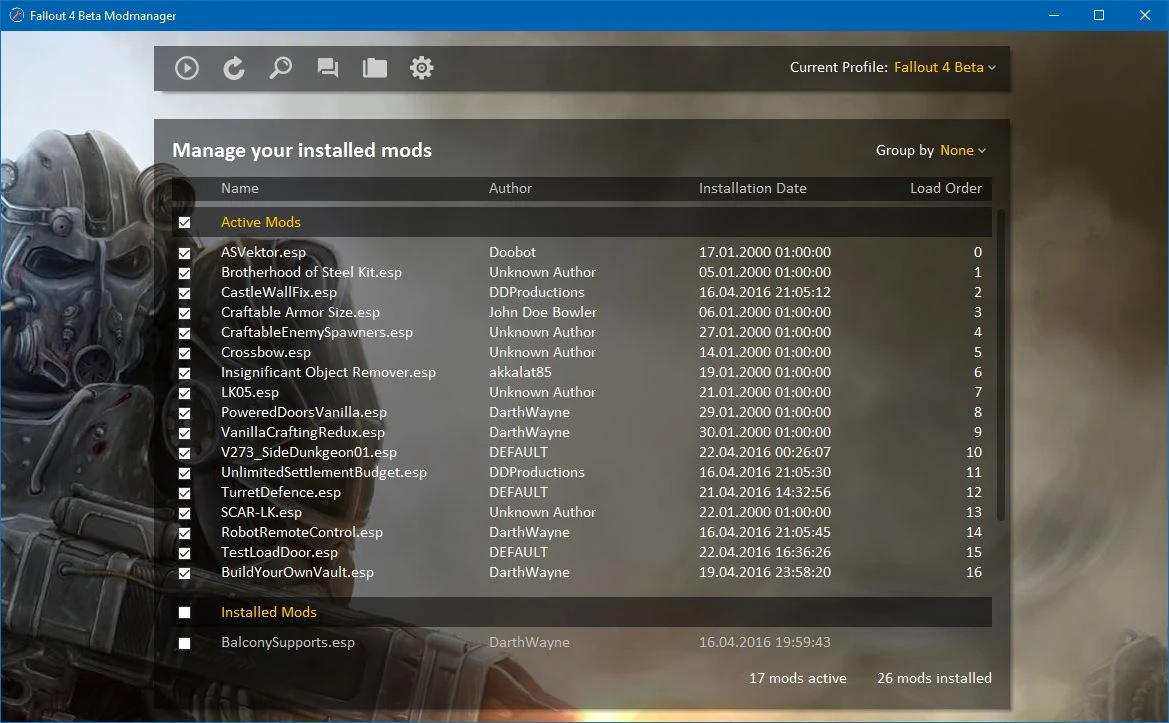
This modmanager enables you to manage your active plugins and load order for a few Bethesda games. Load order sorting via drag and drop is only enabled if the modlist is grouped by nothing and sorted by load order (default). Besides it offers you some useful shortcuts to start the game, open the installation folder or browse the web for community and new mods. These URLs are saved in a profile.
-
[]Activate and deactivate mods
[
]Manage your load order[]Group ond sort mods for better overview
[]Choose your own background
[]Create profiles for Fallout 4 or Skyrim
[]Useful shortcuts for starting game, browsing Nexusmods or opening installation folder
[]Works with Fallout 4 version 1. 5 (select Fallout 4 Beta as game)
[]Multi language support (currently English and German)
This program is written in Java and it is open source. You can get the source code from my BitBucket.
W H A T T H I S A P P L I C A T I O N D O E S N O T D O
This modmanager does not have any functionality to install or uninstall mods, as I install all my mods manually. The goal of this program is to manage already installed mods. This does not mean that there will never be such a feature though.
I N S T A L L A T I O N I N S T R U C T I O N S
In order to use the application you need Java JRE 8. You can find out your Java version with the command java -version. If you don't have Java installed you can get it here.
This application is portable, which means you can drop it wherever you want in your file system and don't need to install it. To start the application just double click on StartModmanager.bat or Modmanager.jar. StartModmanagerCmd.bat starts the application and leaves the console open and is meant for debugging.
F U R T H E R D E V E L O P M E N T A N D S U P P O R T
I will continue developing this application irregularly when I feel like it needs another feature or a patch. If you want this program in your own language you can help by translating the Strings_en.properties file in the Localisation fo
📊 Mod Details
- Game
- Fallout 4 Mods
- Author
- DarthWayne
- Version
- 0.6
- Downloads
- 3,470
- Endorsements
- 232
- Category
- Utilities
- Created
- 4/22/2016
- Updated
- 4/22/2016
🔧 How to Install Fallout 4 Mods
Download from Nexus.
📖 Full step-by-step install guide for Fallout 4 →
Visit the official mod page for specific installation instructions for this mod.
🎮 Need cheat codes or console commands? Check ur gaming wiki for Fallout 4 commands, item IDs, and more.
Keep browsing — more Fallout 4 mods await