Jetpacks FAO v5
⚪ Last updated 2019⚠️ Install Order · 2 steps
Install in this order, then this mod last — most mods fail to load without their framework and dependencies in place.
Preview
🔍 Analysis
- 👍 2.2% endorsement rate — high engagement, a strong quality signal
- 🏆 #202 of 214 Armour mods in this game by downloads
📋 About This Mod
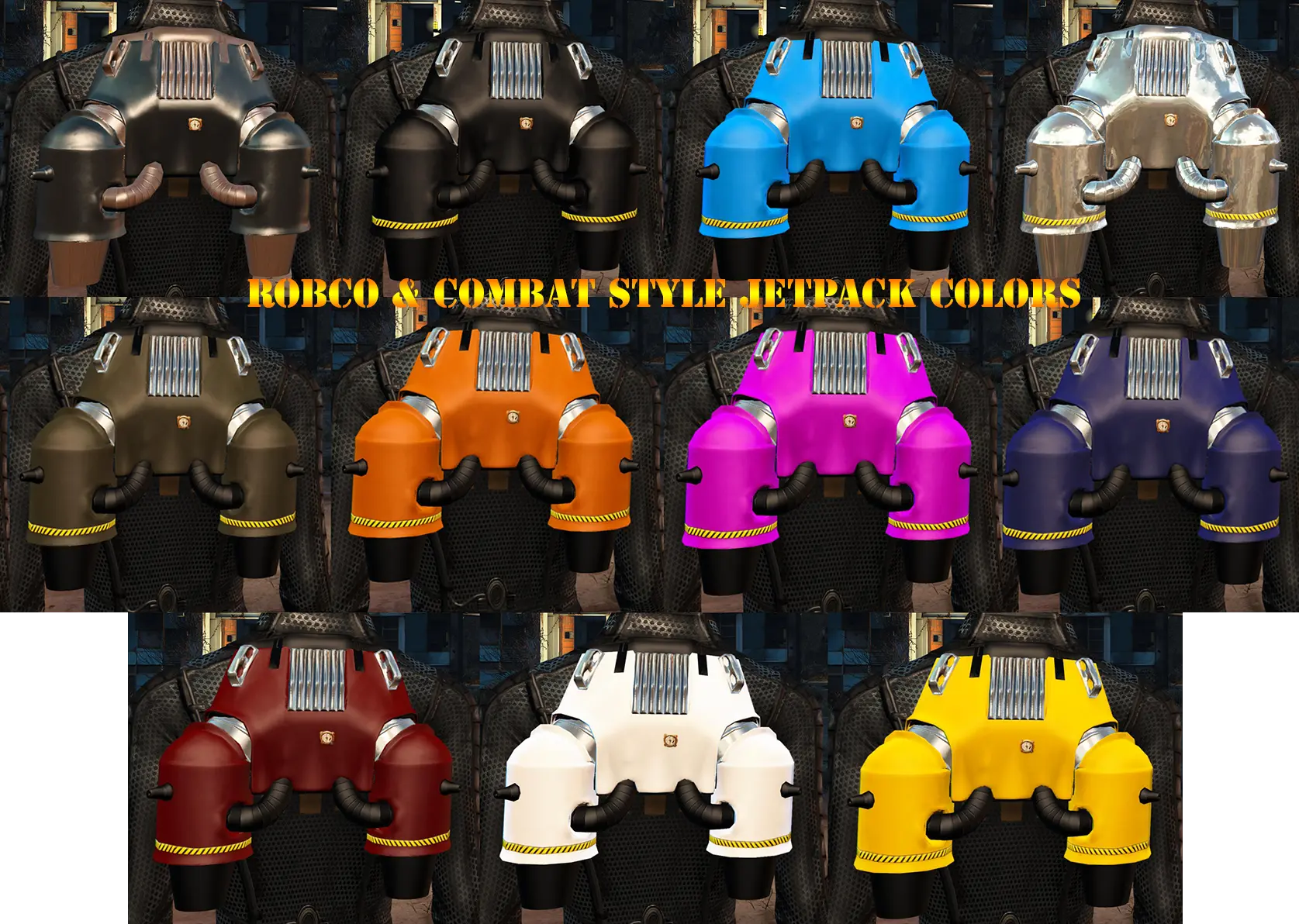
Firstly, this is a jetpack mod I pieced together by using primarily Vasstek's Nanosuit 6. 2 and Niero's CROSS Jetpack's assets. There are 2 different styles of jetpacks, a Nano style jetpack based on the model in Nanosuit 6. 2, and a RobCo style jetpack similar to the one used in Personal Jetpack and Armorsmith Extended. All jetpacks are craftable, have animated flight like CROSS Jetpack, and together add a total of 60+ color and style selections to the game. Jetpacks FAO colors have been selected to match some of the popular armor sets such as Kerrigan Bodysuit, Nanosuit 6. 2, and Courser X-92 Power Suit. You will find the recipe for the jetpacks at either the chemistry bench under UTILITY or the Armorsmith Extended bench under JETPACKS.
Secondly, JFAO has become a patch project where I have started putting together patches in my spare time to make other jetpacks compatible with the CROSS Jetpack animation script. The patches are completely independent of the main file and CROSS Jetpack, which means you can download what patches you want and it will add flames and animations to those jetpacks, so no more ugly T-pose during flight!
Version 5. 0 Update
Version 5. 0 adds a ton of new colors to both the RobCo and Vault Tec jetpacks, a new alternate mount option for the "light" RobCo jetpack that sets it close to the body like the Armorsmith Extended jetpack models, and 20 "custom" paint slots for the RobCo jetpack that allow players to add their own jetpack colors from other mods. A tutorial readme is included in the Jetpacks FAO - Installer that explains how to customize these paint slots by adding textures from other jetpack mods, including power armor jetpacks such as WIPAG. There is an option in the installer to import the jetpack colors from FO4 War Tags but you need to have either Armorsmith Extended or FO4 War Tags installed to use it. You do NOT need the .esp from those fi
Jetpacks FAO v5 adds a large variety of jetpacks to Fallout 4, with many colors and designs that match popular armor sets like Kerrigan's Bodysuit, Nanosuit 6.2, and Courser X-92 Power Armor. It's a cosmetic mod for players who want to customize their character's look with functional jetpack options.
✨ Key Features
📊 Pros & Cons
✅ Pros
- Huge variety of jetpacks to choose from, so you can find one that fits your style.
- Specifically designed to match popular armor sets, so you can keep your look cohesive.
- Community favorite with 3,325 endorsements and over 150k downloads.
⚠️ Cons
- Last updated in 2019, so it may not be compatible with the latest game patches or DLC.
- Cosmetic only — doesn't add new gameplay mechanics or stats, just visual variety.
For Fallout 4 players who want to customize their jetpack's appearance to match their favorite armor sets. If you're into role-playing or just want your character to look cool while flying, this is for you. Skip if you're looking for gameplay changes or new mechanics.
💡 Beginner Tips
- Make sure you have the base game and any DLC that the armor sets come from, like Far Harbor or Nuka-World, to see the jetpacks on those armors.
- Use a mod manager like Vortex or NMM to install and manage the mod easily.
- Check the mod's comments section on Nexus for user reports on compatibility with other mods or game versions.
📊 Mod Details
- Game
- Fallout 4 Mods
- Author
- Murielkai
- Version
- 5.0
- Downloads
- 151,950
- Endorsements
- 3,325
- Category
- Armour
- Created
- 9/30/2016
- Updated
- 11/21/2019
🔧 How to Install Fallout 4 Mods
Download from Nexus.
📖 Full step-by-step install guide for Fallout 4 →
Visit the official mod page for specific installation instructions for this mod.
🎮 Need cheat codes or console commands? Check ur gaming wiki for Fallout 4 commands, item IDs, and more.
Keep browsing — more Fallout 4 mods await