How to Change Map Icon Colors
⚪ Last updated 2016⚠️ Install Order · 2 steps
Install in this order, then this mod last — most mods fail to load without their framework and dependencies in place.
Preview
🔍 Analysis
- 👍 7.0% endorsement rate — high engagement, a strong quality signal
- 🏆 #17 of 37 Modders Resources and Tutorials mods in this game by downloads
📋 About This Mod
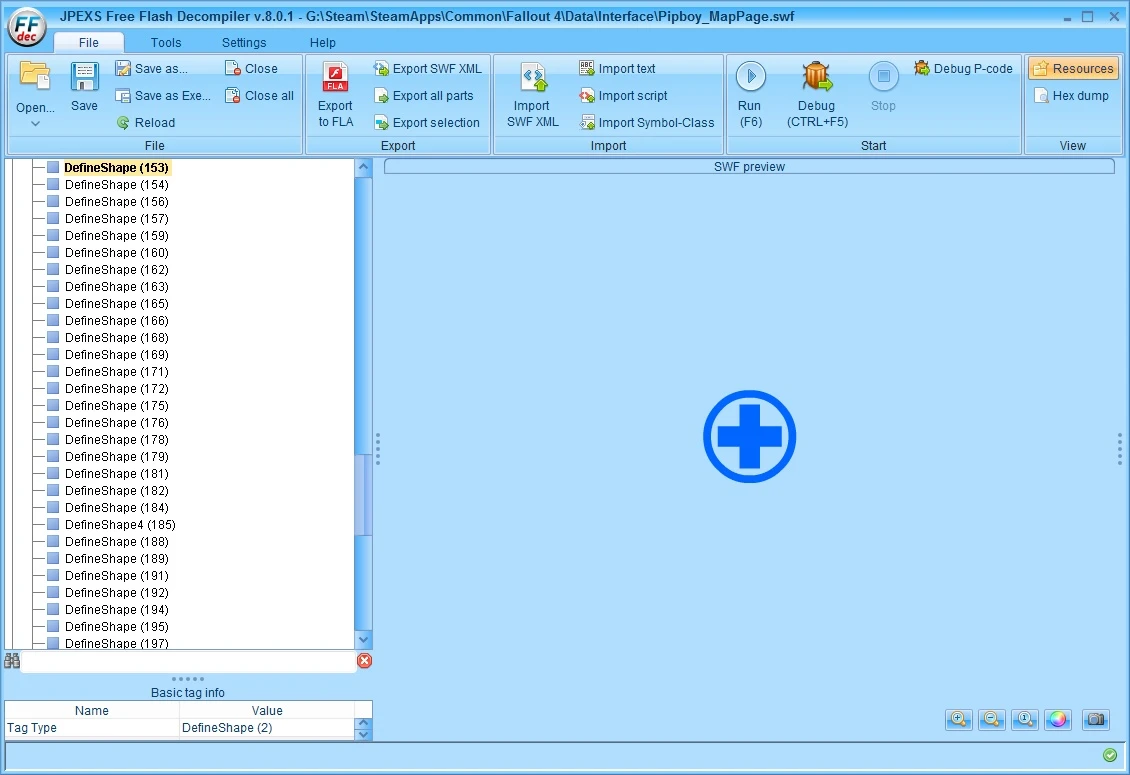
A small pictorial tutorial on changing the colours of the icons in Pipboy_MapPage.swf using JPEXS Free Flash Decompiler
As some of you may know I uploaded a Fallout v1. 5 (and 1. 6) compatible version of Zenotep's Zoom-out Extended as her's doesn't work with the 1. 5 update.
Originally I just used Zenotep's instructions (that she helpfully added to the description) to add the different zoom options for different map resolutions. But I've now (with another set of brief instructions from Zenotep) finally been able to change the colour of the icons. But it's tedious and time-consuming and I really don't want to have to make a load of different colour versions that people may want.
So, I took some screenshots of the process and if you follow them in order you should be able to change the icons' colours yourself.
If you would like to share your version with others you can send it to me and I'll be happy to upload it to my mod page.
You'll need to install JPEXS Free Flash Decompiler, which requires Java, so install that first if you don't have it.
When you open Pipboy_MapPage.swf in JPEXS Free Flash Decompiler you will get a message it needs assets imported from fonts_en.swf so I've uploaded that file as well, so you don't have to extract it from the game's Interface archive yourself.
Your can get a 'white icon' version of Pipboy_MapPage.swf from my Zoom-out Extended for World Map - Unofficial Update for Fallout 4 1. 6 page to use as a base.
Here are the instructions (the individual steps don't necessarily match up with a particular screenshot)[]Install Java []Install JPEXS Free Flash Decompiler []Put fonts_en.swf into Data\Interface []Open Pipboy_MapPage.swf in JPEXS Free Flash Decompiler (say yes to import assets from fonts_en.swf) []Expand 'shapes' in the left pane, right click on a 'DefineShape' you want to alter (you can double click on the icon in the right pane first if you don't know which DefineShape you want), and choose 'Raw edit' []Click on Edit at the bottom of the right pane []Expand shapes>fillStyle>fillStyles>fillStyle and click on color:RGB then on the little square (it will be white if the shape hasn't been coloured yet) []Select a colour from the swatches or use the tabs on the dialogue to define a colour more accurately, then click 'OK' []Click 'Save' to save that DefineShape []Some Shapes (they all seem to be called DefineShape2) have two parts that are coloured indepandantly. The first part is coloured in the same way as the single colour shapes [*]For the second colour, you need to expand shapeRecords, then find the cor
📊 Mod Details
- Game
- Fallout 4 Mods
- Author
- Old Nick
- Version
- 1.0
- Downloads
- 1,238
- Endorsements
- 87
- Category
- Modders Resources and Tutorials
- Created
- 5/8/2016
- Updated
- 5/8/2016
🔧 How to Install Fallout 4 Mods
Download from Nexus.
📖 Full step-by-step install guide for Fallout 4 →
Visit the official mod page for specific installation instructions for this mod.
🎮 Need cheat codes or console commands? Check ur gaming wiki for Fallout 4 commands, item IDs, and more.
Keep browsing — more Fallout 4 mods await