Glass or Transparent Aluminum Combat Armor
⚪ Last updated 2016⚠️ Install Order · 2 steps
Install in this order, then this mod last — most mods fail to load without their framework and dependencies in place.
Preview
🔍 Analysis
- 👍 4.1% endorsement rate — high engagement, a strong quality signal
- 🏆 #84 of 231 Armour mods in this game by downloads
📋 About This Mod
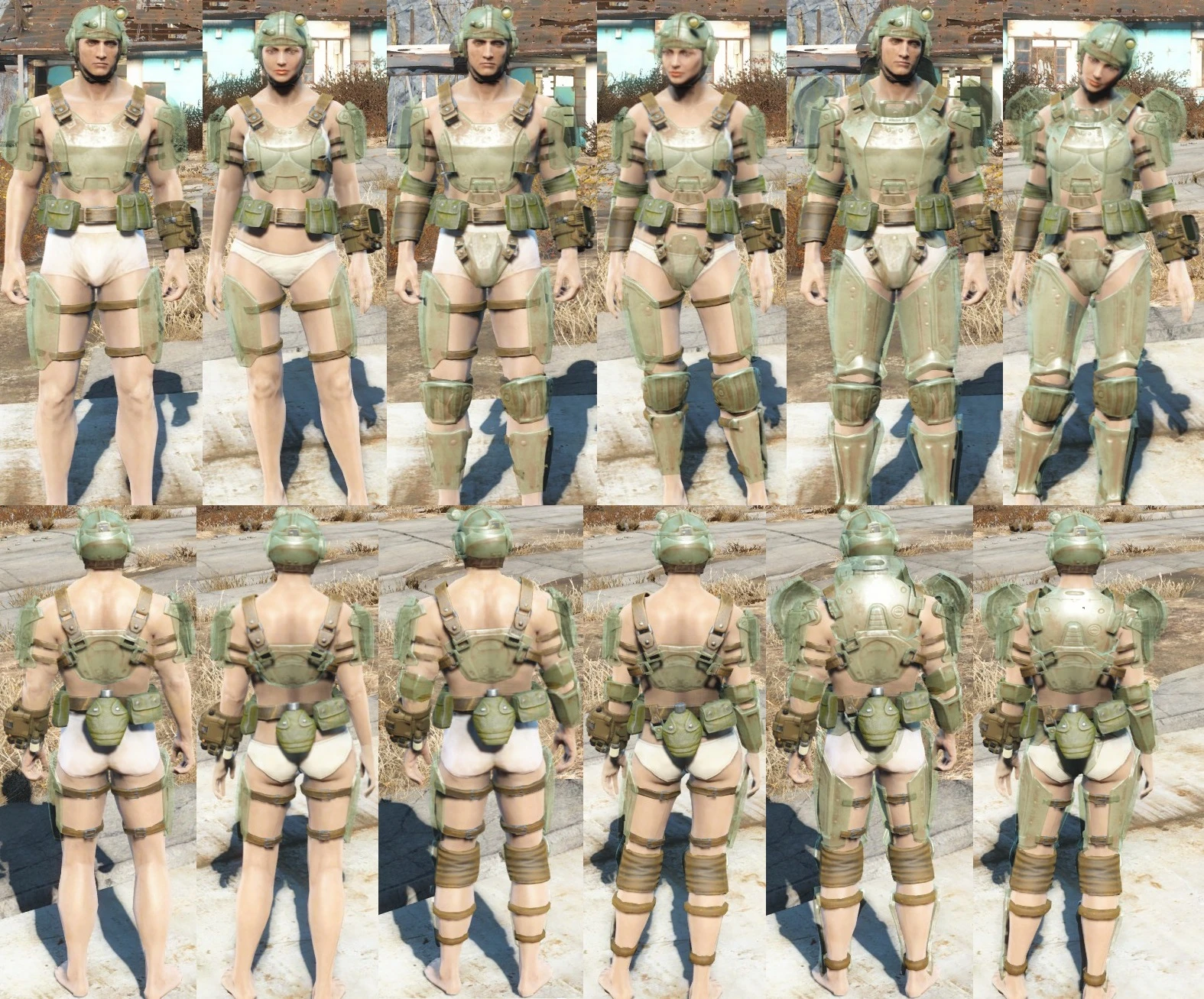
Glass or Transparent Aluminum version of Combat Armor Can use all the same mods as base-game Combat Armor
Description: This mod creates a standalone Combat Armor that is transparent, like Glass. This armors in this mod can be modded just like any other combat armor pieces, with the same coloring and everything. You can now chose to install the Glass version or the Transparent Aluminum version, or install them both if you want. The Decal has been removed from the chest pieces, so there will not be a Star or any other symbol on the chest piece. The leather straps, aluminum fittings, and belt bags were not made transparent for realism. The leather undershirt has been removed from the Sturdy and Heavy variants.
Update: New version of Glass Combat Armor uploaded. This version matches the Bethesda.net version of this file, with the two different color pallets (both included with the zip file), Wear options selectable, and moved to a Glass Combat Armor recipe header to keep it from cluttering the Chemistry Workbench. The Wear Options allow for a larger or smaller version of the armor using only the Under-armor Scaling option found in the Creation Kit. This version was also created entirely using the Creation Kit, so remove any existing armors and sell them or scrap them BEFORE installing the new version to prevent from loosing them entirely.
Installation: Mod Managers should be able to install this by default, as I used default folder names starting with Data
You can also manually install this by simply extracting the Data folder into your Fallout 4 install folder, usually located at: C:\Program Files (x86)\Steam\Steamapps\Common\Fallout4 but this can change depending on your installation.
After extracting Manually or with a mod manager, add GlassCombat.esp, or TACombat.esp to your Plugins.txt file, making sure to make this file read only after editing it, usually at: C:\Users\<USERID>\AppData\Local\Fallout4
If you would like to make the Glass Combat Armors look more glassy, I have included an optional file that will allow you to accomplish this in the downloads section. This is done with a Pallet file, so this download only has that pallet file in it. If you do not use that file the Glass Combat Armor will use the same color pallet as the Vanilla Combat Armor. Unzip this optional file into your main Fallout 4 folder as with the files above, but only after installing Glass Combat Armors. I have included instructions with the optional file as a readme if you want to replace the pallet for Transparent Aluminum instead, but this file was intended for the Glass version.
Removal: Delete the GlassCombat or TACombat folder from your Materials, Meshes, and Textures Folders, delete GlassCombat.esp and/or TACombat.esp from the Data Folder.
In Game:[/col
📊 Mod Details
- Game
- Fallout 4 Mods
- Author
- Guidion
- Version
- 1
- Downloads
- 4,059
- Endorsements
- 166
- Category
- Armour
- Created
- 2/26/2016
- Updated
- 6/10/2016
🔧 How to Install Fallout 4 Mods
Download from Nexus.
📖 Full step-by-step install guide for Fallout 4 →
Visit the official mod page for specific installation instructions for this mod.
🎮 Need cheat codes or console commands? Check ur gaming wiki for Fallout 4 commands, item IDs, and more.
Keep browsing — more Fallout 4 mods await