Fiddleflaps Vids - Kingsport Lighthouse Settlement Blueprint
⚪ Last updated 2022⚠️ Install Order · 3 steps
Install in this order, then this mod last — most mods fail to load without their framework and dependencies in place.
Preview
🔍 Analysis
- 👍 2.8% endorsement rate — high engagement, a strong quality signal
- 🏆 #36 of 39 Transfer Settlement Blueprints mods in this game by downloads
📋 About This Mod
I recorded a tour of the build for my YouTube channel which also features my other settlement builds:
plxe1GFRf_Q
Settlement Resources
Food: 12 | Water: 12 | Power: 8 | Defense: 56 | Beds: 11
Installation
-
[]Either install with a Mod Manager or extract the files and copy to your Fallout 4 game folder.
[
]Ensure you have Transfer Settlements, HUDFramework and F4SE (including the script files) installed.[]The blueprint uses Slot 19, if you have an existing blueprint using this slot you will need to move the blueprint .json file to different folder
Importing
Travel to the required location and then import the settlement via the Transfer Settlements holotape, detailed instructions on this process can be found on the Transfer Settlements mod page.
Before importing manually scrap all objects (see note below), and to ensure the settlement imports correctly enable the following options from within the holotape:
-
[]Enable ‘Import original items (not built by the Player)’.
[]Enable 'Import DLC items / Import mod-added items'.
[]Enable 'Import wired power connections'.
[]Enable 'Restore snapped power connections'.
[]Enable 'Farm Animals' (optional - adds a cat to the kitchen in the existing house)
Optional Scrapping
The safe in the existing house and the beached whale cannot normally be scrapped but can be removed by disabling them via the console.
Note: The settlement is designed around the vanilla location and uses some objects and items that are normally un-scrapable. Using a scrapping mod would allow those objects to be removed, so ideally should be disabled when clearing the settlement before importing. Additionally using any mods that ‘clean up’ the location or alter its terrain could cause the settlement to not import as intended.My Other Settlement Blueprints
-
[]Abernathy Farm
[
]Boston Airport[]Croup Manor
[]Costal Cottage
[]Covenant
[]Egret Tours Marina
[]Greentop Nursery
-
[]Hangman's Alley
[]Home Plate
[]Jamaica Plain
[]Murkwater Construction Site
[]Oberland Station
[]Outpost Zimonja
[]Red Rocket Truck Stop
[]Sanctuary Hills
[]Starlight Drive In
[]Sunshine Tidings Co-Op
[]Taffington Boathouse
[]Tenpines Bluff
[]The Castle
[]The Slog
- []Vault 88
-
[]Abernathy Farm
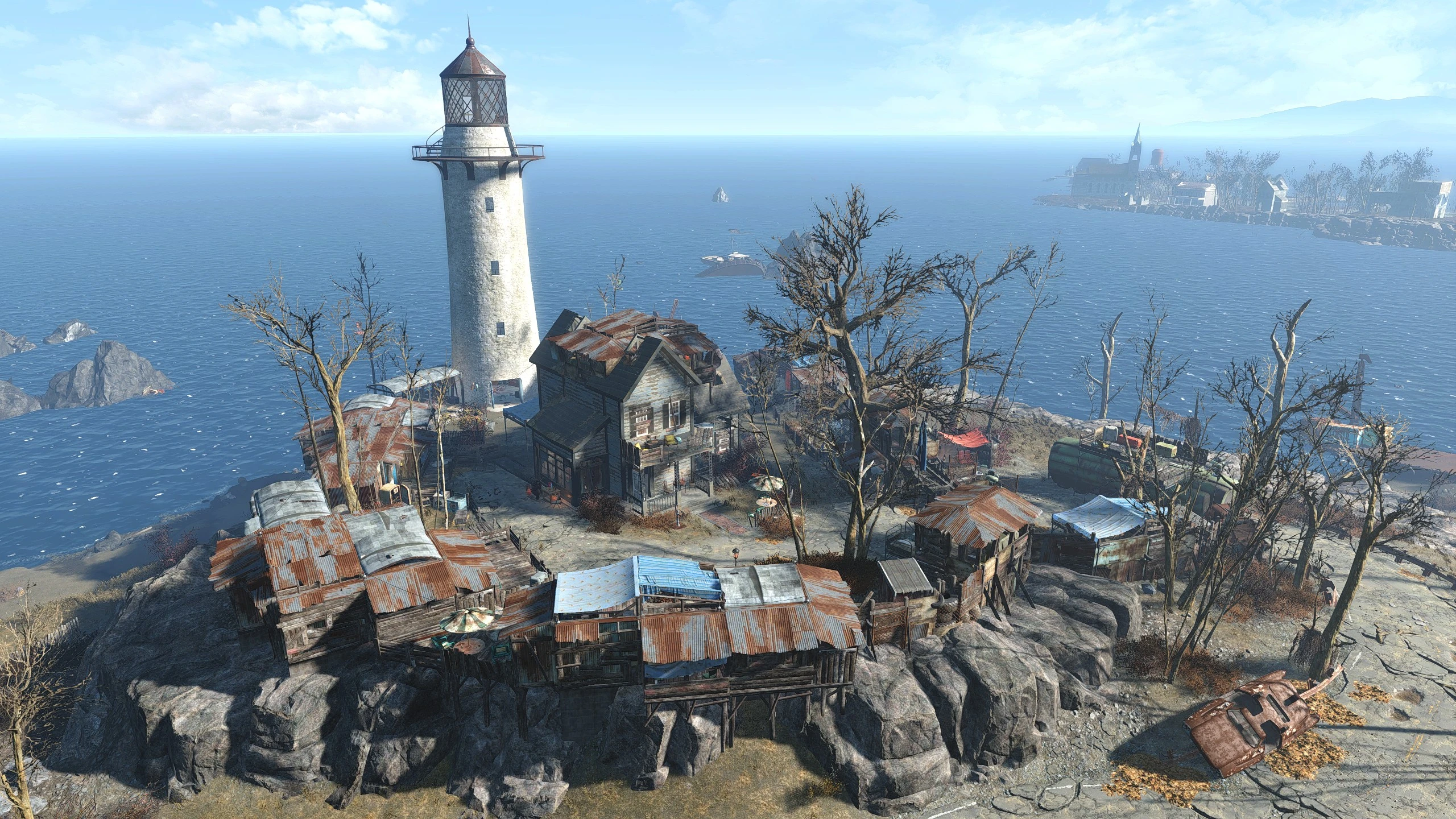
A settlement blueprint for Kingsport Lighthouse in Fallout 4, built with vanilla and DLC objects. Fully decorated and lore-friendly, this mod lets you transfer the author's detailed build to your own game. With 401 endorsements and 14,419 downloads, it's a popular choice for settlement enthusiasts.
✨ Key Features
📊 Pros & Cons
✅ Pros
- Community favorite with 401 endorsements and over 14k downloads
- No DLC requirements beyond what's included in the base game and expansions
- Lore-friendly design fits the game world
⚠️ Cons
- Only covers Kingsport Lighthouse, not other settlements
- May conflict with other mods that alter the same location
- Requires the Transfer Settlements mod to use blueprints
For Fallout 4 settlement builders who want a ready-made, lore-friendly build at Kingsport Lighthouse without spending hours. Perfect for players who enjoy detailed decoration but lack the time or creativity. Skip if you prefer building from scratch or use mods that overhaul that area.
💡 Beginner Tips
- Make sure you have the Transfer Settlements mod installed and working before trying to import this blueprint.
- Check that you have all the required DLCs (like Far Harbor) to avoid missing objects.
- If you're using other mods that change Kingsport Lighthouse, load this blueprint after them to avoid conflicts.
📊 Mod Details
- Game
- Fallout 4 Mods
- Author
- Fiddleflap
- Version
- 1.0
- Downloads
- 14,419
- Endorsements
- 401
- Category
- Transfer Settlement Blueprints
- Created
- 7/21/2022
- Updated
- 7/21/2022
🔧 How to Install Fallout 4 Mods
Download from Nexus.
📖 Full step-by-step install guide for Fallout 4 →
Visit the official mod page for specific installation instructions for this mod.
🎮 Need cheat codes or console commands? Check ur gaming wiki for Fallout 4 commands, item IDs, and more.
Keep browsing — more Fallout 4 mods await