Fallout Performance Monitor
⚪ Last updated 2021⚠️ Install Order · 2 steps
Install in this order, then this mod last — most mods fail to load without their framework and dependencies in place.
Preview
🔍 Analysis
- 👍 6.6% endorsement rate — high engagement, a strong quality signal
- 🏆 #24 of 27 Utilities mods in this game by downloads
📋 About This Mod
[] Fallout Performance Monitor
- By Sir Garnon
Description:
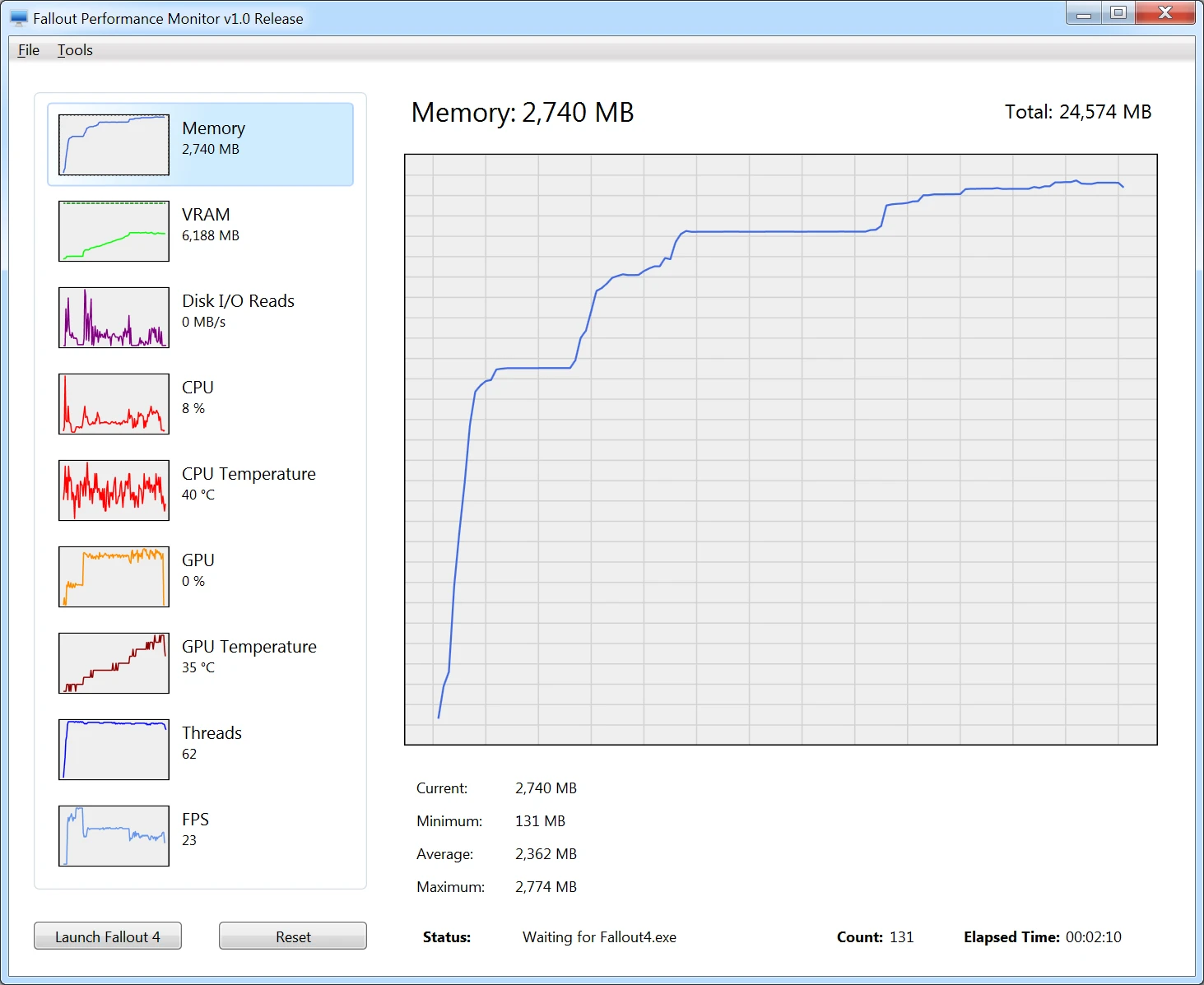
The Fallout Performance Monitor is a utility used for tracking Fallout 4’s system resource usage as they relate to the game engine, your system hardware, and installed mods.
FPM Currently monitors the following resources:
-
[] Memory
[] VRAM
[] Disk I/O
[] CPU Temperature
[] GPU Temperature
[] Threads
[] FPS
Main Features:
-
[] Graphs and In-Game Display for Memory, VRAM, Disk I/O, CPU, CPU Temperature, GPU, GPU Temperature, and Threads resource usage, and also for FPS.
[
] Ability to save and replay past performance runs for use in comparing different configurations.[] Ability to Pause monitoring while Fallout 4 is running.
[] Ability to capture Screenshots, useful for posting.
In-Game Counter Configuration:
Support for dynamically customizing the Graphs and In-Game Counter Colors, Font Size, and Display Order:
In-Game Font and Font size can be changed:
Keyboard mappings reference for the in-game counter hotkeys:
Requirements:
-
[] Windows 7 and above, 64-bit
[
] Microsoft . NET Framework v4. 5Installation:
-
[] To install, simply unzip the download to your Windows Desktop, and run the "FalloutPerformanceMonitor.exe" application.
[
] Windows 10 users may need to manually "unblock" the files in order for FPM to work correctly.[] You may also need to install the latest Microsoft . NET Framework (required):
[] Microsoft . NET Framework v4. 5
-
[]Run the Windows Uninstaller program in the Control Panel.
Directions:
- [
[] Click the "Launch Fallout 4" button.
[] Fallout 4 should launch, and FPM should then being monitoring.
Important Notes:
While I've thoroughly tested this and use it myself, it may contain bugs. If you encounter any problems though, please let me know by posting the issue in the FPM Nexus Site Comments section, and I'll get it fixed asap.
The Memory, CPU, Disk I/O, and Threads values are retrieved from the Windows Performance Counters, and are not a
-
[]Run the Windows Uninstaller program in the Control Panel.
-
[] To install, simply unzip the download to your Windows Desktop, and run the "FalloutPerformanceMonitor.exe" application.
-
[] Windows 7 and above, 64-bit
-
[] Graphs and In-Game Display for Memory, VRAM, Disk I/O, CPU, CPU Temperature, GPU, GPU Temperature, and Threads resource usage, and also for FPS.
Fallout Performance Monitor is a utility for tracking Fallout 4's system resource usage, including memory, VRAM, disk I/O, CPU, GPU, GPU temperature, threads, and FPS. It helps players analyze performance issues related to the game engine and hardware. With 1,699 endorsements and 25,571 downloads, it's a well-received tool for performance troubleshooting.
✨ Key Features
📊 Pros & Cons
✅ Pros
- Community-approved with 1,699 endorsements and 25,571 downloads.
- Covers a wide range of metrics including GPU temperature, which is rare in similar tools.
- Last updated in April 2021, so it's still relatively recent for a utility mod.
⚠️ Cons
- Only supports Fallout 4, so it's useless for other Bethesda games.
- Potential compatibility issues with future game updates or mods that alter the engine.
- Requires manual setup and may not work with all hardware configurations.
For Fallout 4 players who want to diagnose performance issues like stuttering or low FPS by monitoring system resources in real time. Also useful for modders who need to test the impact of their mods on system performance. Skip if you're not experiencing performance problems or prefer built-in tools.
💡 Beginner Tips
- Run the monitor while playing to identify which resource is maxing out, then adjust your mod load order accordingly.
- Use the GPU temperature readout to ensure your graphics card isn't overheating during long sessions.
- Compare FPS data before and after installing mods to see their performance impact.
📊 Mod Details
- Game
- Fallout 4 Mods
- Author
- Sir Garnon
- Version
- 1.45
- Downloads
- 25,571
- Endorsements
- 1,699
- Category
- Utilities
- Created
- 11/21/2015
- Updated
- 4/12/2021
🔧 How to Install Fallout 4 Mods
Download from Nexus.
📖 Full step-by-step install guide for Fallout 4 →
Visit the official mod page for specific installation instructions for this mod.
🎮 Need cheat codes or console commands? Check ur gaming wiki for Fallout 4 commands, item IDs, and more.
Keep browsing — more Fallout 4 mods await