Fallout 4 Configuration Tool - By Bilago
⚪ Last updated 2024⚠️ Install Order · 2 steps
Install in this order, then this mod last — most mods fail to load without their framework and dependencies in place.
Preview
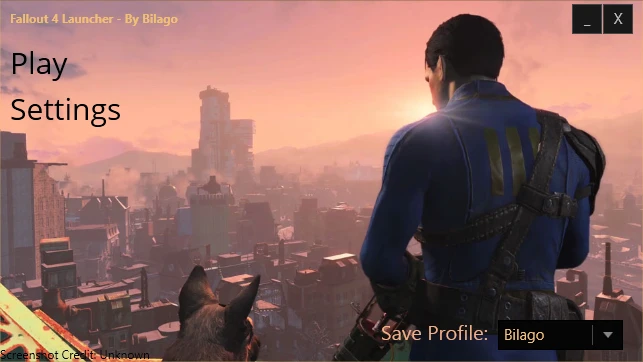
🔍 Analysis
- 👍 2.5% endorsement rate — high engagement, a strong quality signal
- 🏆 #8 of 49 Utilities mods in this game by downloads
📋 About This Mod
Features:
- [] Field of View Tweaker (1st person, 3rd person, 3rd Person ADS) [] Toggle Mouse Acceleration [] Toggle Mouse Smoothing Removed [] Toggle Vsync lock [] Toggle Gamepad Support [] Gamepad sensitivity [] Toggle the Intro video [] Tweak the Mouse Sensitivity [] Tweak Resolution [] Toggle Windowed Borderless [] Makes your INI files read-only after editing so they don't revert Now Toggable [] Enable Developer Console [] Pipboy color changer []Pipboy scanlines enable/disable [] VATS color changer []HUD color changer [] Kodix's FPS Boost Removed and replaced with iNumHWThreads [] Disable Gore (not Al Gore guys... lol) []High CPU Priority
- []DOF and Bokeh toggles []Shadow Resolution tweaker []Shadow Distance tweaker []Shadow LOD tweaker []Mod Folder support []uGridsToLoad tweaker []AA settings []Anistropic Filtering settings []Godray tweaker []AutoExec console commands at startup! []Mipmap tweaker []Grass Density []Texture popin multiplier [] And muchmore!
Due to the upcoming holidays, support for this tool may be limited.*
Does this work on Fallout 4 Beta Patches? No, I do not provide updates for beta releases at this time. Please wait for official Fallout 4 patches.
How do I run this? This is a standalone executable, installing via NMM will help you with update notifications, but you need to launch this program yourself manually. You can do this by either downloading this file manually and putting it on your computer (Desktop/documents/etc) or download it with the Nexus Mod Manager and run it from the Fallout4\Data folder.
Where are your changelogs? Changelogs are always updated and are located on the "changes" tab on this mod page.
This wont start?! WHY? Try running this as administrator. If that doesn't work send me a screenshot of the error message. If you don't get an error message check Windows Event Viewer for more information.
I cannot launch this tool! Windows Event Viewer blames d3d9.dll. Why? Sounds like you're running RIVA Statistics tuner / MSI Afterburner. That software can cause incompatibilities with some .net applications. Please turn this software off or add this application as an exception to fix this error.
After using this tool I cannot edit settings in game?! WTF?! This tool sets your configs to read only to prevent the game from overwriting the tweaks. If you want to edit your settings you can either press "Edit Launcher settings" or if you want
Fallout 4 Configuration Tool by Bilago is a utility that lets you tweak various INI settings with a few clicks. With over 55,000 endorsements and 2.2 million downloads, it's a community staple for PC players who want to adjust game performance and visuals without manual file editing. Last updated in May 2024, it remains a reliable tool for Fallout 4 modding.
✨ Key Features
📊 Pros & Cons
✅ Pros
- Massive community trust (55k+ endorsements, 2.2M downloads)
- Saves time by automating INI edits that are normally manual
- Still updated as of May 2024, so it's not abandoned
⚠️ Cons
- Only works for Fallout 4, not other Bethesda games
- Requires some knowledge of what INI settings do to use effectively
- No built-in backup feature mentioned, so you might want to back up your INIs yourself
For Fallout 4 PC players who want to tweak performance and visual settings without digging through INI files manually. Perfect for modders who need quick adjustments for stability or FPS. Skip if you're on console or prefer a more hands-on approach.
💡 Beginner Tips
- Before using the tool, make a backup of your Fallout4.ini and Fallout4Prefs.ini in case you want to revert changes.
- Use the tool to adjust settings like shadow distance and god rays for a performance boost, but don't go overboard if you want stable frame rates.
- If you're using mods that also change INI settings, run this tool after installing those mods to avoid conflicts.
📊 Mod Details
- Game
- Fallout 4 Mods
- Author
- Bilago
- Version
- 2.0.6.40542
- Downloads
- 2,210,538
- Endorsements
- 55,579
- Category
- Utilities
- Created
- 11/10/2015
- Updated
- 5/18/2024
🔧 How to Install Fallout 4 Mods
Download from Nexus.
📖 Full step-by-step install guide for Fallout 4 →
Visit the official mod page for specific installation instructions for this mod.
🎮 Need cheat codes or console commands? Check ur gaming wiki for Fallout 4 commands, item IDs, and more.
Keep browsing — more Fallout 4 mods await