Expressions and Anims Guide
⚪ Last updated 2016⚠️ Install Order · 2 steps
Install in this order, then this mod last — most mods fail to load without their framework and dependencies in place.
Preview
🔍 Analysis
- 👍 11.3% endorsement rate — high engagement, a strong quality signal
- 🏆 #20 of 25 Modders Resources and Tutorials mods in this game by downloads
📋 About This Mod
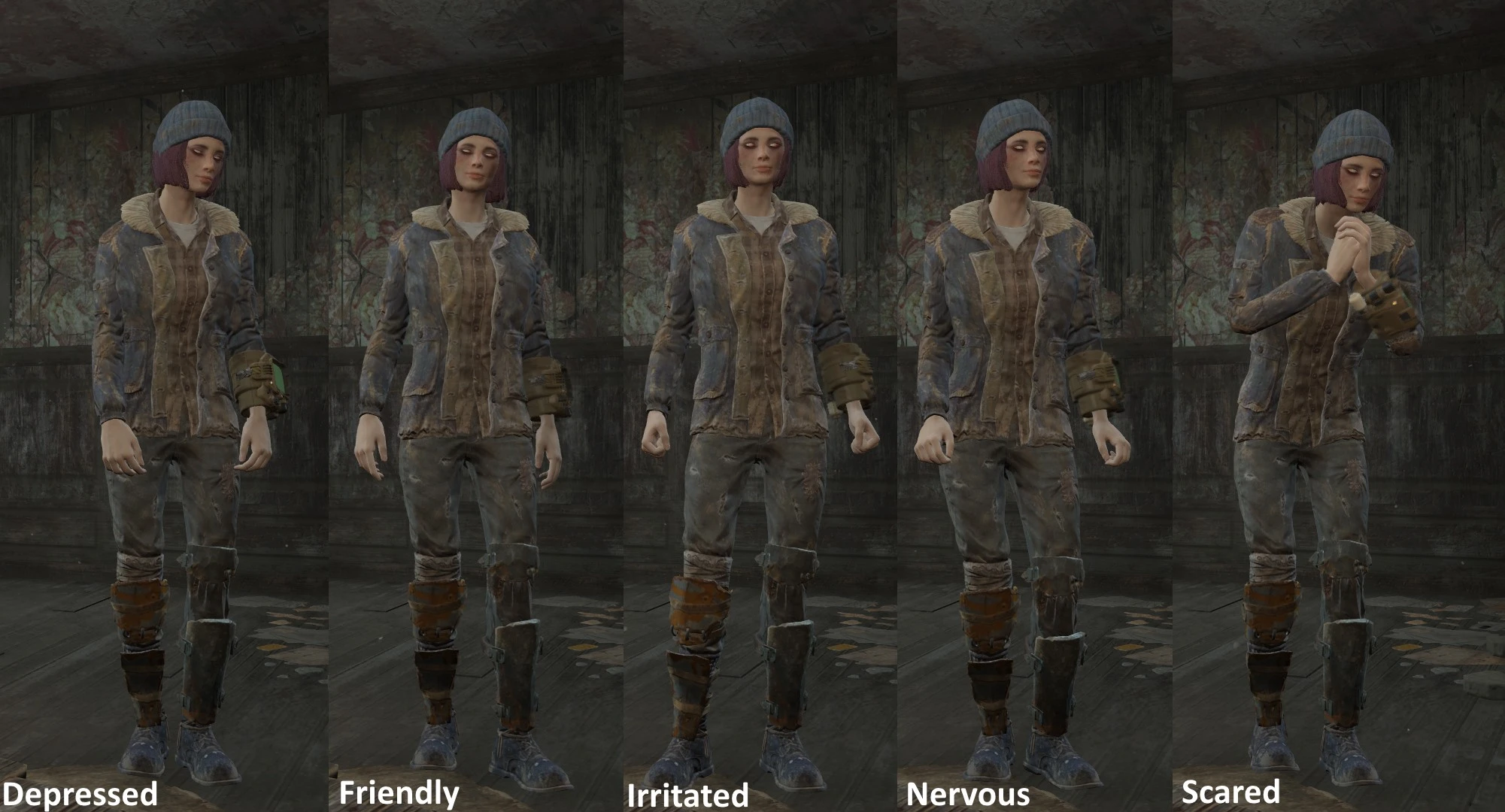
First off, this is not a mod! This is a quick guide I posted in the imageshare,and I'm uploading it as it's own page so it's easier to find. This is just a quick reference and guide on how to set expressions and poses on characters to use
A little while ago, I posted a little guide to the imageshare on posing and expressions in FO4, but because the imageshare moves so quickly and images get buried in no time, I figured it would be a little bit more helpful to post it here as it's own page. This is not a proper "mod", as it doesn't change anything in game and cannot be installed through NMM or any other programs. It's just a text file and some reference images.
Below is a complete copy of the guide:
Expressions:
Click here to see the full size version of the above image.
Use the console command "caa AnimFaceArchetypexxx" to set an actor's expression. Just make sure that you save before you do it, because as of right now I don't know how to reset the expressions and setting an expression on the player character will break the camera!
Replace "xxx" with one of the expression names below:
Afraid Amused Angry Apologetic Awed Concerned Confident Conspiratorial Defiant Depressed Disbelief Disgust FatherDeath Flirting Friendly Grateful Happy Impressed InPain Irritated Mayor Nervous Neutral Piper Player Pleading Preston Puzzled Question Relieved Sad Sarcastic SinisterSmile Somber Stern Sturges Surprised Suspicious Thinking Tired VaultTecRep Worried
For example, say you wanted Piper to smile for a portrait - you'd open the console, click on/select Piper and type "caa animfacearchetypehappy". Instantly happy Piper!
Now, I didn't include all the expression commands in the image above because a lot of them are either super subtle or very similar, but I tried to list all of them in the list above. For easy access in game just type "Help archetype 0" in the console to bring up the list of all the commands.
Postures:
Full sized image here.
While most of the 'archetype' settings are all for expressions there are a couple that can be used to change the way your character stands... It doesn't sound incredibly useful, but it also changes the idle animations your character performs when they've been standing still for a while. For example, the 'irritated' posture has the character crossing their arms, face palming and resting their hands on their hips, while the 'confident' posture has characters cracking their neck, flexing their fingers and looking around. Good for screenshots if you've got the patience to wait for the right idles. Use the command "caa AnimArchetypexxx" to change the posture of your character, where "xxx" is rep
📊 Mod Details
- Game
- Fallout 4 Mods
- Author
- MM
- Version
- 1.0
- Downloads
- 2,265
- Endorsements
- 257
- Category
- Modders Resources and Tutorials
- Created
- 1/12/2016
- Updated
- 1/12/2016
🔧 How to Install Fallout 4 Mods
Download from Nexus.
📖 Full step-by-step install guide for Fallout 4 →
Visit the official mod page for specific installation instructions for this mod.
🎮 Need cheat codes or console commands? Check ur gaming wiki for Fallout 4 commands, item IDs, and more.
Keep browsing — more Fallout 4 mods await