De-uglified Ambient Occlusion - INI TWEAK
⚪ Last updated 2020⚠️ Install Order · 2 steps
Install in this order, then this mod last — most mods fail to load without their framework and dependencies in place.
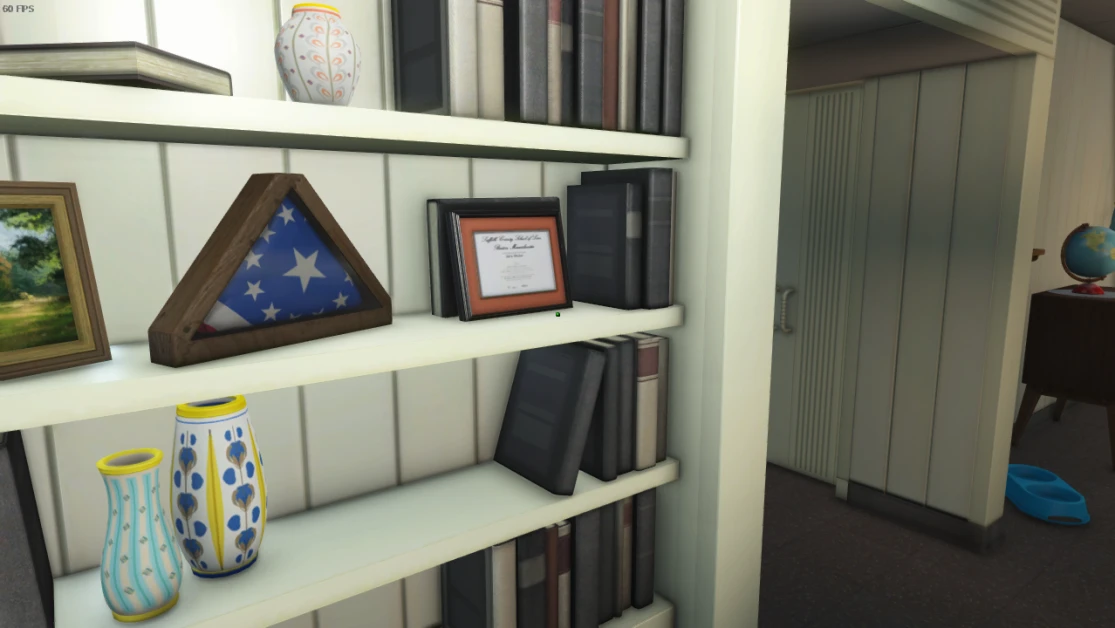
Preview
🔍 Analysis
- 👍 8.1% endorsement rate — high engagement, a strong quality signal
- 🏆 #14 of 40 Visuals and Graphics mods in this game by downloads
📋 About This Mod
.ini tweak to make HBAO+ much more visually pleasing and overall less bumpy, inconsistent, and weird.
So, Fallout 4 has ambient occlusion. Yeah, wow, who knew? But like, it sucks. SSAO is just bleh, it's typical SSAO. HBAO+ is not great. It's just really weird. Like, take for example it's presence in pre-war. In many areas, you notice how it disappears around the edges of your screen (naturally it will, it's screenspace after all), it's way too dark, and worst of all - What is up with that bumpy, inconsistent, really weird shading? It's not smooth at all, and just doesn't make sense, especially on the shelf with the american flag. So, I took a couple hours going back and forth with the ini settings for HBAO trying all kinds of different values trying to fix this and I FINALLY DID IT.
Here you have it, the values to make HBAO actually good, and looks great. This is not an ENB, this is not a ReShade, this isn't post processing shenanigans. There's no FPS impact versus default HBAO. Just some good ol' fashioned ini tweaking.
bBackgroundAOEnable=1
bBlurEnable=1
bBlurSharpnessProfileEnable=1
bDepthThresholdEnable=0
fBackgroundAOViewDepth=750. 0000
fBias=0. 5000
fBlurSharpness=16. 0000
fBlurSharpnessProfileBackgroundViewDepth=1. 0000
fBlurSharpnessProfileForegroundSharpnessScale=0. 0000
fBlurSharpnessProfileForegroundViewDepth=1. 0000
fCoarseAO=0. 9000
fDepthThresholdMaxViewDepth=500. 0000
fDepthThresholdSharpness=100. 0000
fDetailAO=5. 6500
fPowerExponent=3. 0000
fRadius=0. 2500
iBlurRadiusEnum=1
iDepthClampModeEnum=0
Those values should go in your Fallout4Prefs.ini. First check to see if they're already there. If so, replace everything with those. If not, add those values at the end of the file. I've also provided a txt file with the values, so you can save them for later or something, idk. Won't do anything on it's own, gotta put the values in your ini manually. I know, sucks. Won't work in Fallout4custom.ini either, has to go inside fallout4prefs.ini.
I've been fiddling with fBias
, tried several values, found that the higher the number, the less thing affected by hbao. This is good.
fPowerExponent
Can be tweaked too. As you raise it though, it starts affecting more things, but in a different way from bias. Tends to affect faces much earlier, since it's exponential, but also leads to much darker shades.
This plays on the way fDetailAO works. The weird, bumpy, inconsistent shading comes from fCoarseAO. Not sure why it's so bad, but it is. Detail AO is very tight, and can actually make the game look like a cartoon if you raise the power exponent and radius and set coarse to 0. Outlines everything. Due to this, you can get some really nice, really tight shades that get dark super quick with the right tweaks. Detail AO is the setting we want, Coarse is the setting we don't want much
📊 Mod Details
- Game
- Fallout 4 Mods
- Author
- AshlynnMods
- Version
- 3
- Downloads
- 2,048
- Endorsements
- 166
- Category
- Visuals and Graphics
- Created
- 10/19/2019
- Updated
- 12/21/2020
🔧 How to Install Fallout 4 Mods
Download from Nexus.
📖 Full step-by-step install guide for Fallout 4 →
Visit the official mod page for specific installation instructions for this mod.
🎮 Need cheat codes or console commands? Check ur gaming wiki for Fallout 4 commands, item IDs, and more.
Keep browsing — more Fallout 4 mods await