Craftable Armor Size
⚪ Last updated 2016⚠️ Install Order · 2 steps
Install in this order, then this mod last — most mods fail to load without their framework and dependencies in place.
Preview
🔍 Analysis
- 👍 3.8% endorsement rate — high engagement, a strong quality signal
- 🏆 #5 of 20 Crafting - Equipment mods in this game by downloads
📋 About This Mod
Craftable Armor Size
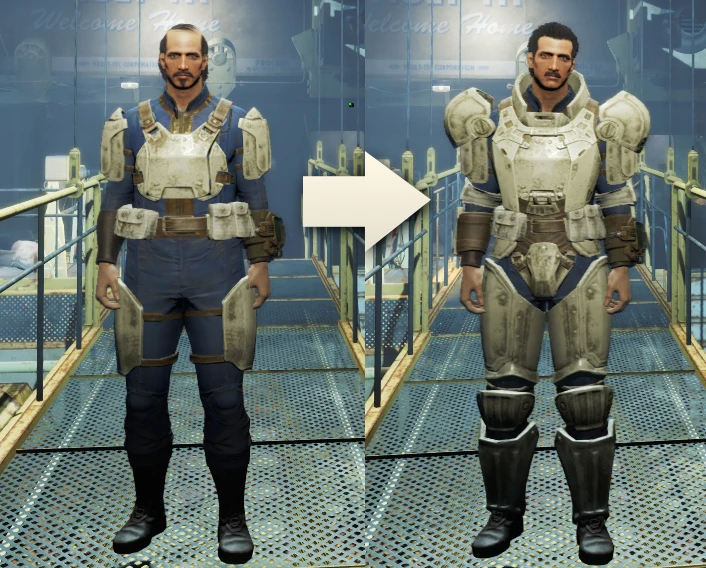
This mod enables Light, Sturdy and Heavy armor mods in the armor workbench.
Requires the perk Armorer rank 3 for Sturdy upgrades, and Armorer rank 4 for Heavy upgrades.
Misc mod items are also created when replacing a modification, so you can downgrade a random and apply it to that [★Legendary Light Chest] you just got off a gunner.
It works on all Leather, Metal, Combat, Raider and Synth armor parts.
This plugin maintains balance by adding perk requirements and reasonable material cost to the added recipes.
Compatibility with other mods
Unless the mod changes the armor modification record for sizes, you should be good to go. Known compatible mods are:
- []Better Armor Mod Descriptions (download the Craftable Armor Size addon for added bonus) []Better Armor and Weapon naming and sorting (Highly Recommended!) []Crafting Workbenches []Armorsmith Extended
- Legendary Modification
When it comes to material upgrades, the game uses different recipes for the same material mod, based on the size of the armor, with different requirements. Each recipe applies the same mod, with the same crafting materials. The only difference is that applying the same exact mod on a heavy version, rather than light, has different perk requirements. The game however does not stop you from moving the same mod between sizes.
Example: You want to upgrade your heavy legendary leather piece to "shadowed". You do not have the requirement to upgrade heavy leather to shadowed (it requires Armorer 04). You can however, without an issue, upgrade a light leather to shadowed (it requires Armorer 01), detach the mod, and attach it to your legendary heavy piece. It doesn't even have anything to do with being able to craft size upgrades, this is just a broken vanilla behavior.
This optional plugin gets rid of the extra recipes for medium and heavy, and only uses the recipe for the light version, thus removing the unnecessary step the game forces you to take.
Q: The perk requirements for Leather and Raider are too high, can you lower them?
A: It cannot be done without breaking balance. The perk requirements a
Craftable Armor Size is a compact crafting mod that unlocks Light, Sturdy, and Heavy armor mods at the armor workbench. With 38,168 endorsements and over a million downloads, it's a community favorite for players who want more armor customization options. Last updated in 2016, it remains a simple, effective addition for Fallout 4.
✨ Key Features
📊 Pros & Cons
✅ Pros
- Huge community trust – 38k endorsements and a million downloads speak for themselves.
- Does exactly what it says: unlocks all three armor size mods at the workbench, no fuss.
- Lightweight and simple – no extra bloat, just the feature you want.
⚠️ Cons
- Last updated in 2016 – might have compatibility issues with newer game patches or DLC.
- Only adds workbench recipes – if you wanted new armor visuals or stats, this isn't it.
For Fallout 4 players who want to customize their armor with Light, Sturdy, or Heavy mods without hunting for rare drops. Perfect for crafters and builders who spend time at the workbench. Skip if you're looking for new armor models or gameplay overhauls – this is purely a convenience mod.
💡 Beginner Tips
- Make sure you have the required perks (Armorer) to craft the mods – the mod just unlocks the options, but you still need the perk.
- If you're using a mod manager like Nexus Mod Manager or Vortex, install it through there to keep your load order clean.
- Since it's an older mod, check the comments section for any reported issues with the latest game version before installing.
📊 Mod Details
- Game
- Fallout 4 Mods
- Author
- John Doe Bowler
- Version
- 1.3.0
- Downloads
- 1,014,212
- Endorsements
- 38,168
- Category
- Crafting - Equipment
- Created
- 12/5/2015
- Updated
- 2/9/2016
🧩 Commonly Used Together
Users add these mods to the same collections — a real compatibility signal, not an AI guess.
🔧 How to Install Fallout 4 Mods
Download from Nexus.
📖 Full step-by-step install guide for Fallout 4 →
Visit the official mod page for specific installation instructions for this mod.
🎮 Need cheat codes or console commands? Check ur gaming wiki for Fallout 4 commands, item IDs, and more.
Keep browsing — more Fallout 4 mods await