Console Enable for non English Keyboards
⚪ Last updated 2015⚠️ Install Order · 2 steps
Install in this order, then this mod last — most mods fail to load without their framework and dependencies in place.
Preview
🔍 Analysis
- 👍 3.7% endorsement rate — high engagement, a strong quality signal
- 🏆 #42 of 58 Bug Fixes mods in this game by downloads
📋 About This Mod
I am using a Danish keyboard.
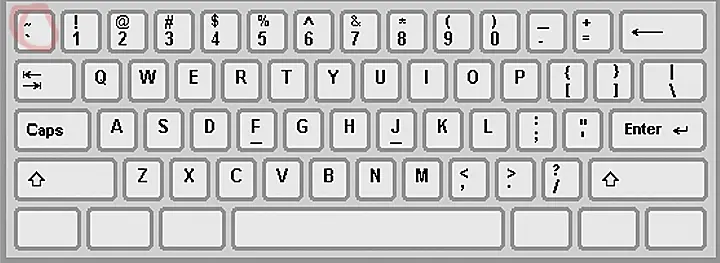
When I first tried to use my old key (that work in previous Fallout series and also in Skyrim) , the one above Tab, to open the developer console, nothing happened.
So I tried all other keys on the keyboard but still no luck. After I tried and when used the "Æ" above "." the console opened.
This might happen to others using non English keyboards so here it is a solution/work around for the problem.
Update
The Fallout 4 Wiki as published most of these settings
There are more in the discussion area, have a look there if you can't find a suitable solution on this page.
There are other keys that work without needing to use this mod. See below.
This mod can still be used for convenience OFC, so you don't have to remember an extra key and have it where it used to be in previous games.
Turns out that on Danish keyboards you just need to use the "æ" key and the console will open.
Let me know what keys work with other languages so I can Update it here and people can find the solution right away.
Keys tested to work
Danish keyboards you just need to use the æ key French keyboard it's ù (near M), submited by stegano German keyboards its ö, (right to l), submited by Nathan000 Swiss keyboard it's ¨ (left to Enter), submited by shisoka Spanish Keyboard it's ñ ,submited by D4V10 Norwegian keyboard it's Ø ,submited by Gran28 Portuguese keyboard it's ç (next to the "L" key), submited by yajdamgunnar Swedish keyboard it's Ö, (next to L), submited by TLegenden Finnish keyboard it's Ö, submited by Elianora Estonian keyboard it's Ü, submited by syync Hungarian keyboard it is ö (right to 9), submited by Arnylegio Italian keyboard it's ò (right to L), submited by Lallina According to darkfender666 Italian can be also @
Requirements (only if you want to bind to another key)
You will need to install AutoHot
Fixes the console command issue for players with non-English keyboards in Skyrim. Simple utility that ensures the tilde key works regardless of keyboard layout. 583 endorsements and 15,910 downloads show it's a trusted fix for a common problem.
✨ Key Features
📊 Pros & Cons
✅ Pros
- Community-trusted fix with 583 endorsements and 15,910 downloads
- Solves a frustrating issue for international players
- Lightweight and focused—does exactly what it says
⚠️ Cons
- Last updated in 2015, so may not be tested with the latest Skyrim patches or Special Edition
- Only addresses keyboard layout issue—no additional features
- Potential conflicts with mods that alter input or key bindings
For Skyrim players using non-English keyboards who can't open the console. If you've ever hit the tilde key and nothing happened, this is your fix. Skip if you use a standard English keyboard or don't need console commands.
💡 Beginner Tips
- Make sure to place the file in your Skyrim Data folder or use a mod manager to install.
- After installing, test the console by pressing the key that corresponds to the tilde on your keyboard layout.
- If you're using Skyrim Special Edition, check if this mod has a compatible version or use an alternative.
📊 Mod Details
- Game
- Fallout 4 Mods
- Author
- skyrimlu
- Version
- 1.0a
- Downloads
- 15,910
- Endorsements
- 583
- Category
- Bug Fixes
- Created
- 11/10/2015
- Updated
- 11/10/2015
🔧 How to Install Fallout 4 Mods
Download from Nexus.
📖 Full step-by-step install guide for Fallout 4 →
Visit the official mod page for specific installation instructions for this mod.
🎮 Need cheat codes or console commands? Check ur gaming wiki for Fallout 4 commands, item IDs, and more.
Keep browsing — more Fallout 4 mods await