Collectible and Placeable Pins
⚪ Last updated 2018⚠️ Install Order · 2 steps
Install in this order, then this mod last — most mods fail to load without their framework and dependencies in place.
Preview
🔍 Analysis
- 👍 1.5% endorsement rate — high engagement, a strong quality signal
- 🏆 #20 of 25 Collectibles, Treasure Hunts, and Puzzles mods in this game by downloads
📋 About This Mod
You can safely update from older versions if you have already found pins, please view the video under the video tab for more detail.
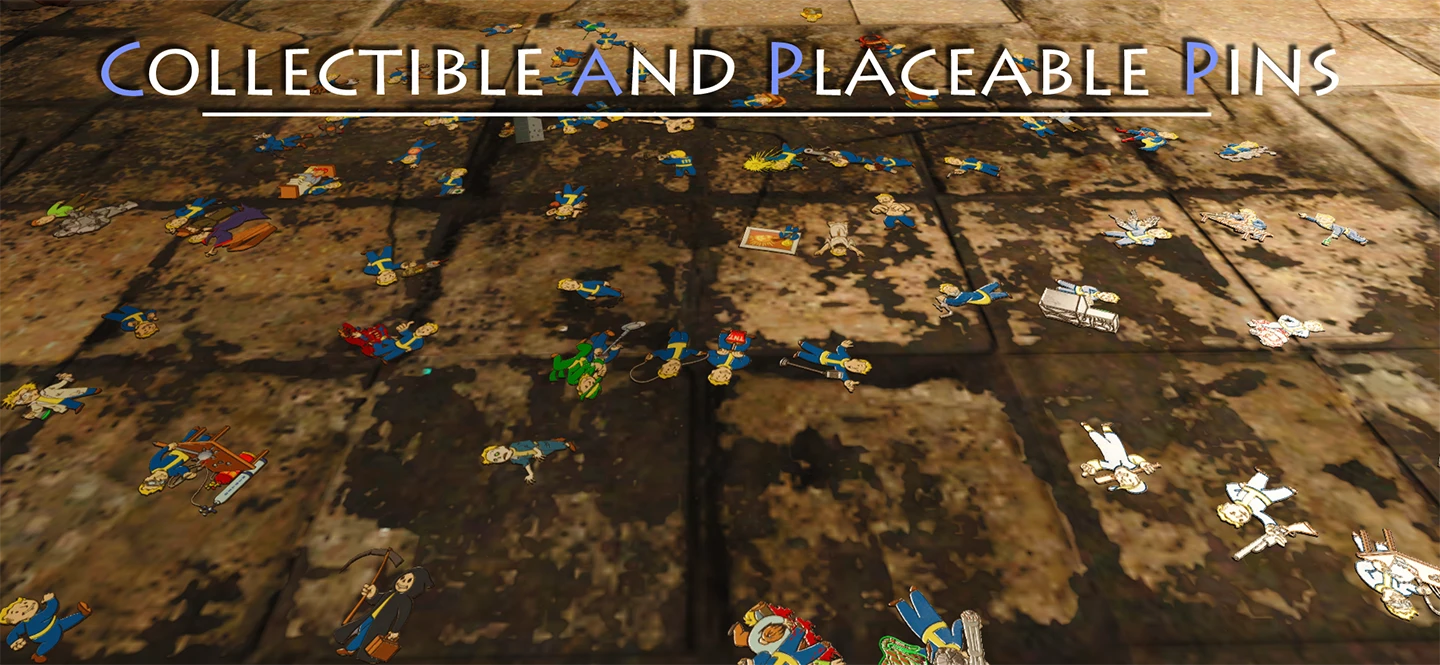
I always thought the loading screen pins looked like they were very well modeled, and what a shame it was they weren't actually in game. Well, no longer! All 77 loading screen pins are now collectible throughout The Commonwealth.
Features
-
[]V1. 3 now includes a perk poster that places each pin in it's correct position
[
]V1. 2 now includes a quest with optional markers for each pin[]77 Collectible pins
[]Custom 'Pin Rack', 'Pin Frame', and 'Pin Poster'
[]No conflictions
[]Optional 2k or 1k textures, and optional glowing textures
How to Install/Uninstall
Activating the mod through NMM will correctly install the mod, just do the opposite to uninstall.
Here is a comparison of the 1k (2MB), 2k (8MB), and default 4k (32MB) textures. The 1k and 2k textures can be found under optional files. (The pin textures are already in game and loaded in your memory.)
How to Build
The Pin Frame can be found in Furniture > Shelves, next to the Vanilla Magazine Rack, it requires 2 wood to build.
The Pin Poster can be found in the same area, it requires 2 cloth to build. Each pin goes in it's correct position on the poster.
The Pin Rack can be found in the same area as well, it requires 1 screw and 4 steel to build. Add your favorite pin last (if you can find them all) it will be featured front and center!
Where to Find
The pins can be found mostly in the interior cells of unmarked locations, but there are a handful in outdoor areas and marked locations. One can be found in the bunker in Sanctuary Hills. Here is a link to a cheat sheet that gives general locations for the pins.
How to Use Quest Controller
To bring the menu up, you must drop the controller and pick it back up. It is called 'CAPP - Quest Controller' and will be automatically added after you start the the game with version 1. 2 or newer. For a more detailed tutorial, please see the video under the videos tab.
My Other Mods
Adds all 77 pins from the loading screens to the world as collectible items that can be placed on a perk poster, picture frame, or a repurposed magazine rack. Includes a quest with optional markers. A well-received collectible mod for Fallout 4, with 991 endorsements and over 66k downloads.
✨ Key Features
📊 Pros & Cons
✅ Pros
- Community favorite with 991 endorsements and over 66k downloads – clearly a hit.
- Gives you a reason to explore the Commonwealth again, hunting down all 77 pins.
- The quest with optional markers is a nice touch for completionists who don't want to use a guide.
⚠️ Cons
- Last updated in 2018 – might have compatibility issues with newer game patches or DLC.
- No mention of compatibility with other mods that alter loading screens or world objects.
- If you're not into collectible hunting, this mod adds little to gameplay – it's purely for completionists.
For Fallout 4 players who love collectible hunts and want to display their finds in their settlements. Perfect for completionists who enjoy tracking down every last item. Skip if you're looking for gameplay overhauls – this is a pure collectible mod.
💡 Beginner Tips
- Use the quest markers to find pins without external guides – it's the intended way.
- Plan your display: choose a perk poster, picture frame, or magazine rack for your pins.
- If you're using mods that change loading screens, check for conflicts – this mod relies on the original pin locations.
📊 Mod Details
- Game
- Fallout 4 Mods
- Author
- nater
- Version
- 1.31
- Downloads
- 66,435
- Endorsements
- 991
- Category
- Collectibles, Treasure Hunts, and Puzzles
- Created
- 9/3/2017
- Updated
- 1/18/2018
🧩 Commonly Used Together
Users add these mods to the same collections — a real compatibility signal, not an AI guess.
🔧 How to Install Fallout 4 Mods
Download from Nexus.
📖 Full step-by-step install guide for Fallout 4 →
Visit the official mod page for specific installation instructions for this mod.
🎮 Need cheat codes or console commands? Check ur gaming wiki for Fallout 4 commands, item IDs, and more.
Keep browsing — more Fallout 4 mods await