CleanVATS - VATS Green Tint Remover
⚪ Last updated 2017⚠️ Install Order · 2 steps
Install in this order, then this mod last — most mods fail to load without their framework and dependencies in place.
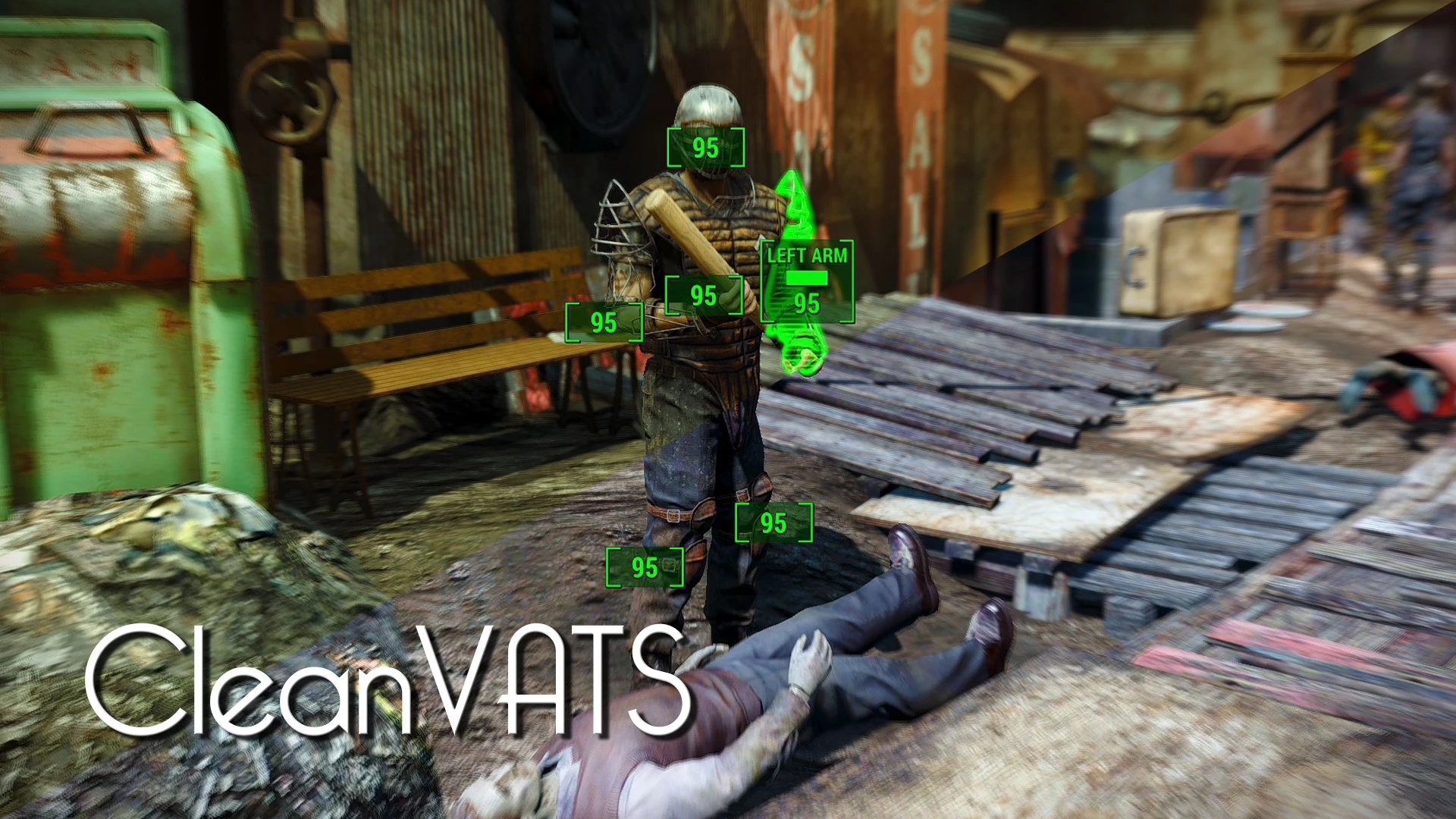
Preview
🔍 Analysis
- 👍 0.8% endorsement rate
- 🏆 #50 of 76 Visuals and Graphics mods in this game by downloads
📋 About This Mod
Description
This mod simply removes the green tint in the pause menu and while using VATS, giving you true coloured slow motion shots.
Also available on:
PC (Bethesda)
CleanVATS is a simple visual mod for Fallout 4 that removes the green tint from the VATS and pause menu. With over 1,500 endorsements and nearly 200,000 downloads, it's a popular quality-of-life improvement for players who prefer a cleaner look. Last updated in 2017, it remains a go-to for many.
✨ Key Features
📊 Pros & Cons
✅ Pros
- Huge community trust: 1,525 endorsements and nearly 200k downloads.
- Does exactly what it says—no bloat, just removes the green tint.
- Works for both VATS and pause menu, so your whole UI feels cleaner.
⚠️ Cons
- Last updated in 2017—might not be tested with the latest Fallout 4 patches or DLC.
- Only affects the green tint; if you wanted more UI customization, this isn't it.
For Fallout 4 players who find the green VATS tint distracting or ugly and want a cleaner look without changing gameplay. Perfect for purists who want a simple visual fix. Skip if you're looking for more extensive UI overhauls or gameplay tweaks.
💡 Beginner Tips
- Since it's a simple texture/interface mod, you can install it manually by dropping the files into your Data folder, but using a mod manager like Nexus Mods' Vortex makes it easier to uninstall if you change your mind.
- If you're using other UI mods, test them together—this mod only touches the green tint, so it should be compatible, but load order might matter if other mods alter the same files.
- Make sure you have the game's archive invalidation enabled (or use a mod manager that does it automatically) to ensure the changes show up correctly.
📊 Mod Details
- Game
- Fallout 4 Mods
- Author
- MajorSideCharacter
- Version
- 1.0
- Downloads
- 198,368
- Endorsements
- 1,525
- Category
- Visuals and Graphics
- Created
- 3/7/2017
- Updated
- 3/7/2017
🔧 How to Install Fallout 4 Mods
Download from Nexus.
📖 Full step-by-step install guide for Fallout 4 →
Visit the official mod page for specific installation instructions for this mod.
🎮 Need cheat codes or console commands? Check ur gaming wiki for Fallout 4 commands, item IDs, and more.
Keep browsing — more Fallout 4 mods await