Clean Settler Faces - Remove Dirt And Grime
⚪ Last updated 2018⚠️ Install Order · 2 steps
Install in this order, then this mod last — most mods fail to load without their framework and dependencies in place.
Preview
🔍 Analysis
- 👍 7.8% endorsement rate — high engagement, a strong quality signal
- 🏆 #22 of 72 NPC mods in this game by downloads
📋 About This Mod
This mod was made a long time ago. It still works, but is probably obsolete and will conflict with any mod that changes the same entries... which hundreds of npc related mods will do.
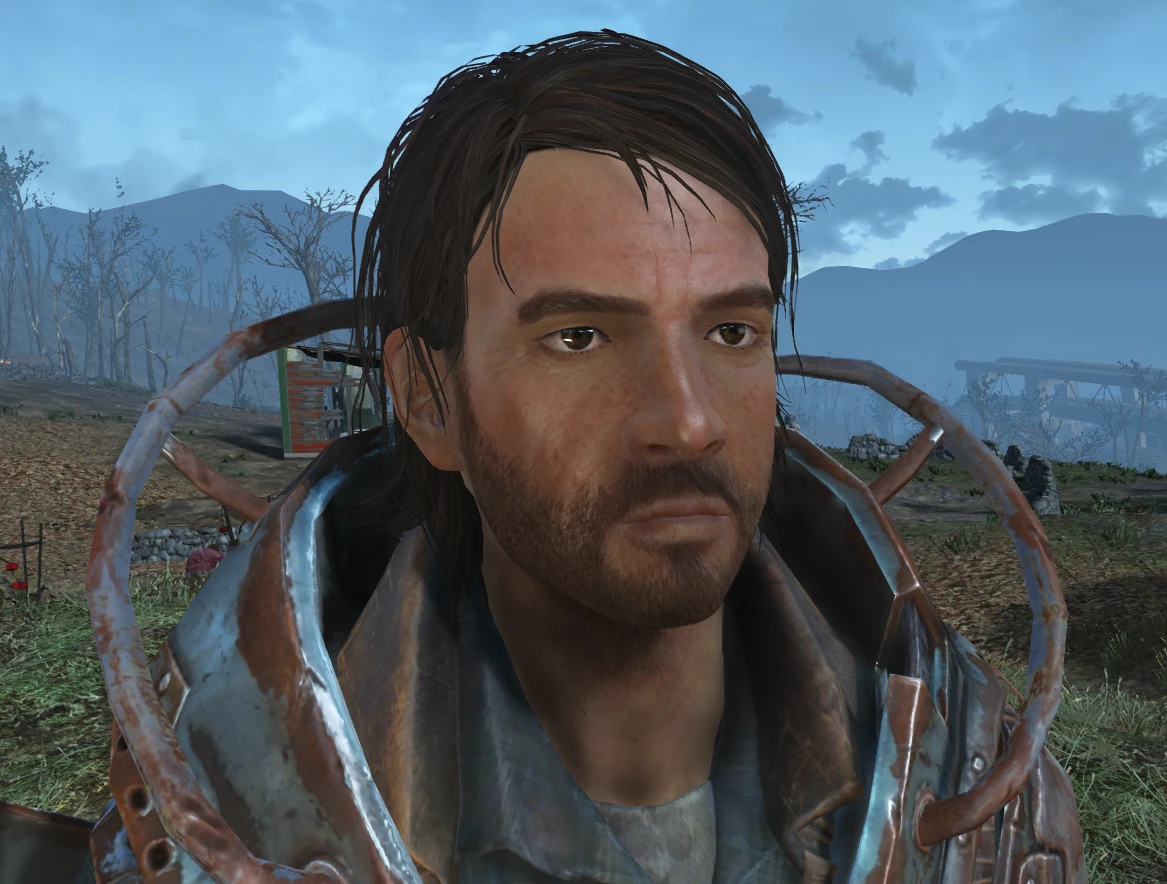
This mod simply removes the "grime" Face Tinting Layers from settlers' faces.
This allows them to look cleaner, like they've actually taken advantage of the clean water we've supplied them with in our settlements!
Fully made just by removing the grime layers from Non-Player Character entries for settlers in FO4Edit.
Male and Female settlers both have clean faces now.
Nothing else has been done.
No unique (named) settlers have been edited.
The bruises, freckles, scars, paint, etc haven't been edited so some of them may still seem a little grungy.
But they definitely have clean faces! No more black soot or mud smeared across their cheeks and forehead.
I, personally, don't use any mods that alter the settlers in any way.
But I don't see this mod conflicting with much.
I've uploaded two options! A download for people with DLCs, and one for people without DLCs.
You should be able to remove this mod at any time if you decide you don't like it, but most recommend not uninstalling ESP plugins once it gets saved into your game.
Put this mod where ever you see fit in your load order. My recommendation is at the top/beginning of your load order, but I also recommend to check FO4Edit to see if you have any conflicts, mainly just because it's a good habit to have when adding new mods to your game.
Use Nexus Mod Manager (or mod manager of your choice), or extract the ESP into your Fallout 4's Data folder.
Use Nexus Mod Manager (or mod manager of your choice), or delete the ESP from your Fallout 4's Data folder.
No Ugly Plants And More - Invisible Vines Shrubs Brambles Grasses ETC
Clean Settler Faces - Remove Dirt And Grime
Long Time Coming - Automatic Quest Progression For Nick Valentine - Eddie Winter (BAT File)
Silent Mysterious Stranger
Quieter Crafting
Quieter Player Voice - Quieter Protagonist Voice
Reuploads of mods by other authors:
Clickerfied Ghouls - Idle Sounds - By NkL3
Q: Will you change ~i
Clean Settler Faces removes the grime face tinting layers from settlers in Fallout 4, making them look cleaner. This cosmetic mod is for players who want more visually appealing NPCs. With 1,490 endorsements and 19,183 downloads, it's a popular quality-of-life improvement.
✨ Key Features
📊 Pros & Cons
✅ Pros
- Community-approved with 1,490 endorsements and nearly 20k downloads
- Does exactly what it says: cleans up settler faces for a more polished look
- Lightweight and doesn't touch other aspects of NPCs, so low risk of conflicts
⚠️ Cons
- Last updated in 2018, so may not be tested with the latest Fallout 4 updates or DLC
- Only affects settlers, not other NPCs like companions or raiders
- Purely cosmetic – if you're looking for gameplay changes, this isn't it
For Fallout 4 players who are bothered by the grimy look of settlers and want a cleaner appearance without overhauling NPCs. Also great for settlement builders who spend a lot of time around their settlers. Skip if you want more dramatic NPC overhauls or gameplay tweaks.
💡 Beginner Tips
- Install with a mod manager like Nexus Mods' Vortex for easy management and uninstallation.
- Load order shouldn't matter much, but place it after other NPC overhaul mods to ensure it takes effect.
- If you use other mods that alter settler faces, test in a new game or after clearing the area to avoid conflicts.
📊 Mod Details
- Game
- Fallout 4 Mods
- Author
- NeuroticPixels
- Version
- 1.3
- Downloads
- 19,183
- Endorsements
- 1,490
- Category
- NPC
- Created
- 6/30/2018
- Updated
- 7/17/2018
🔧 How to Install Fallout 4 Mods
Download from Nexus.
📖 Full step-by-step install guide for Fallout 4 →
Visit the official mod page for specific installation instructions for this mod.
🎮 Need cheat codes or console commands? Check ur gaming wiki for Fallout 4 commands, item IDs, and more.
Keep browsing — more Fallout 4 mods await