Ciri Preset (The Witcher 3)
⚪ Last updated 2020⚠️ Install Order · 3 steps
Install in this order, then this mod last — most mods fail to load without their framework and dependencies in place.
Preview
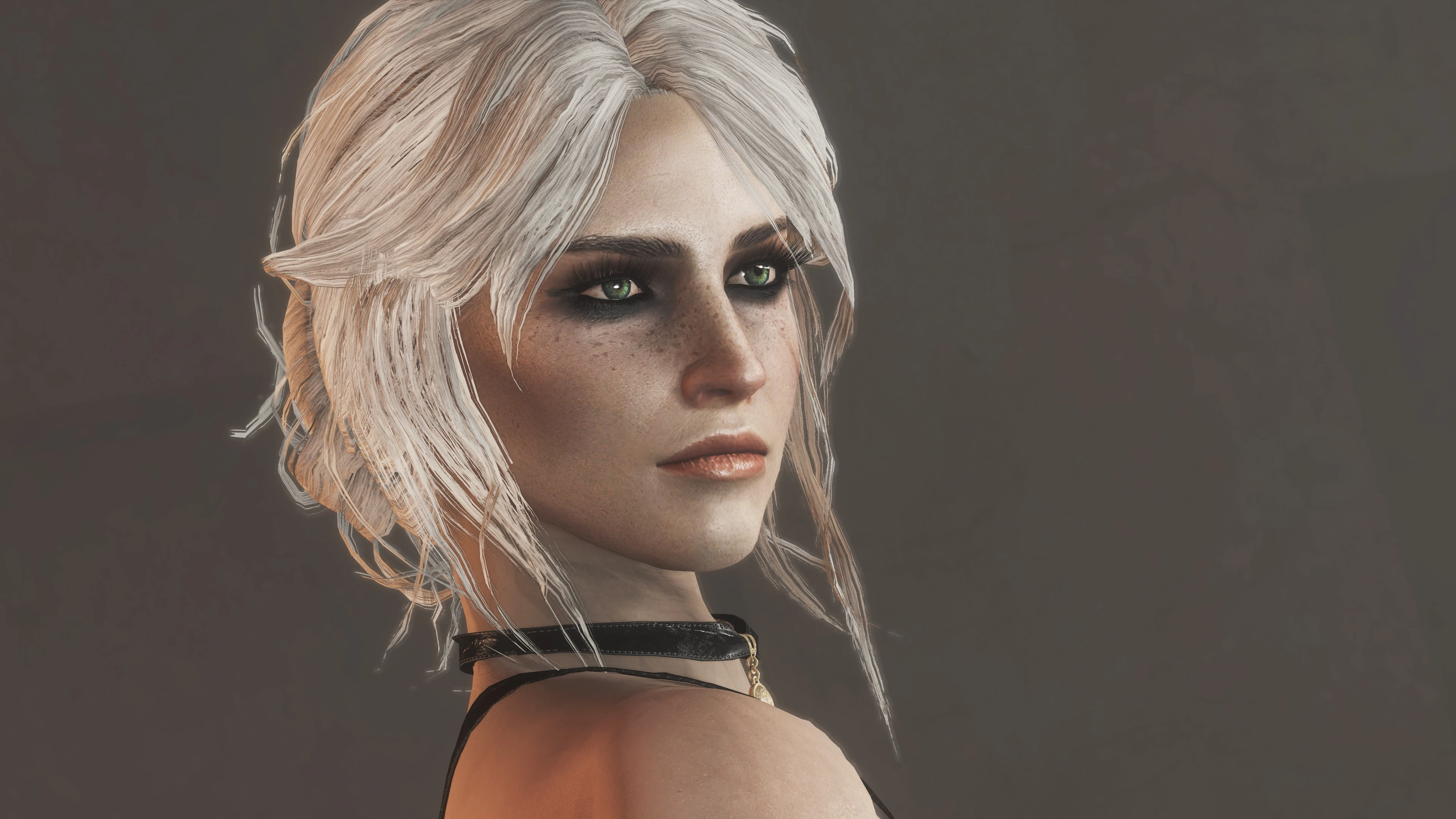
🔍 Analysis
- 👍 1.1% endorsement rate — high engagement, a strong quality signal
- 🏆 #7 of 76 Character Presets mods in this game by downloads
📋 About This Mod
Required Mods
-
[]Fallout 4 Script Extender (F4SE) to run LooksMenu.
[
]LooksMenu to load the preset.[]Extended Facial Sculpting to morph the face.
[]Looks Menu Customization Compendium for the makeup, scar, eyebrows, and hair color. You might need the "HD DLC fix" optional file as well.
[]Ponytail Hairstyles by Azar for the hair bun.
[]Valkyr Female Face and Body Textures for skin textures.
[]HN66s and XAZOMNs Long EyeLashes for FO4 for more eyeliner and bigger eyelashes.
Recommended Mods
-
[]Ciri Battle Gear, which is her main outfit from TW3.
[]Regent - Standalone Sword, the closest FO4 sword I've seen to a sword from TW3.
[]FCO - HD Eyes, for better looking eyes.
Installation
After installing the required mods, use Nexus Mod Manager to install "Ciri by Korlando.json" to the LooksMenu presets folder.
Here are the manual steps if anyone needs them:
-
[]Download "Ciri by Korlando.json" (rename it if you want). Move this file to the LooksMenu presets folder, usually located at: C:\Program Files (x86)\Steam\steamapps\common\Fallout 4\Data\F4SE\Plugins\F4EE\Presets
[
]Run the game using the F4SE launcher, hit ~ to open the console, and enter slm 14 to open the looksmenu on your (presumably female) character. You can also open the looksmenu on other characters with slm <id>, where <id> is the RefID of the character (displayed when you click on someone with the console open).[]Click the "Presets" option on the left. If it's greyed out, make sure you're running the game through the F4SE launcher.
[]Click the "Ciri by Korlando" preset from the list to apply it.
Disclaimers
- []The preset should work on other female characters besides the player, but with a caveat. For example, when applied to Piper, her face might look malformed the next time you boot up the game. This can be fixed by simply applying the preset again in the looksmenu.
- []No, the preset doesn't look exactly like Ciri, especially under certain lighting conditions. Maybe close enough, eh?
-
[]Download "Ciri by Korlando.json" (rename it if you want). Move this file to the LooksMenu presets folder, usually located at: C:\Program Files (x86)\Steam\steamapps\common\Fallout 4\Data\F4SE\Plugins\F4EE\Presets
-
[]Ciri Battle Gear, which is her main outfit from TW3.
A LooksMenu preset for Fallout 4 that recreates Ciri from The Witcher 3. Requires the Extended Facial Sculpting mod. Popular with 1,353 endorsements and over 124k downloads, last updated in 2020.
✨ Key Features
📊 Pros & Cons
✅ Pros
- Huge download count (124k+) shows it's a go-to for Ciri fans.
- Simple install: just drop the preset into LooksMenu and load it in-game.
- Endorsement ratio is solid (1,353) — players actually like the result.
⚠️ Cons
- Requires Extended Facial Sculpting — if you don't have it, the preset won't work.
- Last updated in 2020 — might have issues with newer game patches or LooksMenu versions.
- No preview images or detailed instructions in the description, so you're flying blind until you test it.
For Fallout 4 players who want to roleplay as Ciri or just love The Witcher 3's aesthetic. If you're into character presets and don't mind grabbing a dependency, this is a quick win. Skip if you're not into cross-game cosplay or prefer vanilla faces.
💡 Beginner Tips
- Make sure you have LooksMenu installed and the Extended Facial Sculpting mod enabled before loading the preset.
- In LooksMenu, use the 'Presets' tab to load the file — if the face looks off, check that Extended Facial Sculpting is active and not conflicting with other face mods.
- If you're using a mod manager, install the preset manually into the LooksMenu folder to avoid any load order issues.
📊 Mod Details
- Game
- Fallout 4 Mods
- Author
- korlando
- Version
- 2.0
- Downloads
- 124,812
- Endorsements
- 1,353
- Category
- Character Presets
- Created
- 9/11/2018
- Updated
- 1/4/2020
🔧 How to Install Fallout 4 Mods
Download from Nexus.
📖 Full step-by-step install guide for Fallout 4 →
Visit the official mod page for specific installation instructions for this mod.
🎮 Need cheat codes or console commands? Check ur gaming wiki for Fallout 4 commands, item IDs, and more.
Keep browsing — more Fallout 4 mods await