Build Your Own Pool
⚪ Last updated 2016⚠️ Install Order · 2 steps
Install in this order, then this mod last — most mods fail to load without their framework and dependencies in place.
Preview
🔍 Analysis
- 👍 3.1% endorsement rate — high engagement, a strong quality signal
- 🏆 #20 of 81 Crafting - Home/Settlement mods in this game by downloads
📋 About This Mod
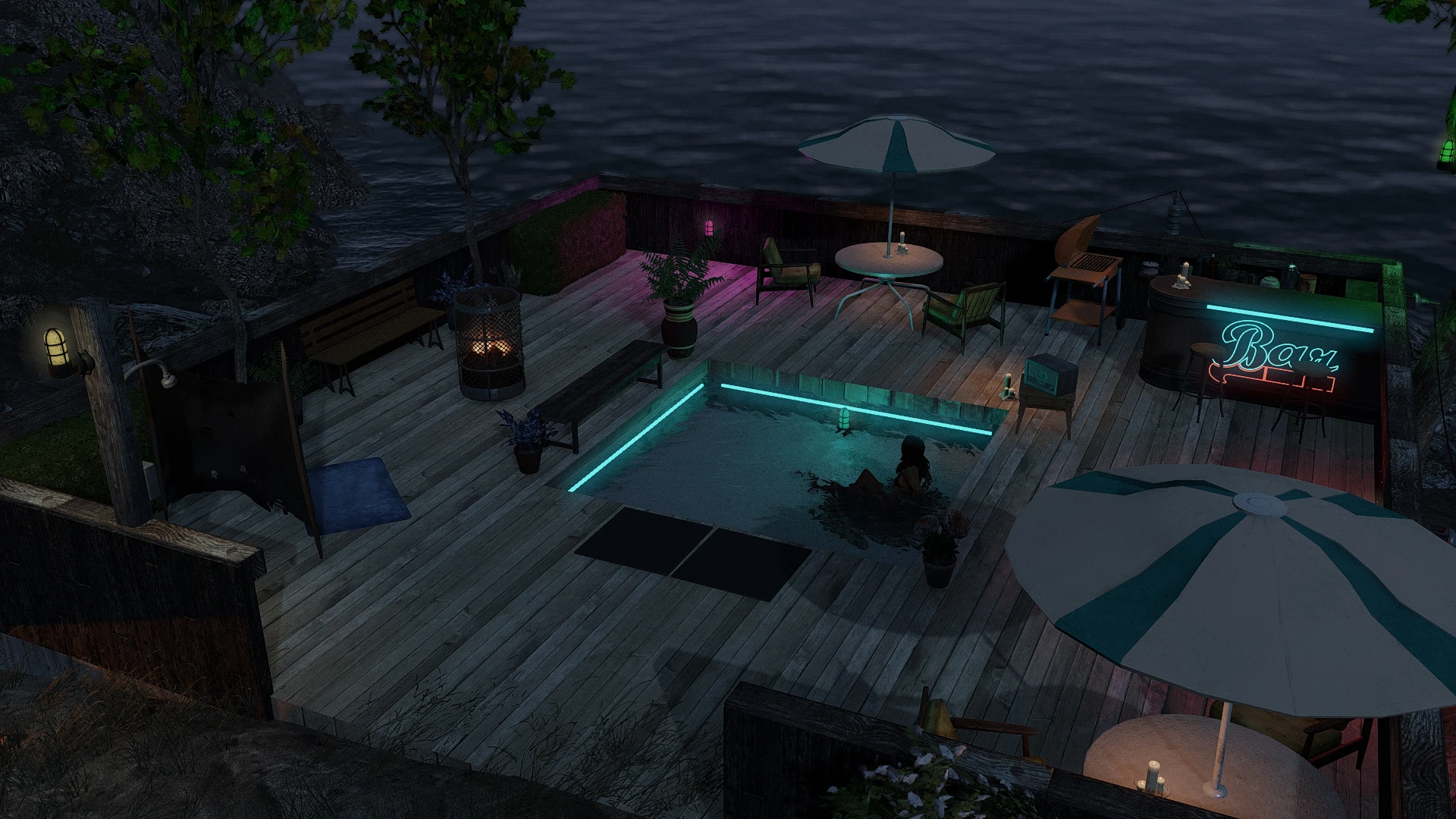
- []Add a Special issue of Picket Fence that allows you to build pool and shower at your settlement (the issue is located in the small cabin at the exit of vault 111 see screenshot) []Adds 4 water planes to build at your settlement workshop. The water markers snap with each other and most of workshop structures. []Adds 8 fully functional showers. NPC can use it, the actor that use it (even the player) will automatically undress and redress upon exiting. []Adds 2 Rad-Away Showers that remove radiations. []Adds 2 Waterfalls. []Adds 3 Water-Splashes. []Adds 1 Relaxation Point Marker. []Adds 18 Ceramic Tiles to build your pool or a bathroom. []The new items are found in the workshop main menu under B. Y. O. P. (or Furniture / Structure >> Misc if you disable the new menu option) once you found the Picket Fence Special Issue : B. Y. O. P. []Perfectly compatible with mods like Settlement Keywords or Homemaker. []If you enter the workshop mode while in sneak mode the markers won't show-up allowing you to place stairs or statue in your pool. []See the What's New section for further details.
- []In order to get the new items to show in your workshop menu you need to find a magazine named Picket Fence Special Issue : B. Y. O. P. located in the cabin right at the exit of Vault 111 (see screenshot). []Once you found the magazine an Holotape named Build Your Own Pool will be added to your inventory. []If you don't change the settings the new items will be found under B. Y. O. P. in the main workshop menu. []If you chose to integrate the items in vanilla menu the water marker will be located under Structure >> Miscellaneous and the Showers under Furniture >> Miscellaneous. []Relaxation Point : In order to work efficiently the relaxation marker must be placed near furniture, alone It won't attract any settler.
[]FLipdeezy for the shower animation. If you like my mod, please Endorse FLipdeezy mod. []vexenonify for the headers screenshot. []Ci
Build Your Own Pool adds 3 snap-able water planes and 5 functional showers to settlement workshops in Fallout 4. NPCs can use the showers, making it a practical and cosmetic addition for settlement builders. With 19,780 endorsements and 636,980 downloads, it's a popular choice for enhancing player bases.
✨ Key Features
📊 Pros & Cons
✅ Pros
- Huge community trust with 19,780 endorsements and over 636k downloads.
- Snap-able water planes make building pools easy and versatile.
- Functional showers add immersion—NPCs actually use them.
⚠️ Cons
- Last updated in 2016—may have compatibility issues with current game patches.
- No mention of DLC requirements—could conflict if you don't own all DLCs.
- Only adds water planes and showers—no other pool accessories like ladders or diving boards.
For Fallout 4 settlement builders who want to add realistic pools and functional showers to their bases. If you're into creative building and want NPCs to interact with your structures, this is a must-have. Skip if you're looking for gameplay overhauls—this is purely cosmetic and settlement-focused.
💡 Beginner Tips
- Place water planes on flat ground first to avoid clipping issues.
- Use the workshop mode to snap water planes together—they align automatically.
- Test showers with a settler to see the animation; they work like vanilla showers.
📊 Mod Details
- Game
- Fallout 4 Mods
- Author
- Akarnan
- Version
- 4.0
- Downloads
- 636,980
- Endorsements
- 19,780
- Category
- Crafting - Home/Settlement
- Created
- 5/10/2016
- Updated
- 6/4/2016
🧩 Commonly Used Together
Users add these mods to the same collections — a real compatibility signal, not an AI guess.
🔧 How to Install Fallout 4 Mods
Download from Nexus.
📖 Full step-by-step install guide for Fallout 4 →
Visit the official mod page for specific installation instructions for this mod.
🎮 Need cheat codes or console commands? Check ur gaming wiki for Fallout 4 commands, item IDs, and more.
Keep browsing — more Fallout 4 mods await