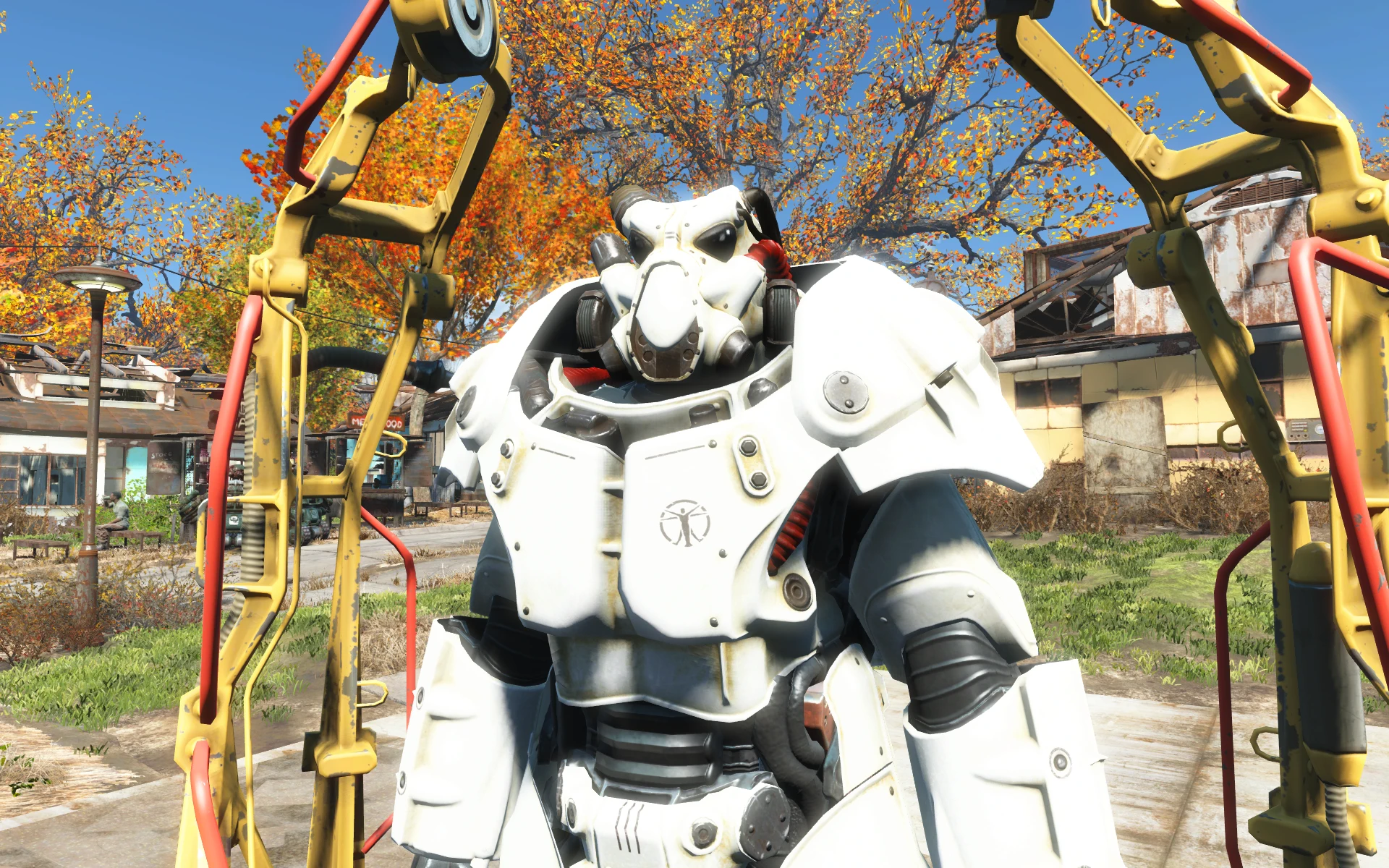
Brighter X-01 Institute Polymer Power Armor
⚪ Last updated 2020⚠️ Install Order · 2 steps
Install in this order, then this mod last — most mods fail to load without their framework and dependencies in place.
Preview
🔍 Analysis
- 👍 0.2% endorsement rate
- 🏆 #23 of 36 Power Armour mods in this game by downloads
📋 About This Mod
Sorry, I'm poor at English Language. Pardon me, Please.
This MOD is X-01 Institute Polymer Power Armor to Make Brighter and Shiny as like My X-02/X-03 All Factions MOD.
This MOD Replace Vanilla X-01 Institute Paintjob, Not Standlaone.
This MOD Requested From IanCowdery.
1. 1 Update
Brighter all Red Parts.
Remove Grey Square on the Mask.
Installation
1. Just install with NMM, OR, Extracting the File, and drop all files to DATA folder and overwrite them.
2. Add the following lines to your "Fallout4Custom.ini" file located in "Documents\My Games\Fallout4":
bInvalidateOlderFiles=1
sResourceDataDirsFinal=
Check My Another Retexture MOD For Your PowerArmor.
-
[]T-45 Power Armor Camouflage Retexture - StandAlone
[
]T-51 Power Armor Camouflage Retexture - StandAlone[]T-60 Power Armor Camouflage Retexture - StandAlone
[]X-01 Enclave Power Armor Camouflage Retexture - StandAlone
[]X-02 Power Armor - All Factions Paintjob
[]X-03 Power Armor Camouflage Retexture - StandAlone
[]X-03 Power Armor - All Factions Paintjob
[]Raider Power Armor Polished Retexture - StansAlone
[]Raider Power Armor - All Factions Paintjob
[]Vault Tec Power Armor Camouflage Retexture
[]Power Armor Frame GunMetal and Chrometic Retexture
- []Power Armor JetPack Camouflage Retexture
A simple visual enhancement mod that brightens the X-01 Institute Polymer Power Armor in Fallout 4. It's a lightweight cosmetic tweak for players who find the default armor too dark. With 155 endorsements and over 82,000 downloads, it's a popular choice for a niche aesthetic change.
✨ Key Features
📊 Pros & Cons
✅ Pros
- Huge download count (82,575) shows many players wanted this tweak
- Simple, focused mod that does exactly what it says
- No gameplay changes, so it's safe for any playthrough
⚠️ Cons
- Last updated in 2020 — may not be compatible with the latest Fallout 4 patches
- Only affects one armor variant, so it's very niche
- No screenshots or detailed description provided, so you're flying blind
For Fallout 4 players who use the Institute Polymer X-01 armor and find it too dark. If you're a power armor enthusiast looking for a subtle visual upgrade, this is for you. Skip if you want more comprehensive armor overhauls or gameplay changes.
💡 Beginner Tips
- Install manually by dropping the file into your Fallout 4 Data folder, or use a mod manager like Vortex.
- Make sure to enable the mod in your load order before launching the game.
- If you're using other power armor texture mods, load this one after them to ensure it takes effect.
📊 Mod Details
- Game
- Fallout 4 Mods
- Author
- Assault Dragon
- Version
- 1.1
- Downloads
- 82,575
- Endorsements
- 155
- Category
- Power Armour
- Created
- 2/18/2020
- Updated
- 2/20/2020
🔧 How to Install Fallout 4 Mods
Download from Nexus.
📖 Full step-by-step install guide for Fallout 4 →
Visit the official mod page for specific installation instructions for this mod.
🎮 Need cheat codes or console commands? Check ur gaming wiki for Fallout 4 commands, item IDs, and more.
Keep browsing — more Fallout 4 mods await