Black Military Paint for Power Armor
⚪ Last updated 2015⚠️ Install Order · 2 steps
Install in this order, then this mod last — most mods fail to load without their framework and dependencies in place.
Preview
🔍 Analysis
- 👍 4.4% endorsement rate — high engagement, a strong quality signal
- 🏆 #13 of 50 Power Armour mods in this game by downloads
📋 About This Mod
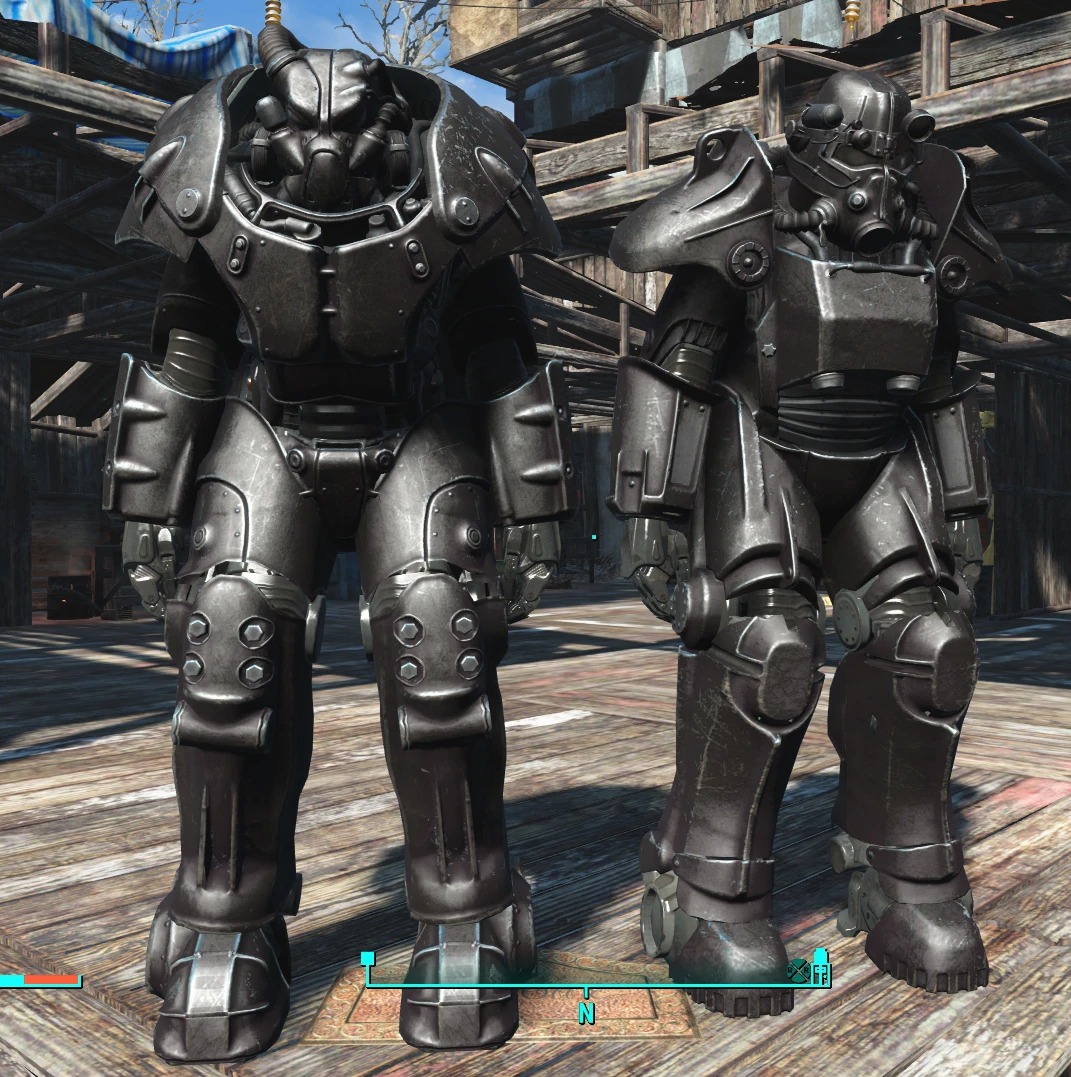
Replaces the Military paint for all power armor to be black.
Also replaces the power armor frame texture, to be a bit darker.
UPDATE Updated the pallet files to be the correct 32 bit so no more crunchy colors. Also added a separate pallet file for the T51 armor.
OPTIONAL FILE: If you want all your base paints to be black, install the second file. Should black every base paint option.
Extract to: \Fallout 4\Data\Textures\Actors\powerarmor
I cant tell if its working or not with the mod manager, so if it doesn't... I guess download it manually?
This tiny Fallout 4 mod swaps the default military paint on power armor to black and darkens the frame. It's a simple texture replacement for players who want a stealthier look. With 1,796 endorsements and 40,674 downloads, it's a popular cosmetic tweak, though it hasn't been updated since 2015.
✨ Key Features
📊 Pros & Cons
✅ Pros
- Community favorite with 1,796 endorsements—clearly a lot of people dig the black look.
- Tiny download and zero plugin overhead, so it won't bloat your load order.
- Works for all power armor sets since it replaces the shared military paint texture.
⚠️ Cons
- Last updated in 2015—might not play nice with newer texture mods or game updates.
- Only affects the military paint variant; other paint jobs stay vanilla.
- No screenshots or detailed instructions in the description—you're on your own for install.
For Fallout 4 players who want a sleek, blacked-out power armor look without messing with complex mods. If you're a roleplayer going for a stealth or spec-ops vibe, this is a quick win. Skip if you want more paint options or gameplay changes—this is purely cosmetic.
💡 Beginner Tips
- Make sure you extract the files to the correct path: Fallout 4\Data\Textures\Actors\powerarmor—if you put them elsewhere, the mod won't show up.
- Since it's a texture replacer, it won't affect your save or load order—just drop it in and go.
- If you use a mod manager, you can still install manually by dragging the folder into your Data directory.
📊 Mod Details
- Game
- Fallout 4 Mods
- Author
- Keepitevil
- Version
- 1.2
- Downloads
- 40,674
- Endorsements
- 1,796
- Category
- Power Armour
- Created
- 11/29/2015
- Updated
- 12/3/2015
🔧 How to Install Fallout 4 Mods
Download from Nexus.
📖 Full step-by-step install guide for Fallout 4 →
Visit the official mod page for specific installation instructions for this mod.
🎮 Need cheat codes or console commands? Check ur gaming wiki for Fallout 4 commands, item IDs, and more.
Keep browsing — more Fallout 4 mods await