Better Dials for Power Armor - Fallout 4
⚪ Last updated 2016⚠️ Install Order · 2 steps
Install in this order, then this mod last — most mods fail to load without their framework and dependencies in place.
Preview
🔍 Analysis
- 👍 3.1% endorsement rate — high engagement, a strong quality signal
- 🏆 #53 of 69 Power Armour mods in this game by downloads
📋 About This Mod
This mod improves the heads up display dials you see when entering power armor. Power armor dials are now more clear, cleaner, and less distracting. I hand crafted them for improved aesthetics and performance. Install this if the blocky user interface when inside power armor annoys you.
Major Changes
Cleaner lines. The original interface comes with blobs of color splattered here and there--an artifact of the compression process. My new dials are hand-built from scratch, so there are no artifacts.
4 color options. It comes in 4 colors--default amber, pip boy green, Vault-Tech blue, and Institute white.
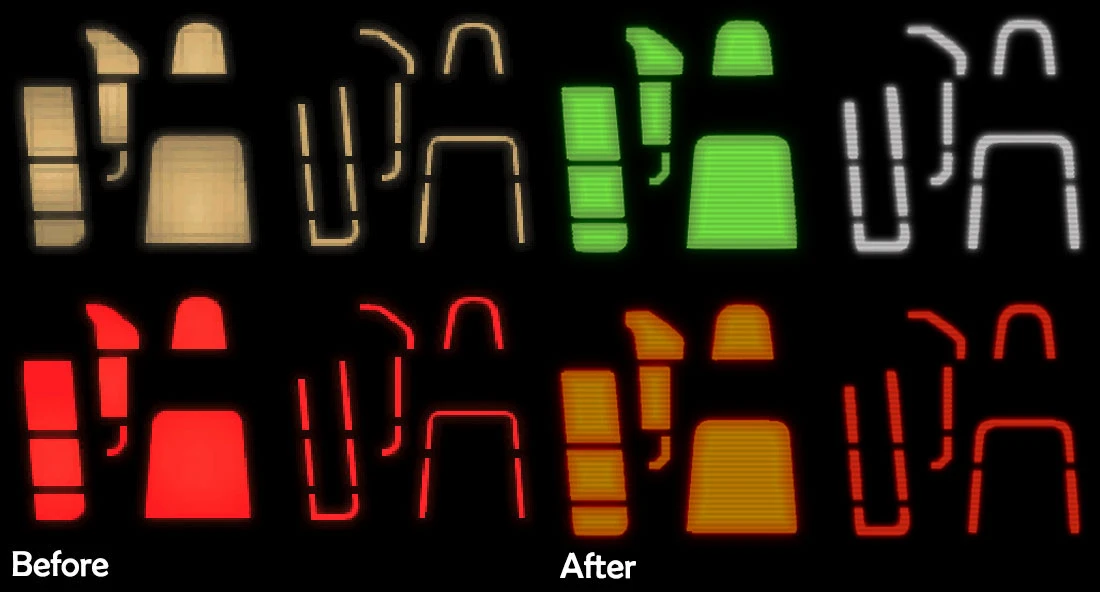
Better condition meter. The existing power armor condition meter is ugly as sin. It's all one color, and has a blocky appearance. It doesn't look anything like a dashboard lamp, which it is supposed to be.
I built a new power armor condition lamp from the ground up. I removed the grayish blocks and added an illuminating interior gradient, so that it looks more like a dashboard lamp. I also added faint horizontal LED lines. This makes it look more like a lamp, and also hides some of the pixels (which are unavoidable since the original had such poor resolution.)
My condition lamp comes in traditional warning colors. Solid green = power armor has good durability. Solid orange = power armor has low durability and is about to break. Red outline = power armor is broken. White outline = power armor slot is not equipped.
How is This Mod Different?
There are a few other power armor interface mods out there. This one is different in the following ways:
1) Many of the other mods use the existing dials as a base, and simply paint new colors on top. This keeps all original artifacts and image glitches. I have crafted all dials from scratch. My dials have much higher visual quality. 2) Some other mods go overboard with glows and shadows, to the point that the numbers become illegible in-game. This is because Fallout 4 adds its own glow and light-pass-through effect to the dials during gameplay. With this mod, I kept the back glow to a minimum, to emphasize clarity. This keeps the dials highly legible. 3) I kept colors to a minimum, modeled after vehicle dials. The base UI color is the soft amber that comes with the game. To break up monotony and add clarity, I used white to denote ticks in multiples of 10 for AP and HP, and 25 for fusion core charge. I then used red only to denote "low" states, when a core is about to expire or your character is about to die.
I then used a simple red, green, amber system for power armor durability meter and rads meter. Anyone who drives should understand this--it's self-explanatory. This is, in my opinion, an elegant solution to add variance to the UI while also improving clarity.
A cosmetic Fallout 4 mod that replaces the power armor HUD dials with clearer, cleaner designs in 4 colors. Hand-crafted for better aesthetics and performance, it's a simple fix for players annoyed by the blocky default interface. With 6,165 endorsements and 199,684 downloads, it's a popular quality-of-life improvement.
✨ Key Features
📊 Pros & Cons
✅ Pros
- Huge community approval (6,165 endorsements) and nearly 200k downloads
- Simple cosmetic fix that directly addresses a common annoyance
- Multiple color choices let you match your HUD preference
⚠️ Cons
- Last updated in 2016 — may not be compatible with newer game patches or DLC
- Purely cosmetic; no gameplay or performance changes beyond visual clarity
For Fallout 4 players who spend time in power armor and find the default HUD dials clunky or distracting. If you want a quick visual upgrade without touching gameplay, this is a solid pick. Skip if you're looking for gameplay overhauls or if you're on a heavily modded setup with potential conflicts.
💡 Beginner Tips
- Since it's a simple replacer, just drop the files into your Data folder or use a mod manager like Nexus Mod Manager for easy toggling.
- If you use other HUD mods, test load order — place this after them to ensure it overrides correctly.
- Check the mod's file page for any optional color variants and pick the one that suits your HUD color scheme.
📊 Mod Details
- Game
- Fallout 4 Mods
- Author
- User_32144350
- Version
- 1.4
- Downloads
- 199,684
- Endorsements
- 6,165
- Category
- Power Armour
- Created
- 3/15/2016
- Updated
- 3/26/2016
🔧 How to Install Fallout 4 Mods
Download from Nexus.
📖 Full step-by-step install guide for Fallout 4 →
Visit the official mod page for specific installation instructions for this mod.
🎮 Need cheat codes or console commands? Check ur gaming wiki for Fallout 4 commands, item IDs, and more.
Keep browsing — more Fallout 4 mods await