Better Computer Terminals - 4K or 2K
⚪ Last updated 2015⚠️ Install Order · 2 steps
Install in this order, then this mod last — most mods fail to load without their framework and dependencies in place.
Preview
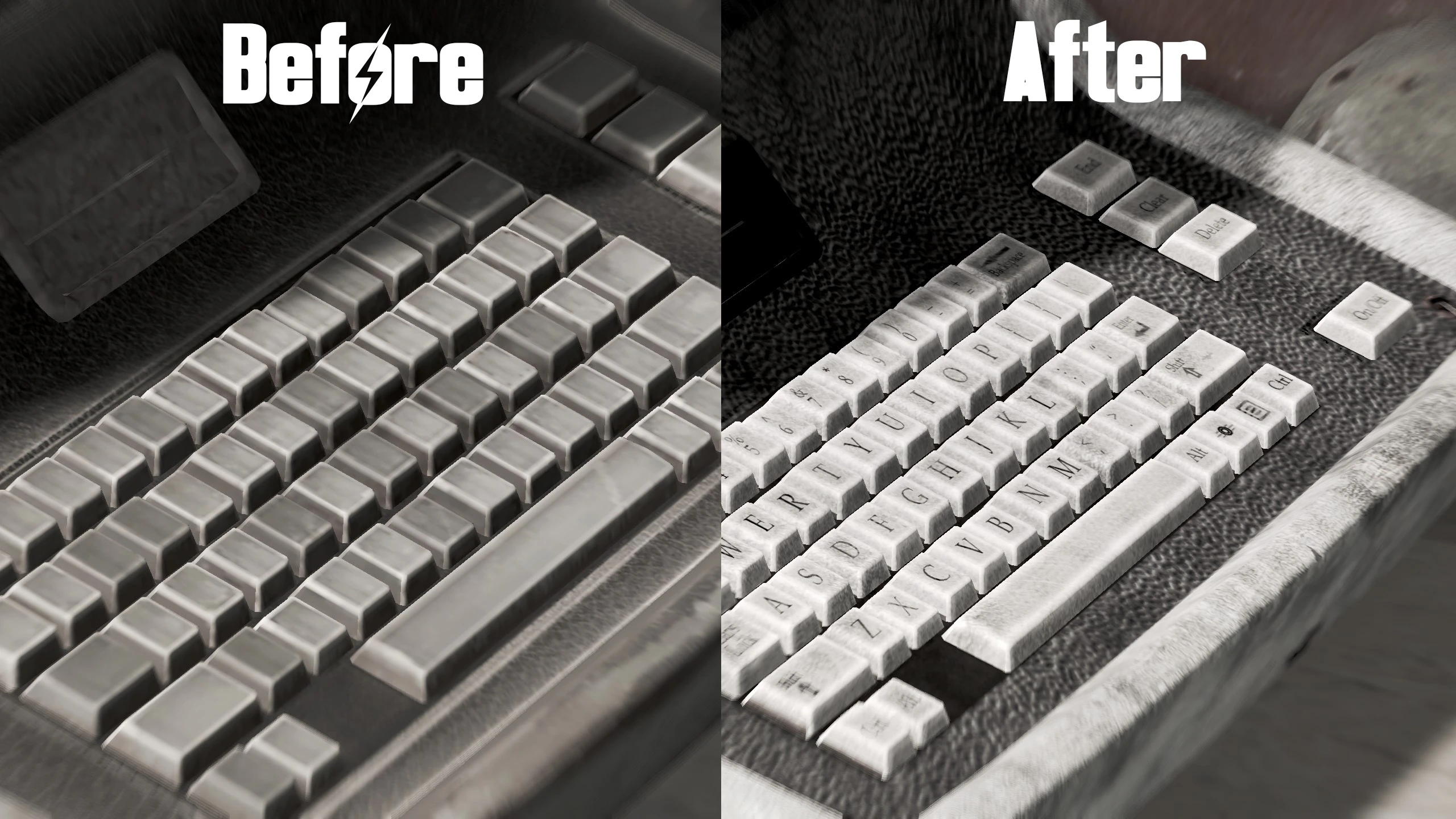
🔍 Analysis
- 👍 2.8% endorsement rate — high engagement, a strong quality signal
- 🏆 #149 of 271 Models and Textures mods in this game by downloads
📋 About This Mod
This is a mod containing 4096x4096 textures that replaces the standard 1024x1024 textures for the computer terminals that you often find yourself hacking and using.
I have now published a 2K version of the textures for anyone that prefers that.
I've also made 3 flavors of the textures:
Standard
Even dirtier
For anyone that likes the keys and/or the key-labels but prefer the vanilla look: I've published a few keyboard only versions both in 2K and 4K.
Installation instructions:
1. Open up the Fallout4.ini located in C:\Users\<USERNAME>\Documents\my games\Fallout4 and make sure the line 'sResourceDataDirsFinal' includes 'TEXTURES\' (for example: sResourceDataDirsFinal=STRINGS\, TEXTURES\).
2. Open up the Fallout4Prefs.ini located in C:\Users\<USERNAME>\Documents\my games\Fallout4 and under the title '' add the line 'bEnableFileSelection=1' as stated in Gopher's 'Enabling Modding for PC' video.
3. Use the nexus mod manager to download and install the mod. If this fails, try the manual installation listed below instead.
Method 2 (manual installation):
1. Copy .zip contents into your data folder located in your steam folder (standard folder is located at C:\Program Files (x86)\Steam\steamapps\common\Fallout 4\)
2. Open up the Fallout4.ini located in C:\Users\<USERNAME>\Documents\my games\Fallout4 and make sure the line 'sResourceDataDirsFinal' includes 'TEXTURES\' (for example: sResourceDataDirsFinal=STRINGS\, TEXTURES\).
3. Open up the Fallout4Prefs.ini located in C:\Users\<USERNAME>\Documents\my games\Fallout4 and under the title '' add the line 'bEnableFileSelection=1' as stated in Gopher's 'Enabling Modding for PC' video.
Obviously to extract the contents of a .zip file you might need an application like WinRAR or 7zip.
Uninstallation instructions:
Uninstall in the NMM.
Manual installation:
Delete the files.
Other creators may use this mod in any way wanted as long as some form of credit is given.
This mod replaces the default 1024x1024 textures of computer terminals in Fallout 4 with high-resolution 4096x4096 versions, making them crisper and more detailed. It's a straightforward visual upgrade for players who want sharper textures on hacking terminals, with a 2K option available. With over 7,000 endorsements and 259,000 downloads, it's a popular choice for texture enthusiasts.
✨ Key Features
📊 Pros & Cons
✅ Pros
- Massive visual improvement—terminals go from blurry to razor-sharp, especially on 4K monitors.
- Community favorite with 7,289 endorsements and a quarter-million downloads, so you know it works.
- Gives you a choice between 4K and 2K, so you can balance quality vs. performance.
⚠️ Cons
- Last updated in 2015—might not be compatible with the latest Fallout 4 patches or DLC, though texture mods are usually safe.
- Only affects computer terminals, so it's a niche upgrade—don't expect changes to other objects.
- 4K textures can hit your VRAM hard on lower-end GPUs, so the 2K option is there for a reason.
For Fallout 4 players who are tired of blurry terminal screens and want a crisp, high-res look without overhauling the whole game. If you're on a high-resolution display and have the GPU headroom, this is a no-brainer. Skip if you're on a low-end rig or don't care about terminal aesthetics.
💡 Beginner Tips
- If you're using a mod manager like Nexus Mods' Vortex, just download with the manager and it'll handle the installation—no manual file placement needed.
- Choose the 2K version if you're on a mid-range GPU or playing on a 1080p monitor; the 4K version is best for 4K displays.
- Since this is a texture replacer, it won't affect your save files, so you can install or remove it anytime without breaking your game.
📊 Mod Details
- Game
- Fallout 4 Mods
- Author
- Jomla97
- Version
- 1.0
- Downloads
- 259,453
- Endorsements
- 7,289
- Category
- Models and Textures
- Created
- 11/22/2015
- Updated
- 11/23/2015
🔧 How to Install Fallout 4 Mods
Download from Nexus.
📖 Full step-by-step install guide for Fallout 4 →
Visit the official mod page for specific installation instructions for this mod.
🎮 Need cheat codes or console commands? Check ur gaming wiki for Fallout 4 commands, item IDs, and more.
Keep browsing — more Fallout 4 mods await