Best Low-End-PC Config (INI) (with fixed lockpick and pa hud)
⚪ Last updated 2017⚠️ Install Order · 2 steps
Install in this order, then this mod last — most mods fail to load without their framework and dependencies in place.
Preview
🔍 Analysis
- 👍 4.4% endorsement rate — high engagement, a strong quality signal
- 🏆 #3 of 8 Performance mods in this game by downloads
📋 About This Mod
Hello my friends! These are my INI-Files for a low end pc or a notebook. Actually I can play on higer settings but im getting really annyoing FPS-Drops in Highly Populated Areas. These files fixed that completeley for me.
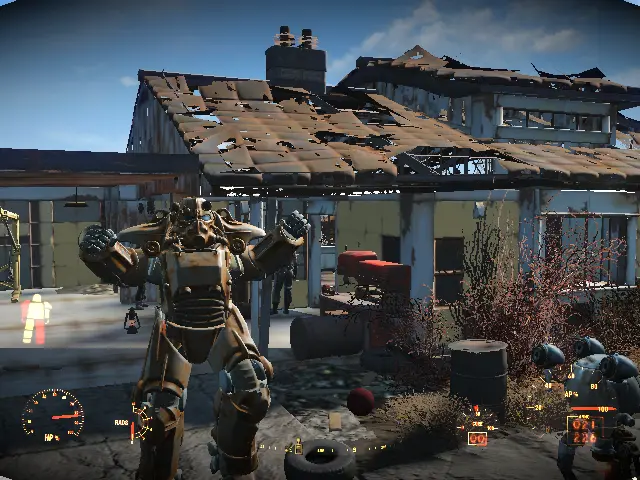
Contains: Fallout4.ini Fallout4prefs.ini Fixed Lockpicking animation! (in every low end ini I found, I had the problem tha the lockpicking animation would not appear on my desktop) Fixed Power Armor HUD! (fixed the issue that lead to a Power Armor Hud, which was to big for the screen, so the player couldn't see the HP and Ammo) Installation: Simply drag and drop in your Fallout 4 Folder in C:\Users\YourName\Documents\My Games\Fallout4
I hope this helped some of you!
P. S. Sorry for my bad english its my 3. Language and sorry if there are some missing "U"´s, my "U" key is broken xd
Credits: 4aLse - I modified his .ini-Files. Crow43 (ME) - Fixing the Lockpick and Power Armor issues. You can use & share these files as you want, as long as you credit the first author and me.
This is a set of pre-configured INI files for Fallout 4, designed to improve performance on low-end PCs and notebooks by reducing FPS drops in highly populated areas. It also includes fixes for the lockpicking animation and Power Armor HUD scaling issues. The mod is a simple drag-and-drop installation, with 362 endorsements and last updated in 2017.
✨ Key Features
📊 Pros & Cons
✅ Pros
- Community-tested with 362 endorsements and over 8,000 downloads.
- Addresses two common visual bugs (lockpick animation and Power Armor HUD) that other low-end configs miss.
- Zero-fuss setup—just drop the files in and go, no mod manager needed.
⚠️ Cons
- Last updated in 2017, so it may not be fully compatible with the latest Fallout 4 patches or DLC.
- INI tweaks can conflict with other mods that modify the same settings, potentially overriding your custom preferences.
- Performance gains vary by system; what fixed the author's FPS drops might not work for everyone.
For Fallout 4 players on low-end PCs or notebooks who are tired of stuttering in cities like Diamond City and want a quick, no-fuss fix. Also for anyone who's had the lockpick animation or Power Armor HUD glitch out. Skip if you're on a high-end rig or prefer to tweak your own INI settings.
💡 Beginner Tips
- Back up your current Fallout4.ini and Fallout4prefs.ini before overwriting, so you can revert if something goes wrong.
- After installing, launch the game and check your settings in the launcher—these files may reset your resolution or graphics options.
- If you use mods that change UI or gameplay, test them after installing to ensure no conflicts.
📊 Mod Details
- Game
- Fallout 4 Mods
- Author
- Crow43
- Version
- N/A
- Downloads
- 8,177
- Endorsements
- 362
- Category
- Performance
- Created
- 5/10/2017
- Updated
- 5/10/2017
🔧 How to Install Fallout 4 Mods
Download from Nexus.
📖 Full step-by-step install guide for Fallout 4 →
Visit the official mod page for specific installation instructions for this mod.
🎮 Need cheat codes or console commands? Check ur gaming wiki for Fallout 4 commands, item IDs, and more.
Keep browsing — more Fallout 4 mods await