B.A.E. - Bethesda Archive Extractor
⚪ Last updated 2018⚠️ Install Order · 2 steps
Install in this order, then this mod last — most mods fail to load without their framework and dependencies in place.
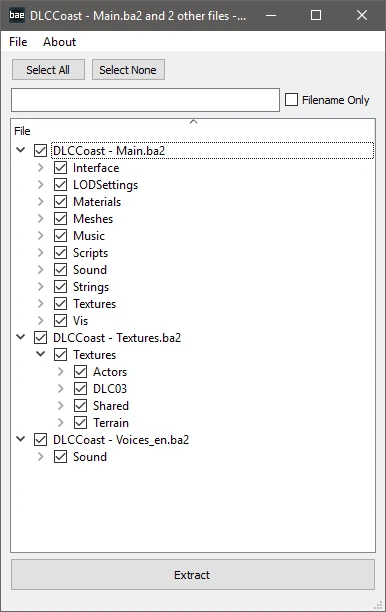
Preview
🔍 Analysis
- 👍 5.5% endorsement rate — high engagement, a strong quality signal
- 🏆 #26 of 49 Utilities mods in this game by downloads
📋 About This Mod
B. A. E. - Bethesda Archive Extractor v0. 11
Before Anyone Else... there was Bethesda Archive Extractor.Please make a bug report for any issues you have (please check the Known Issues).
B. A. E. can extract BA2 and BSA files.
Known Issues
- Checking/Unchecking files takes increasingly long with the number of files inside a BA2.
Version History
0. 01 - Initial Commit
0. 02 - Significantly faster open times on all BA2s, especially Fallout4 - MeshesExtra.ba2
which took several minutes (now takes ~1s).
0. 03 - Width/Height were actually listed as Height/Width in the BA2 so non-square textures were
incorrectly extracted.
- Gave window a minimum width/height as Windows 10 users complained of the window being too small.
- Can open multiple archives via the file dialog, or by dragging to the executable.
0. 04 - Cube maps were being extracted incorrectly.
0. 05 - Skyrim SE BSA support
0. 06 - Added drag and drop to main window
- Added application icon
- Added About window
0. 07 - Corrected the size sent to LZ4 for decompression, which affected only a very small number of files.
Please see the sticky on the Nexus page for information.
- Added a file filter which lets you drop a text file with a list of full or partial filenames (using wildcards).
This was added mostly to simplify re-extracting the files affected by the bug above.
0. 08 - 3-4x faster extraction
- Added a filter to the UI. Searches either filename or entire path, supports wildcards (*)
0. 09 - Drag and Drop file extraction. You can drag one or multiple files from the archive to any location
on your computer, including to programs that can open the filetypes you are dragging.
Ctrl- or Shift- click rows to drag multiple files. The checkboxes do not matter and are used for normal Extraction.
0. 10 - Fixed Select All/None which I inadvertently broke last release. Also improved the implementation to be faster.
- Fixed read/write of extended ASCII filepaths.
Only 3 vanilla FO4 filenames were affected to my knowledge (María_F.fuz, María_M.fuz, Sánchez_F.fuz)
0. 11 - Added support for sRGB variants of BCn textures which were not used in official files until Creation Club and FO76. Non-sRGB BC1/2/3/7 were already fully supported.
- Added support for BC4 textures (grayscale).
- Added support for R8G8B8A8 and R8G8B8A8 sRGB textures. FO4 previously only used B8G8R8A8.
- Added support for BC5 SNORM (signed normals) textures. FO4 previously only used UNORM (unsigned).
- Added error log to the progress window which will list any file
B.A.E. is a utility tool that extracts Bethesda's BA2 archives and also supports the older BSA format. With over 26,000 endorsements and 475,000 downloads, it's a trusted, essential tool for modders and players who need to unpack game files for modding or customization. Last updated in 2018, it remains a standard choice for Fallout 4 and other Bethesda games.
✨ Key Features
📊 Pros & Cons
✅ Pros
- Community staple with 26k endorsements and nearly half a million downloads — this is the go-to tool for BA2 extraction.
- Handles both BA2 and BSA formats, so you're covered for older and newer Bethesda games.
- Simple utility that does exactly what it says — no bloat, just extraction.
⚠️ Cons
- Last updated in 2018 — may not support the latest game versions or archive changes, so check for alternatives if you're on newer titles.
- No GUI or fancy features — it's a command-line tool, which might intimidate less technical users.
- No explicit documentation or support included in the description, so you might need to look up usage guides elsewhere.
For modders and mod users who need to unpack Bethesda's BA2 or BSA archives to inspect, modify, or extract assets. Also for players who want to customize their game files but prefer a reliable, proven tool. Skip if you're looking for a one-click installer or a graphical interface — this is a no-nonsense utility.
💡 Beginner Tips
- Run the extractor from the command line with the path to your .ba2 or .bsa file as an argument — check the mod's forum posts for exact syntax.
- Extract to a separate folder to avoid overwriting original game files, especially if you're modding.
- For Fallout 4, make sure you have the latest game version, but note the tool hasn't been updated since 2018, so test with a backup first.
📊 Mod Details
- Game
- Fallout 4 Mods
- Author
- hexabit
- Version
- 0.11
- Downloads
- 475,051
- Endorsements
- 26,010
- Category
- Utilities
- Created
- 11/10/2015
- Updated
- 11/1/2018
🔧 How to Install Fallout 4 Mods
Download from Nexus.
📖 Full step-by-step install guide for Fallout 4 →
Visit the official mod page for specific installation instructions for this mod.
🎮 Need cheat codes or console commands? Check ur gaming wiki for Fallout 4 commands, item IDs, and more.
Keep browsing — more Fallout 4 mods await