Astraea's LooksMenu Preset
⚪ Last updated 2020⚠️ Install Order · 2 steps
Install in this order, then this mod last — most mods fail to load without their framework and dependencies in place.
Preview
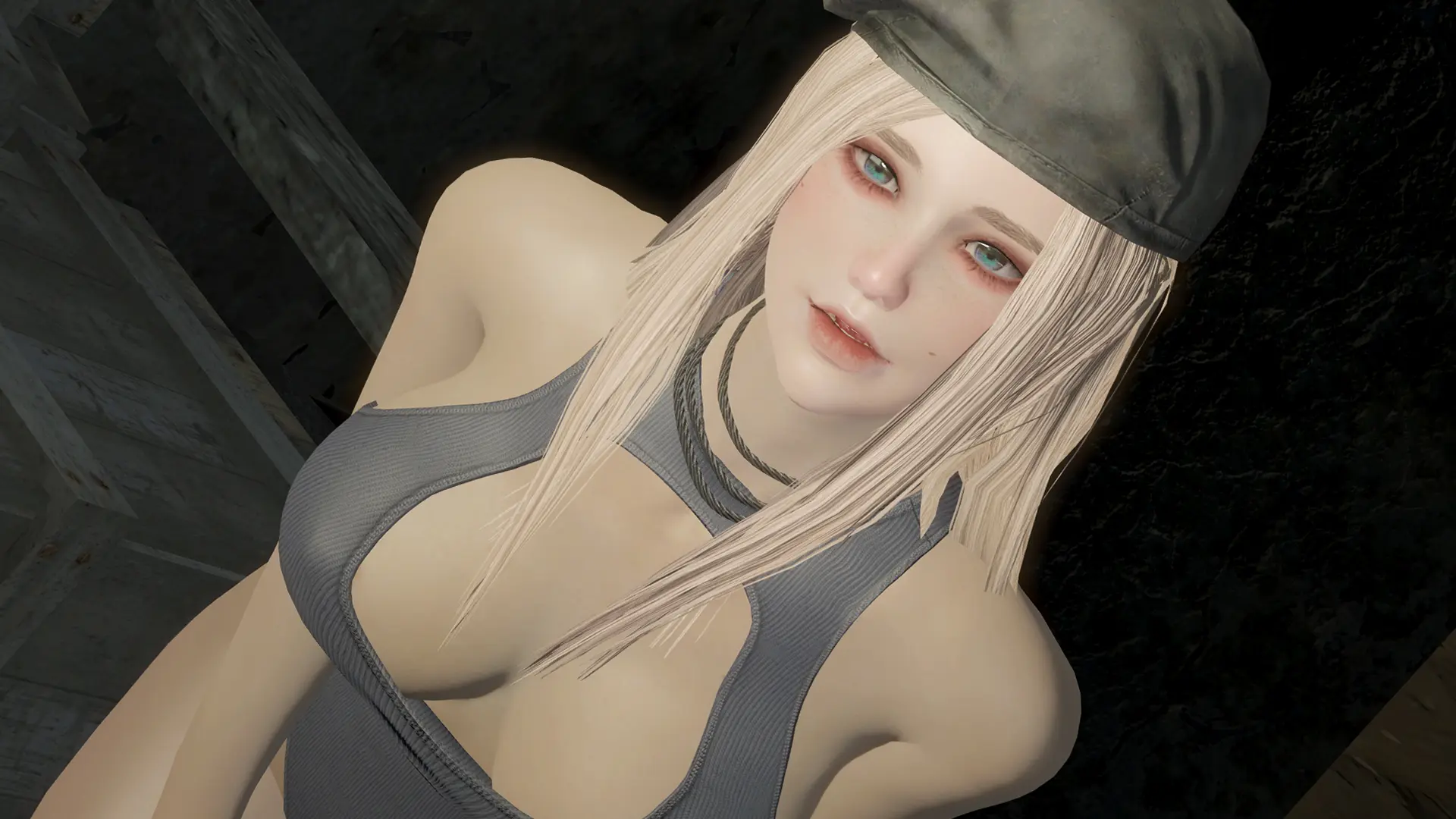
🔍 Analysis
- 👍 3.9% endorsement rate — high engagement, a strong quality signal
- 🏆 #70 of 76 Character Presets mods in this game by downloads
📋 About This Mod
MODS REQUIRED
LooksMenu
Extended Facial Sculpting
THBrows
(Version 1. 2 is used, which can be found in the POSTS page of the original mod (IMPORTANT!!!!!!!).)
Oni Face Textures
Valkyr Female Face
(Please use the specular texture (basefemalehead_s.dds) from Valkyr Female Face to replace the one from Oni Face Textures.)
Asian Face Enhanced
Oni cute asian face parts
(I made a mistake, you should download this mod instead of Asian Face Enhanced.)
Eyes of Beauty
(Choose "No lashes" option while installing.)
Sleek Styles - a Hairstyle Pack
GUIDE FOR LMCC USERS
I've uploaded a LMCC-version preset of my character, with which you do not need to install THBrows. But if you want to fully replicate my character, you still need to extract the alternative lipliner from THBrows mod:
1. Download Fallout 4 Tools and THBrows 1. 2 (Alternative lipliner is removed in version 1. 3)
2. Use Fallout 4 Tools to unpack THBrows - Textures.ba2
3. Drag textures\Actors\Character\Character Assets\TintMasks\LipLiner01_d. DDS and all files in textures\Actors\Character\Character Assets\FaceDetails into the same directory of your game.
INSTALLATION
Drag the preset file into your Data\F4SE\Plugins\F4EE\Presets
OTHER MODS USED IN MY PICTURES
I only used NAC in my game. All outfits can be found in files uploaded by Vtaw on nexusmod or patreon. I also used Photo Light to make my character have a consistent look.
Astraea's LooksMenu Preset is a character preset for Fallout 4 that offers a single, custom female face. With over 2,100 endorsements and 54,000 downloads, it's a popular choice for players seeking a ready-made, attractive character appearance. The mod is simple and straightforward, providing a direct install for LooksMenu users.
✨ Key Features
📊 Pros & Cons
✅ Pros
- Community favorite with 2,112 endorsements – clearly a look people love
- Massive download count (54k+) means it's been tested by tons of players
- Simple preset – no complex requirements, just drop it in and go
⚠️ Cons
- Only one preset – if you don't like the look, you're out of luck
- No screenshots or detailed description – you're flying blind until you try it
- Last updated in 2020 – might not be compatible with the latest LooksMenu version
For Fallout 4 players who want a ready-made, attractive female character without spending hours in the character creator. Perfect for those who value community-approved aesthetics and want a quick start. Skip if you prefer to customize your own look or want multiple preset options.
💡 Beginner Tips
- Make sure you have LooksMenu installed and enabled before adding this preset – it won't work without it.
- Place the preset file in the correct folder: Data/F4SE/Plugins/F4EE/Presets – if you're using a mod manager, it should handle this automatically.
- If the preset doesn't show up in-game, double-check that LooksMenu is up to date and that the preset file is in the right directory.
📊 Mod Details
- Game
- Fallout 4 Mods
- Author
- Adingsiling
- Version
- 0.1
- Downloads
- 54,714
- Endorsements
- 2,112
- Category
- Character Presets
- Created
- 4/20/2020
- Updated
- 4/23/2020
🔧 How to Install Fallout 4 Mods
Download from Nexus.
📖 Full step-by-step install guide for Fallout 4 →
Visit the official mod page for specific installation instructions for this mod.
🎮 Need cheat codes or console commands? Check ur gaming wiki for Fallout 4 commands, item IDs, and more.
Keep browsing — more Fallout 4 mods await