4estGimp - T-49 - Armor of the Storyteller PA CIS INNR ini
⚪ Last updated 2024⚠️ Install Order · 5 steps
Install in this order, then this mod last — most mods fail to load without their framework and dependencies in place.
Preview
🔍 Analysis
- 👍 0.3% endorsement rate
- 🏆 #96 of 165 Patches mods in this game by downloads
📋 About This Mod
Please visit us on Discord:
This mod is for a No-AWKCR build and Complex Item Sorter users.
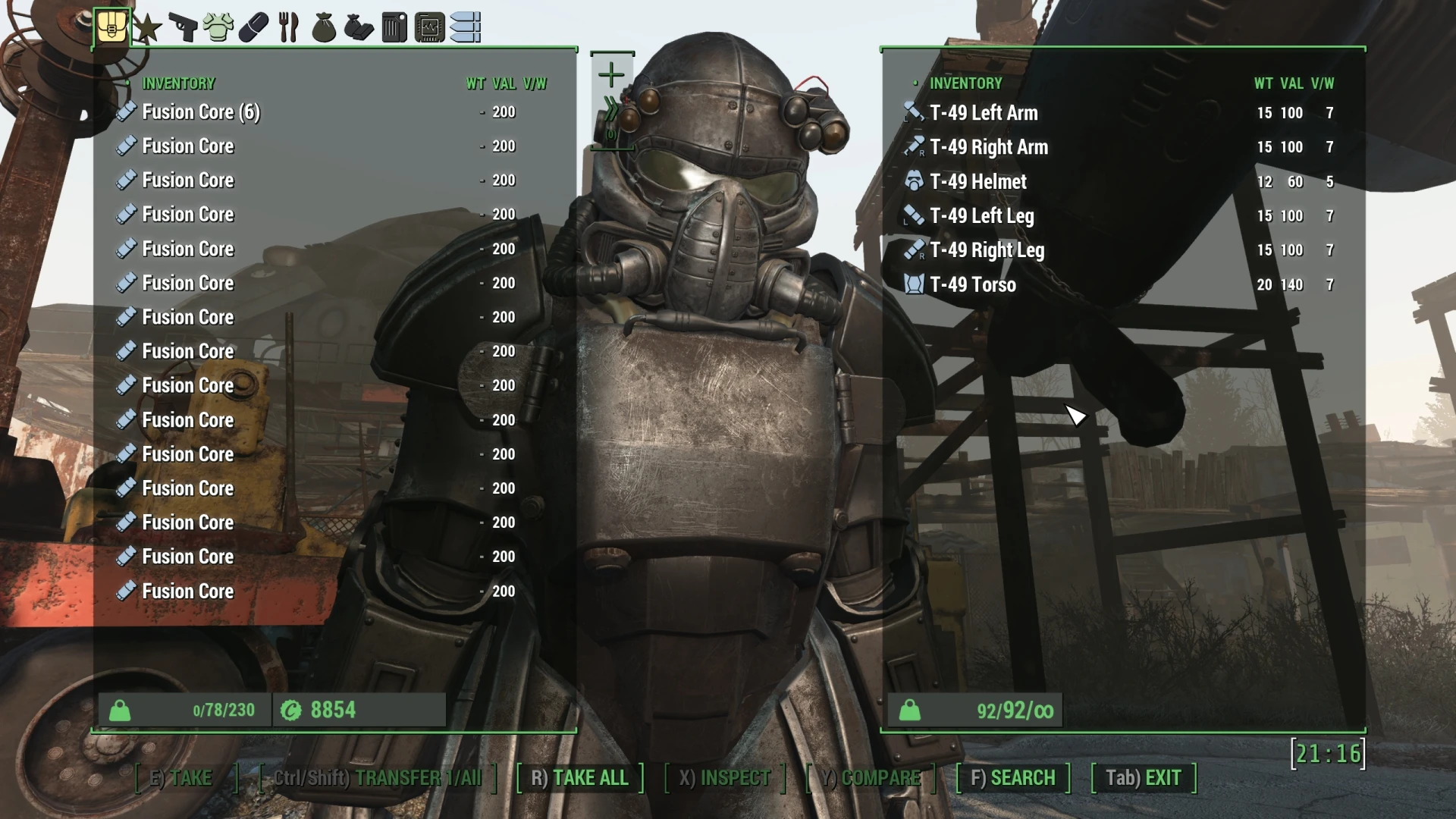
This mod uses Complex Item Sorter .ini files to arrange the INNR and icon tags. The custom INNR rule sets are arranged into a format that displays nicely with the R88 INNR or ECO INNR.
INSTALLATION
- Without Fallout Brotherhood mod
1. Install T-49 - Armor of the Storyteller
2. Install 4estGimp - T-49-Armor of Storyteller CIS INNR ini here. DO NOT USE with fallout Brotherhood mod.
3. Create a new Complex Item Sorter Output file.
(OPTIONAL) Fallout Brotherhood Patch Users (in step 3. below)
1. Install T-49 - Armor of the Storyteller
2. Install Fallout Brotherhood - A Storyteller Quest Mod
3. Install Fallout Brotherhood - Upgradeable T-49 Power Armor - changed dn_T49 INNR and requires a new tagging patch.
4. Install FALLOUT Brotherhood - Storyteller - eXoPatch - Changed to new INNR and requires new tagging patch.
4. Install 4estGimp - Fallout Brotherhood Patches CIS INNR ini to tag both the "Patch" mods above.
5. Create a new Complex Item Sorter Output file.
OPTIONAL
This mod use a custom class icon from 4estGimp - M8r98a4f2's Complex Item Sorter Enhancements II but it is not required. A minor Edit of the .ini file allows a person who does not run my Enhancements II mod to simply use standard Power Armor Icons.[s
This patch adds an .ini file that tags the T-49 Armor of the Storyteller Power Armor set using M8r98a4f2's Complex Item Sorter rules. It also rearranges and formats the INNR to work with both Ruddy88's Simple Sorter and M8r98a4f2's Complex Item Sorter. For Fallout 4 players using these sorting mods.
✨ Key Features
📊 Pros & Cons
✅ Pros
- Essential for inventory sorting mod users (98 endorsements, 33k downloads).
- Works with both major sorting frameworks, so you're covered either way.
- Lightweight patch—just drop the .ini and you're done.
⚠️ Cons
- Requires the T-49 Power Armor mod and a sorting mod to be useful.
- Last updated June 2024—might not cover newer sorting mod updates.
For Fallout 4 players who use Ruddy88's Simple Sorter or M8r98a4f2's Complex Item Sorter and want the T-49 Power Armor to sort correctly in their inventory. Skip if you don't use sorting mods or don't have the T-49 armor.
💡 Beginner Tips
- Place the .ini file in your Fallout 4 Data folder, then activate it in your mod manager or launcher.
- Make sure you have the T-49 Power Armor mod installed first, or the patch won't have anything to sort.
- If you use both sorting mods, test in-game to confirm the tags appear correctly—conflicts can happen.
📊 Mod Details
- Game
- Fallout 4 Mods
- Author
- 4estGimp
- Version
- .93
- Downloads
- 33,109
- Endorsements
- 98
- Category
- Patches
- Created
- 5/7/2021
- Updated
- 6/22/2024
🔧 How to Install Fallout 4 Mods
Download from Nexus.
📖 Full step-by-step install guide for Fallout 4 →
Visit the official mod page for specific installation instructions for this mod.
🎮 Need cheat codes or console commands? Check ur gaming wiki for Fallout 4 commands, item IDs, and more.
Keep browsing — more Fallout 4 mods await