XBOX 360 controller Tips
⚪ Last updated 2008⚠️ Install Order · 2 steps
Install in this order, then this mod last — most mods fail to load without their framework and dependencies in place.
Preview
🔍 Analysis
- 👍 4.9% endorsement rate — high engagement, a strong quality signal
- 🏆 #71 of 437 Gameplay Effects and Changes mods in this game by downloads
📋 About This Mod
This is a simple modification to the FalloutPrefs.ini which fixes the lackluster control speed and sensitivity.
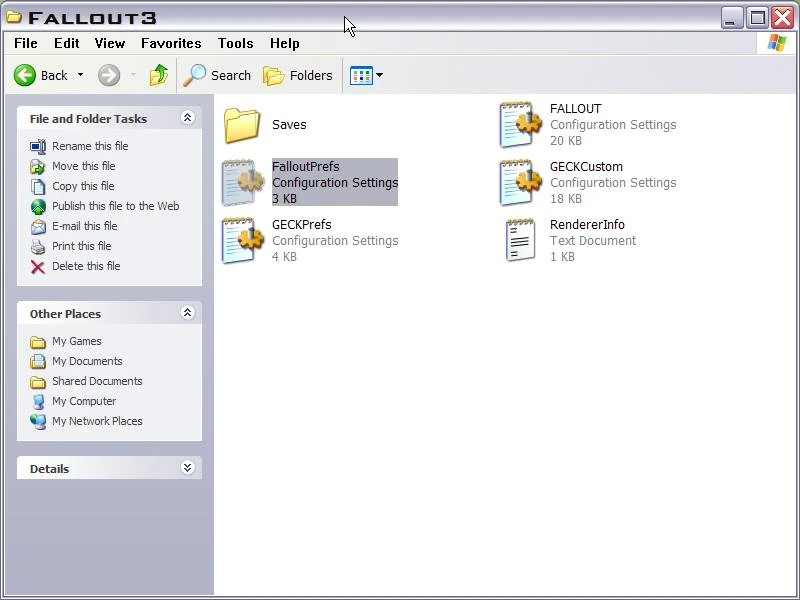
Name: Functional XBOX Controller Values Version: 1. 0 Date 12/27/2008 Category: Gameplay Tweaks and Changes Author: Wogz187 Update I removed my \'Custom Pipboy 3000 XBOX fix\' so I\'ll include it here (at the bottom) in case you missed it. The default values assigned to the XBOX controller are nearly useless (as I\'m sure you\'ve noticed). This is a simple modification you\'ll make yourself to the FalloutPrefs.ini which fixes the lackluster control speed and sensitivity. With all the awesome weapon Mods now available on NEXUS this will no longer suffice. Details ======= 1) Navigate to your My documents/My Games/Fallout3 directory 2) Open the file FalloutPrefs with Notepad 3) Locate these lines under fXenonVertLookSpeed=1200. 0000 fXenonHorizLookSpeed=1200. 0000 fMouseSensitivity=0. 0045 4) Change the above lines to: fXenonVertLookSpeed=800. 0000 fXenonHorizLookSpeed=800. 0000 fMouseSensitivity=0. 0035 5) Save and exit. The next time you load your game you\'ll notice that it takes more effort to swing around in circles - and that it happens more slowly. You can, of course, play with the above values but after some testing I feel this is similiar to how Rainbow Six Vegas (1&2) feels. That is, easy to aim. Custom Pipboy 3000 XBOX fix! ============================ Problem: Custom Pipboy textures don\'t show up when using the XBOX controller. Solution: Copy Fallout 3/Data/Textures/Pipboy3000/PC to your desktop and rename the folder PC as XBOX. Replace the now titled XBOX folder in Fallout 3/Data/Textures/Pipboy3000 directory. I included a .zip with a readme version of this tweak with a bonus! Credits ======= Thanks to Bethesda for the game and G. E. C. K. Thanks to Nexus for creating such an awesome forum Thanks to you, the modders and players, for making a good thing better!
📊 Mod Details
- Game
- Fallout 3 Mods
- Author
- wogz187
- Version
- 1.0
- Downloads
- 1,522
- Endorsements
- 74
- Category
- Gameplay Effects and Changes
- Created
- 12/28/2008
- Updated
- 12/28/2008
🔧 How to Install Fallout 3 Mods
Download from Nexus.
📖 Full step-by-step install guide for Fallout 3 →
Visit the official mod page for specific installation instructions for this mod.
🎮 Need cheat codes or console commands? Check ur gaming wiki for Fallout 3 commands, item IDs, and more.
Keep browsing — more Fallout 3 mods await