Signs and Signage DIY
⚪ Last updated 2019⚠️ Install Order · 2 steps
Install in this order, then this mod last — most mods fail to load without their framework and dependencies in place.
Preview
🔍 Analysis
- 🏆 #9 of 103 Modders Resources and Tutorials mods in this game by downloads
📋 About This Mod
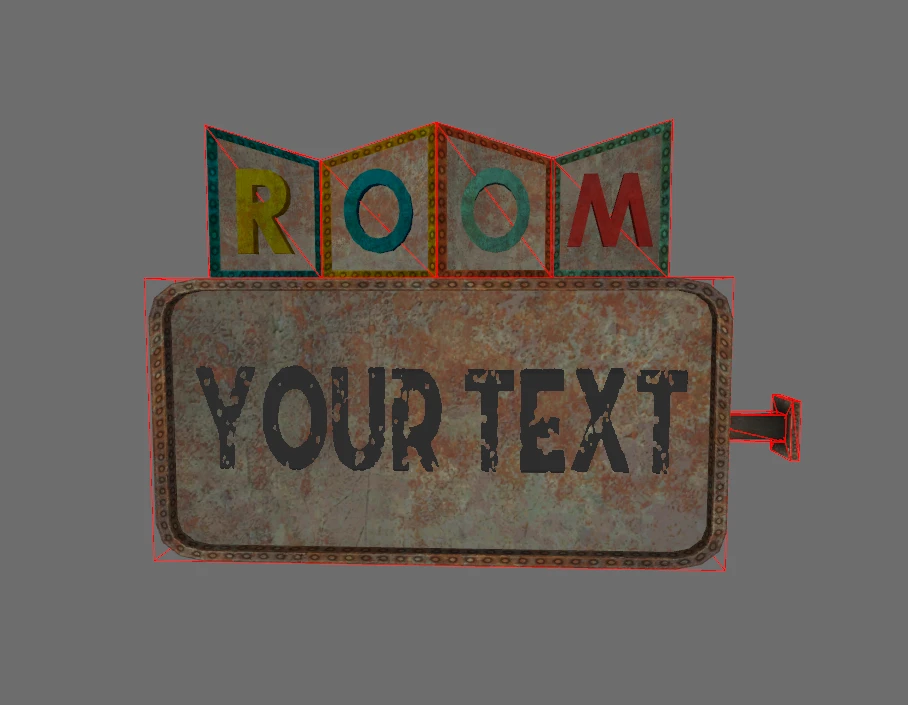
An extensive modular set for sign making. Resource for Modders.
Description:
- 345 meshes carefully designed for easy combination in Geck and minimal impact in game. Uses mainly Vanilla textures (or its replacer). Easy to retexture.
- An esp with all the items referenced, ready for work and some examples. Also showroom if you're curious. COC AAPixSignTest.
- A guide in .pdf with instructions
Some items are animated. They will come in two versions: Idling, always On (marked Idle in name) or activable On/Off (marked ACT) via script (if you want to start them at night for example).
The On state might have different animation or blinking effect.
Some items come in different color, Blue, Green, Red and yellow (Vertex Colored) in addition of Vanilla metal.
There's a Node with Alpha mesh ready to place your text over. The Right rendering is a combination of the texture Opacity, the Alpha setting in the NiMaterialProperty and the threshold of the NiAlphaProperty. I set my textures around 70-80% opacity, 0. 8 for the Alpha setting and 128 for the threshold.
You may need to adjust these.
Details:
Arrows:
- Animated items to attract your customer.
Letters:
- A lower case alphabet.
- An almost reconstituted alphabet with letters coming from different existing signs. Missing: Q.
- Additional symbol & punctuation.
LightBoxes:
- With an Alpha ready Mesh .
- A broken one with sparks.
Signs:
- In all forms and shapes, some with animated neon or bulb. Alpha Mesh for custom text. LowPoly.
Stars:
- With 4,5,6 or 8 branches.
Support:
- Display/support for letter & signs.
This set can be used in conjunction with the Neon letters in Speedy Resources from SpeedyB64.
See also the Illuminated Portable Sign from User826 aka McTammer.
Requirements:
Known issue :
None at the moment.
Installation:
- Manually:
Extract from the archive to any folder. Place the Meshes and textures folder in the game Data folder.
- Or use a Mod Manager
Uninstallation:
- Manually:
Delete the placed folders.
- Or use a Mod Manager
Permission:
Use freely in your FO3 or FNV mod only, with credits.
Please, keep "Pix" somewhere in the name if you renaming my resources.
Legal:
This file is provided as is and the author holds no responsibility for anything that may come to happen from using this file.
You MAY NOT use any part of this resource for commercial purposes, including (but not limited to) creatin
📊 Mod Details
- Game
- Fallout 3 Mods
- Author
- User_1205226
- Version
- 1
- Downloads
- 381
- Endorsements
- 32
- Category
- Modders Resources and Tutorials
- Created
- 4/18/2019
- Updated
- 4/18/2019
🔧 How to Install Fallout 3 Mods
Download from Nexus.
📖 Full step-by-step install guide for Fallout 3 →
Visit the official mod page for specific installation instructions for this mod.
🎮 Need cheat codes or console commands? Check ur gaming wiki for Fallout 3 commands, item IDs, and more.
Keep browsing — more Fallout 3 mods await