Quantity Menu Key Change
⚪ Last updated 2013⚠️ Install Order · 2 steps
Install in this order, then this mod last — most mods fail to load without their framework and dependencies in place.
Preview
🔍 Analysis
- 👍 7.8% endorsement rate — high engagement, a strong quality signal
- 🏆 #47 of 48 User Interface mods in this game by downloads
📋 About This Mod
Ever accidentally loot everything in a container? This fixes that.
Description
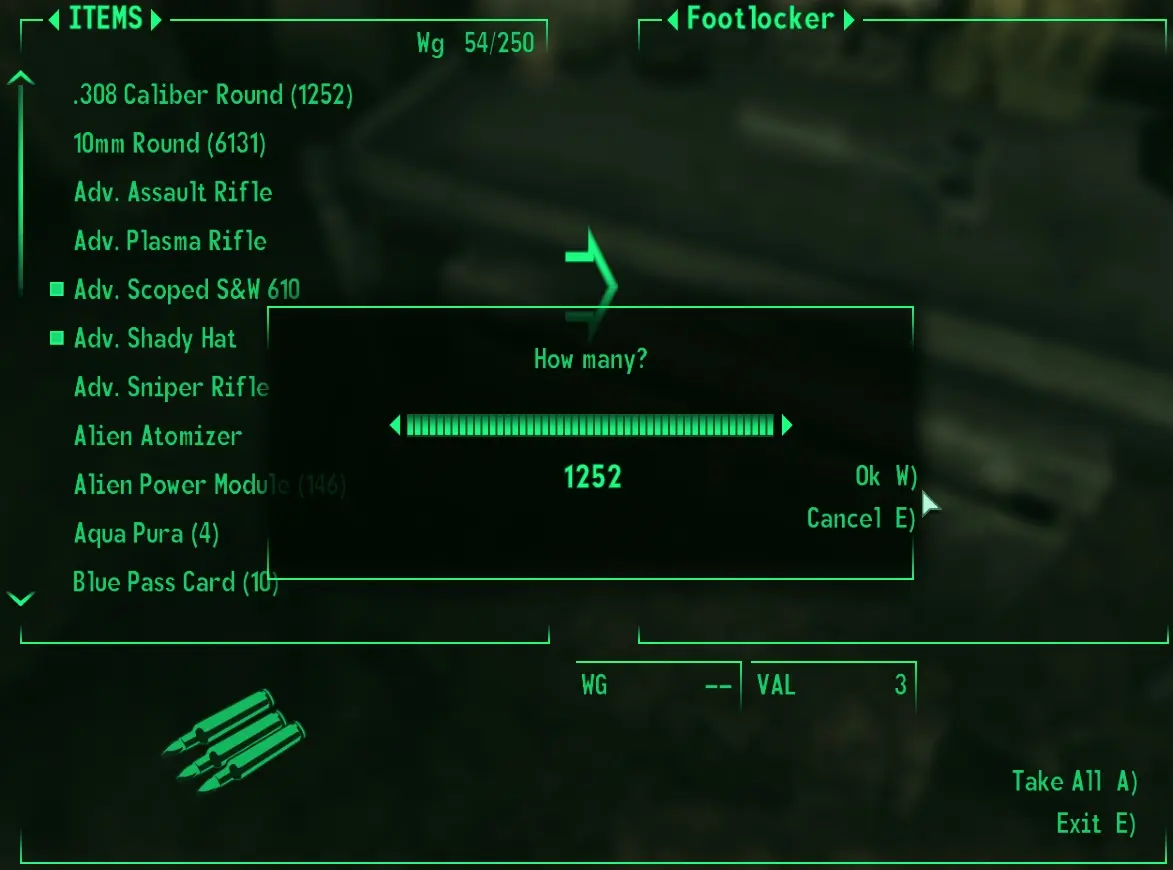
This is a simple mod that changes the "How many?" OK key to 'W' or 'F' instead of 'A' for people who hate accidentally taking everything in a container.
It makes the same change in barter dialogs. Unavoidable, as they use the same XML file. On the plus side, it's consistent.
Originally created for Fallout New Vegas by Umph. His version replaced the key with 'F', but I prefer 'W'. This version has the 'W' version as the main and the 'F' version as an option. Choose one only.
Umph's mod promised a 'W' version, but he uploaded the 'F' version twice. So I released a 'W' version for FNV as a bugfix. He also allows adapting this mod for other games, so here it is for Fallout 3.
Installation
Choose "DOWNLOAD (NMM)" for the 'W' version; choose "DOWNLOAD (MANUAL)" for the 'F' version. Only install one.
Compatibility
There is no esm file, so load order doesn't matter. It's installation order that's important. Install this after any other UI mods and let it overwrite. Reinstall after installing/changing any UI mods that change the menus.
Permissions
The original upload of Quantity Menu Key Change gives permission for conversion to other games. That's all this is. This mod belongs to Umph in its entirety. See Umph's original mod for permissions and use those.
📊 Mod Details
- Game
- Fallout 3 Mods
- Author
- Umph
- Version
- 1.0
- Downloads
- 831
- Endorsements
- 65
- Category
- User Interface
- Created
- 6/16/2013
- Updated
- 12/30/2013
🔧 How to Install Fallout 3 Mods
Download from Nexus.
📖 Full step-by-step install guide for Fallout 3 →
Visit the official mod page for specific installation instructions for this mod.
🎮 Need cheat codes or console commands? Check ur gaming wiki for Fallout 3 commands, item IDs, and more.
Keep browsing — more Fallout 3 mods await