Johnny Appleseed v10
⚪ Last updated 2010⚠️ Install Order · 2 steps
Install in this order, then this mod last — most mods fail to load without their framework and dependencies in place.
Preview
🔍 Analysis
- 👍 5.8% endorsement rate — high engagement, a strong quality signal
- 🏆 #1 of 75 Quests and Adventures mods in this game by downloads
📋 About This Mod
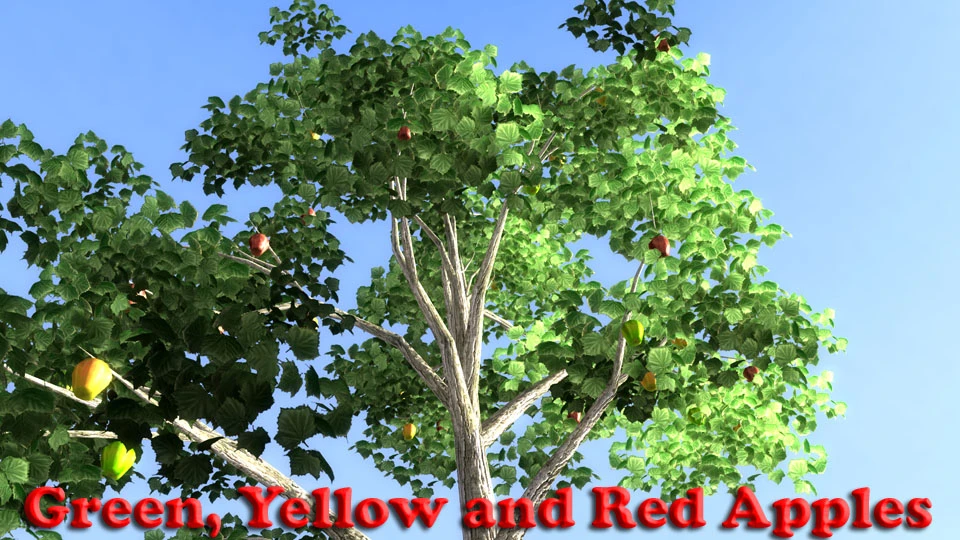
Find Johnny Appleseed and his fruiting apple tree in the wastes far west of Megaton. Eat apples and barter with Johnny. If your lucky you might convince Johnny to make a new Deathclaw weapon for you.
Johnny Appleseed ================== A fruiting apple tree and Johnny.
by WillieSea version 1. 1 - 08/14/2010
Requirements ============ - Fallout 3
THIS README FILE CONTAINS EVERYTHING YOU NEED TO KNOW ABOUT THE MOD. Please read it before asking questions...
Story ===== Wandering the wastes West of Megaton, something green catches your eye in the distance. Walking closer your surprised to find a man tending to an actual apple tree.
Reward: Apples! and special deathclaw gauntlets ================================================= The 'crisp' apples fresh off the tree are healthier than the 'fresh' apples you find in the wasteland. There are three types of retextured Deathclaw gauntlets, Iron, Steel and Titianium. Each does a different amount of damage so you can choose the one that fits with your belief in how gameplay should be. The iron is a little better than the original deathclaw gauntlet. Steel is better than the iron and the Titanium does the most damage.
======================== Known Issues and Caution ======================== 1) Tested with game patch v1. 7 2) If you use the 'Fallout Food' mod, put the Johnny Appleseed mod AFTER it in your load order. 3) NOT compatible with the mod 'An Evening With Mister Manchester'. The tree is at the bottom of the lake. 4) If you see the 'LOD' dead looking tree in the same place as the apple tree, you need to reinstall the 'Meshes' folder from this mods archive. This will update the LOD tree file. 5) The apples are 'not' part of the tree and do not sway with the tree'
INSTALLATION ============ 1. Download the 7z file.
2. Unpack the 7z file to your game folder \Fallout3\Data\.esp
3. Copy the \textures\ folder to your game's \Data\ folder. Since this replaces NONE of the vanilla textures, so you can over-write if asked. Copy to location: \Fallout3\data\textures\williesea\
4. Copy the \Meshes\ folder to your game's \Data\ folder. Since this replaces NONE of the vanilla meshes, you can over-write if asked. \Fallout3\data\meshes\williesea\
5. Activate the mod from the 'Data Files' list on your start menu.
6. Play the game. See 'Starting the Mod' below.
NOTE If the textures are purple on objects in the game or have random texture on them: a) Make sure you have some form of Archive Invalidation installed. http://www.fallout3nexus.com/downloads/file.php?id=944 b) And that you placed the texture in the proper folder as defined above.
NOTE* If you see a yellow d
📊 Mod Details
- Game
- Fallout 3 Mods
- Author
- WillieSea
- Version
- 1.1
- Downloads
- 781
- Endorsements
- 45
- Category
- Quests and Adventures
- Created
- 8/14/2010
- Updated
- 8/15/2010
🔧 How to Install Fallout 3 Mods
Download from Nexus.
📖 Full step-by-step install guide for Fallout 3 →
Visit the official mod page for specific installation instructions for this mod.
🎮 Need cheat codes or console commands? Check ur gaming wiki for Fallout 3 commands, item IDs, and more.
Keep browsing — more Fallout 3 mods await