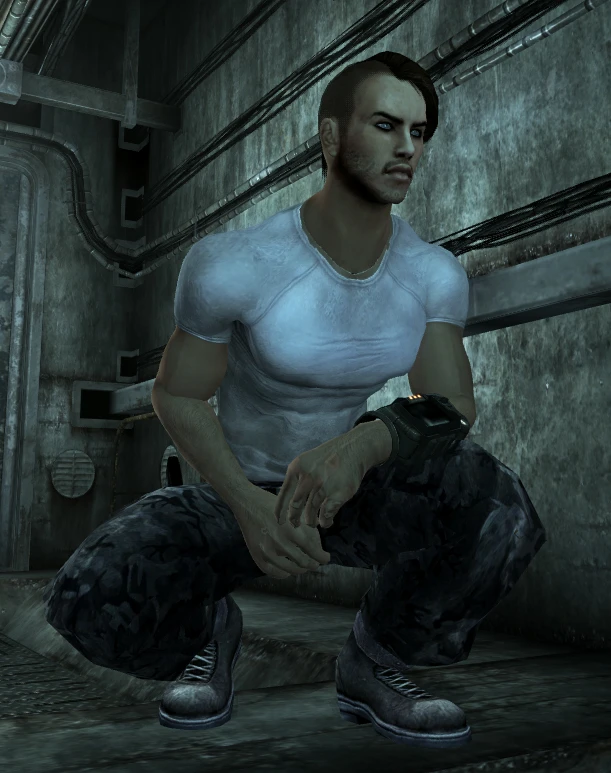
Customizable Wasteland Shirts
⚪ Last updated 2009⚠️ Install Order · 2 steps
Install in this order, then this mod last — most mods fail to load without their framework and dependencies in place.
Preview
🔍 Analysis
- 👍 4.3% endorsement rate — high engagement, a strong quality signal
- 🏆 #65 of 102 Clothing mods in this game by downloads
📋 About This Mod
Adds three customizable shirts ingame. READ USAGE VERY CAREFULLY! REQUIRES ROBERTS MALE BODY
Don\'t hate me for my bad english, also this description might seem kinda long but the mod is made in such a way that even chimpansees with 0 modding skills should be able to customize their outfit. So don\'t let the description scare you and DON\'T request me to add all combinations ingame seperately for you...you lazy @$*(@&! If this doesn\'t scare you at all, thanks for dl my mod and may you have lots of fun with it ;)! One last thing; MALE ONLY MOD. I do not mod female stuff, so this is a male only. Your female requests will be ignored ;)! THIS MOD REQURES Robert\'s Male Body Replacer http://www.fallout3nexus.com/downloads/file.php?id=3671 Usage ===== This mod adds three separate outfits ingame; Wasteland Shirt 01, Wasteland Shirt 02, Wasteland Shirt 03, All of them can be found in the Men\'s restroom in megaton. They all have the same default textures, and look the same if you just install this mod and play it without customizing your outfit. However as the title says you can customize your own outfit. I\'ve added three outfits ingame so you can carry three different versions at a time ingame. HOW TO CUSTOMIZE YOUR OUTFIT The first thing you have to do is simple, go to the images tab on tesnexus and choose your favorite t-shirt and pants. I\'ve added several SHIRT pictures and PANTS pictures in the images section on tesnexus. As you can see I\'ve also added a filename at the bottom of every picture. These names indicate the folder in which the texture is located. All the pants textures are located in the following folder; \\Fallout 3\\Data\\textures\\clothes\\Geo_Hero_Shirt\\XPants_Textures All shirt textures are located in the following folder; \\Fallout 3\\Data\\textures\\clothes\\Geo_Hero_Shirt\\XShirt_Textures If you view these folders you will see that it contains all the texture folders which are described in the pictures on tesnexus. If you open any of the folders you\'ll see that they all contain the following .dds file; shirt.dds or pants.dds The only thing you have to do is choose a color and copy the .dds file and paste AND OVERWRITE it in the following folder; \\Fallout 3\\Data\\textures\\clothes\\Geo_Hero_Shirt\\Shirt_01 or \\Fallout 3\\Data\\textures\\clothes\\Geo_Hero_Shirt\\Shirt_02 or \\Fallout 3\\Data\\textures\\clothes\\Geo_Hero_Shirt\\Shirt_03 For example if you put the pants.dds from the \"..\\Camo_Autumn\" folder in the \"..\\Shirt_01\" folder and also put the shirt.dds from the \"..\\Armygreen_Light\" folder in the \"..\\shirt_01\" folder and start the game you will notice that the \"Wasteland Shirt 01\" outfit will show up ingame having the autumn camo pants and army green light shirt. However you will also see that Wasteland Shirt 02 and Wasteland Shirt 03 will still show up ingame with default textures if you wear them. If you do the same thing as you just did, but with other textures and put them in the \"..\\Shirt_02\" fo
📊 Mod Details
- Game
- Fallout 3 Mods
- Author
- Geonox
- Version
- 1
- Downloads
- 2,460
- Endorsements
- 107
- Category
- Clothing
- Created
- 7/13/2009
- Updated
- 7/13/2009
🔧 How to Install Fallout 3 Mods
Download from Nexus.
📖 Full step-by-step install guide for Fallout 3 →
Visit the official mod page for specific installation instructions for this mod.
🎮 Need cheat codes or console commands? Check ur gaming wiki for Fallout 3 commands, item IDs, and more.
Keep browsing — more Fallout 3 mods await